New Mapper, Could Use Some Tips and Links

Avatar
Crawfish
56 Posts
Posted Mar 24, 2014
Hello everyone! This is my first thread (and post) even though I've been registered here for a few days. This is because I figured I'd need to make this thread sooner, but this place really is full of great advice that I've made good use of.

Anyway, I'm new to the world of Portal 2 mapping. Very new. I figured a good pastime would be to try to create some tests, but as I stated, I'm new to this. As such, I though to myself, "what would be good practice with the Portal 2 Authoring Tools? Something I can complete and be proud of, but have no urge to publicly release?" And over time, I had the idea to recreate a few chambers from Portal in Portal 2's style, and to recreate the destroyed and reconstructing chambers from Portal 2 in a clean style. Seeing as I know all of that's been done a thousand times over by twice as many people, I figures it would be something I can just have fun with.
But as the title suggests, I've built up a few questions that I could use answers for, if anyone could be so kind.

1: Is there any way to incorporate the Aperture Science High Energy Pellet Launcher & Catcher in Portal 2? Surprisingly I can't find much about it anywhere. I could swear I've seen one or two maps in the workshop with them.

2: Is there any better way to use GLaDOS's dialogue from Portal besides an ambient_generic? I find myself having to place several of these with the same names and audio files so that they can be heard throughout the whole room, as increasing the audible distance doesn't seem to do anything, and my ambient_generics are all already set to volume 10.

3: This one is kinda simple; How can I make GLaDOS talk upon destruction of vital testing apparatus?

4: In my searches through these boards for a myriad of problems I've previously solved, I've heard mention of both a test chamber sign maker and custom elevator instances that can actually have videos played in them. Could anyone link me to those please, and maybe tutorials on their usage?

5: I don't suppose there are any custom instances out there of observation rooms? Seems like most of the default ones have desks penetrating the walls, and if I try to realign them, everything else moves with them and I end up getting leaked props, or they're completely empty. Even though only noclippers would get to see the insides of them, and I'm not planning anything to be released, I still want everything to look as professional and detailed as possible.

6: Last thing, and this is more of a personal indecision; In recreating the Portal chambers, should I go for Portal's original atmosphere, with almost completely faithful terrain, mostly cold lighting and one or two reused textures, Portal 2's feeling which is less lonely, slightly warmer and more alive, or should I aim for a cross between the two?

Thanks in advance to anyone who can help with even one of these things. I'll also accept any other random tidbits of advice that you might wanna share with me. That's all, and I'm getting somewhat tired of trying to type professionally, so I'll stop here.

Advertisement
Registered users don't see ads! Register now!
Avatar
RustyDios
154 Posts
Posted Mar 24, 2014
Replied 1 hour later
  1. http://forums.thinking.withportals.com/downloads.php?view=detail&df_id=147
    http://forums.thinking.withportals.com/downloads.php?view=detail&df_id=181
    http://forums.thinking.withportals.com/downloads.php?view=detail&df_id=519
    http://forums.thinking.withportals.com/downloads.php?view=detail&df_id=1041
    ... Sorry, couldn't find anything about the Energy Ball using the search function either.... 4mins....

  2. Have you checked the "play everywhere" flag on the ambient_generic ?
    Also look into using the logic_choreographed_scene and how to correctly play GLaDOS lines...6mins...

  3. See above. Set the "OnDissolved" output of the object to play a sound. Use the search function. "Making GLaDOS Talk"...7mins..

  4. http://forums.thinking.withportals.com/downloads.php?view=detail&df_id=514
    .. Sorry couldn't find that Sign Maker using the search function either... 9mins...
    http://forums.thinking.withportals.com/downloads.php?view=detail&df_id=2071
    ..or the Elevator Instances... 11mins.

  5. Really ?.. Your using Hammer right?... Create your own observation room instance.Four (ish) walls, roof, ceiling, a few static props,light and spotlight. Not too hard. Alternatively, select "objects" (and not "group") on that little menu on the right side of Hammer... .... 13mins...

  6. Haven't a clue... go with whatever you feel looks good and you are comfortable mapping.

Hope my 15 minutes using the search function saved you 15minutes of doing it yourself.
Learn to think of your keywords for searches and finding stuff becomes so much easier. Short.Sweet.Simple. Don't confuse the search engine with long pointless questions. It wants to identify as many relevant keywords as possible. As far as it knows every word you type is relevant. So it will search for them all.

Avatar
Crawfish
56 Posts
Posted Mar 24, 2014
Replied 3 minutes later
Well, I could have done without the sarcasm, but thank you nonetheless.
As for making my own observation rooms, I was just hoping I could find some extra premade ones.
And for the prop destruction, I guess I shouldn't have joked around as I did. I meant when detaching a camera from a wall. I was referencing GLaDOS referring to the cameras as "vital testing apparatus".

The elevators, sign maker and High Energy Pellet things, thank you. I already said I'm new to the site, and I'm not really used to how the searches function, which is likely why I couldn't find what you did.
And I can't exactly use choreographed scenes. I want to play audio from Portal 1, which isn't in Portal 2's scenes file. And... there's a play everywhere flag? God I'm an idiot.

Avatar
RustyDios
154 Posts
Posted Mar 24, 2014
Replied 23 minutes later
Sorry.. I'm breaking rule 1; Don't answer questions on internet forums after consumption of alcohol. Anyway I'm British. And in the military. Sarcasm is in my blood. It's damn near impossible to suppress it.

You'd be much better off making your own obs room, exactly how you want it. It won't take you all that long to make a bunch of them (128x128, 128x192, 128x256 windows). And then you can use them in every map you make.

Aha! I thought you were after lines when you put a cube etc in a fizzler... Haven't got a clue..although a trigger with a filter_class (npc_camera) where the camera is going to fall would be one way that I can think of (basically hollow boxframething around the camera, it moves, sets off trigger, trigger plays soundfile/voiceclip)... .. You could also cover the wall area with func_portal_detector and have it trigger something on detection (once only)... or even try the OnRetired output of the camera... .. ((ps Valve Developer Community: Search Function: Portal 2 Camera : https://developer.valvesoftware.com/wiki/Security_Camera follow further links for the entity usage and func_portal_detector ... 5mins... ))

Avatar
Crawfish
56 Posts
Posted Mar 24, 2014
Replied 15 minutes later
Ah, thank you very much! Maybe I'm easily pleased, but an apology always puts me in a good mood.
I'll be sure to try the func_portal_detector and filer_class. I tried OnRetired previously, but it didn't trigger anything.
I just tested the play everywhere flag on my dialogues and it worked like a charm. Now I just need to see if I can make it echo.
I'll also, if nothing, toy with the premade observation rooms a bit more. I've always wondered why clicking one thing would select multiples (mainly when toying around in decompiled maps from Portal). I had no idea that the groups thing was what was causing it. But I might end up making my own if it really is the best way to go though.

Again, thank you. I don't know if you use them, but do you personally recommend any of those energy pellet prefabs? Or are they all relatively the same in quality?

Avatar
TeamSpen210
608 Posts
Posted Mar 25, 2014
Replied 7 hours later
There's a bunch of observation room instances in "sdk_content/maps/instances/labs/". I'd suggest using Skotty's pellets, it's a set of complete instances with all the models and sounds. You'll need to use something like BSPZIP to pack the materials, sounds and models for the pellets into the BSP so others can play.
I'd recommend the func_portal_detector route for the camera. Make a box sticking into the wall slightly, fitting snugly around the base of the camera so it won't fire if portals are placed really close to the camera. OnStartTouchPortal you'll want to fire the PickRandomShuffle input on a logic_case, with a few OnCase0? outputs to trigger different ambient_generics for the quote. This way GLaDOS will pick a random line every time. Check "Once Only" on the OnStartTouchPortal output so it won't trigger again.
For Brainstone's elevator instances, put the transition instance somewhere outside your map (it's a nodraw room, so it won't leak). Give it a name, and set the parameters to choose the portalgun you get and the chapter title, if you want one. Put the two elevators in as well, give them names and align the open hallway bits with your level. I'd recommend connecting using a small hallway. For the $video properties, choose from this list, but add "movie/" to the beginning ("movie/fizzler"). You'll want to set "$disablePTIVoteDiag" to false, and ignore $newmapname if you are going to publish via the PTI. You'll need the instance "maps/instances/p2editor/global_pti_ents.vmf" in your map to be able to publish.
I'd personally say that you should stick to Portal 2 aesthetics if doing Clean maps.
Avatar
Crawfish
56 Posts
Posted Mar 26, 2014
Replied 1 day later
Could I get help with something else too real quick? I've looked all over the .vpk file and I can't seem to find the portal gun charging sound anywhere. It's the one that plays in the Portal chambers with the pedestal, when the gun is charging. Does anyone know where I could find it? I tried googling it, and searching this forum, and 90% of the results I get are either for Portal 2, or they're completely unrelated.
Avatar
TeamSpen210
608 Posts
Posted Mar 26, 2014
Replied 4 hours later
It's not in portal 2, nor is the particle effects. You can extract it from portal 1, though.
Avatar
Crawfish
56 Posts
Posted Mar 27, 2014
Replied 1 hour later

TeamSpen210 wrote:
It's not in portal 2, nor is the particle effects. You can extract it from portal 1, though.

That's what I was referring to when I said "I've looked all over the .vpk file".
All the Portal .vpk file has in it is music, commentary, GLaDOS dialogue, most of the portlgun sounds, turret dialogue, ambiances, and a couple other misc things. It doesn't seem to have a good chunk of the audio, like the Curiosity/Cake/Anger core dialogues, or, as said, the portalgun charging sound.

Avatar
TeamSpen210
608 Posts
Posted Mar 27, 2014
Replied 18 minutes later
Just looked at some of the files, it's actually a half-life sound effect ("CombineGuard.Special1"). Find it in hl2_sound_misc.vpk ? "weapons/cguard/charging.wav".
Avatar
Crawfish
56 Posts
Posted Mar 27, 2014
Replied 12 hours later

TeamSpen210 wrote:
Just looked at some of the files, it's actually a half-life sound effect ("CombineGuard.Special1"). Find it in hl2_sound_misc.vpk ? "weapons/cguard/charging.wav".

Ah, thank you! I don't know why I didn't recognize it as the Pule Rifle charge right away.

EDIT: Seeing as I seem to have a lot of unanswered (or hidden-answered) questions, I guess I'll just use this thread for any questions I have from now on. No need to create another thread, after all.

Anyway, I have another problem; I downloaded (and slightly modified to fix the charging particles and sound, thanks to you, TeamSpen!) ChickenMobile's Portal Gun Pedestal instance (post53916.html?hilit=pedestal).
Everything seemed to work fine, but then I noticed that the portals don't shoot on-center. They're always slightly to the right of any given surface they're placed on. What's worse is that info_placement_helpers don't do diddlysquat. Anyone know how I might be able to get these portals on-center?

Avatar
CamBen
973 Posts
Posted Mar 27, 2014
Replied 2 hours later
Did you check the force placement flag on the placement helper?
Avatar
Crawfish
56 Posts
Posted Mar 27, 2014
Replied 29 minutes later

CamBen wrote:
Did you check the force placement flag on the placement helper?

Yes, and I also increased the effect radius. It works fine when I shoot the portals myself, it just won't work when shot from the weapon_portalgun on the stand.

Avatar
RustyDios
154 Posts
Posted Mar 27, 2014
Replied 19 minutes later
This might be to do with how the gun sits "on the stand". If I recall correctly to get it to line up and look correct, the gun itself needs to sit 180deg out and slightly down to the right of the actual pedestal. Check in the instance and click the gun.. look for where the guns "box" is in the 3D view, you'll see what I mean.

It's a wild stab in the dark but the only thing I can think of that might be causing your issue ... ...

Avatar
CamBen
973 Posts
Posted Mar 27, 2014
Replied 4 hours later
Try using an invisible portalgun (add a keyvalue of "rendermode 10") in the right position and a prop_dynamic of a visible portalgun on top of it.
Avatar
Crawfish
56 Posts
Posted Mar 28, 2014
Replied 3 hours later
I'll definitely try both of those theories tomorrow! I was a bit busy today with learning a few new things (trigger_catapult, indicator lights, a few things about how func_instances work, etc. Basic stuff.) Thank you both!

Kinda off-topic; I only just noticed it, but I think I've played a map by you from the workshop, CamBen. I'll have to look through my queue and see.

EDIT:

RustyDios wrote:
This might be to do with how the gun sits "on the stand". If I recall correctly to get it to line up and look correct, the gun itself needs to sit 180deg out and slightly down to the right of the actual pedestal. Check in the instance and click the gun.. look for where the guns "box" is in the 3D view, you'll see what I mean.

It's a wild stab in the dark but the only thing I can think of that might be causing your issue ... ...

Your solution seemed to work best. If nothing it pointed me toward what I needed to do. I had to go into the portal gun's properties and change the angle to "269.9" degrees, which I didn't think would even be possible, let alone work.

Avatar
tile
380 Posts
Posted Mar 31, 2014
Replied 3 days later
i'd love to help you, but i'm tired and don't want to risk telling you stupid stuff that isnt correct because of it.

but, i would really like to congratulate you on starting with hammer and not pti. your off to a great start!

here's some tips that are good for general mapping:

• Borders on glass, and make sure it goes all the way around the glass....ALWAYS!
• Allow only the necessary puzzle space. (give or take a bit. You can't really get this perfect.)
• Need a big space? Add even more with toxic pits, bts backdrops etc. make your extra space look interesting.
• Walls need to be 16 units thick. (unless it's glass/see through. Then it should be 8 units with a border.)
• See through= border. See first rule.
• No glass floors, accept if they move or seem to look good in the given area.
• Compact and separate things. Looks bad and confusing otherwise.
• Grates, not holes. (unless you need a hole that something physically passes through, or the grate doesnt fit with the theme.)
• Glass must be in small proportions. Aka not huge panes of glass that stretch over a whole wall.
• No glass on top of another object.
• Big square rooms need variety along the walls.
• No overly bright lights.
• Don't put quotes and storyline points out of context, unless the new context makes sense. (ie, don't have glados just randomly appear and say "hello and welcome back" in the middle of the map, unless the player left and then came back.)
• Does it look like it makes sense? If not, fix it so it does.
• Does it look realistic? If not, please make it so.
• Experiment with more interesting architecture. (ie, a domed ceiling looks better than a flat ceiling.)

Have fun with learning to map, and i hope to see some good maps from you in the future!

Avatar
Crawfish
56 Posts
Posted Apr 01, 2014
Replied 3 hours later

tile wrote:
-helpful snip-

Thank you very much! Like I said, I'm practicing the basics by recreating Valve chambers at the moment, but with that advice in mind, maybe I can make them less of "recreations" and more of "reimaginings".
I was actually going to do this for fun in the Puzzle Creator originally, but then I realized how little control I get over small details, and figured learning Hammer would be worth it in the long run, possibly for more than just Portal 2.

Avatar
Crawfish
56 Posts
Posted Apr 16, 2014
Replied 14 days later
Sorry about the double-post, but seeing as editing posts doesn't light the thread up again, I guess a bump might be in order.
I've come across a couple other minor issues that I'd like to resolve, that I haven't found much help for on the internet.

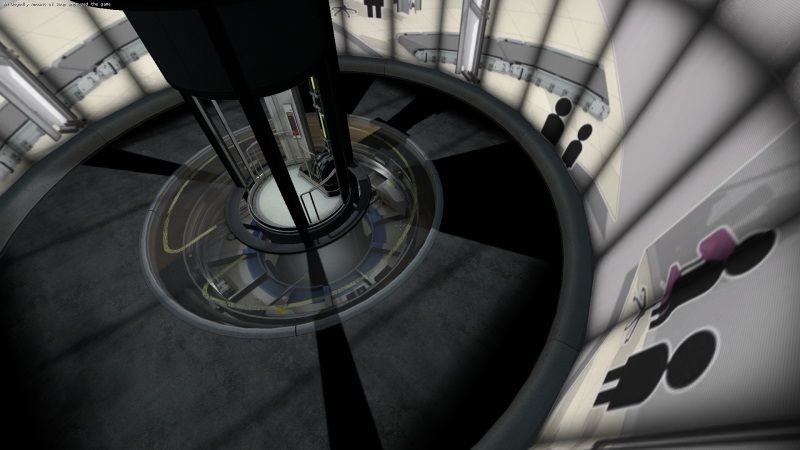
1: No matter what elevator instances I use, the floor in them is always extremely dark with extremely sharp light beams coming from the elevator. Any way I might be able to make the lighting look more like Valve's elevators?
What I mean:
Example

2: Is there a way to make an exit elevator loop for as long as an ambient_generic is playing so it doesn't cut it off? Or do I just have to extend the elevator somehow?

3: How might I be able to port Portal 1's radio skin to Portal 2's model? I don't just mean modding the skin either. I want to be able to select the clean skin under the model viewer and choose which ones I want in Hammer.

4: Another problem with ChickenMobile's Portalgun pedestal instance. It doesn't always lower and close the pedestal after the gun is collected. Any way I can fix that?

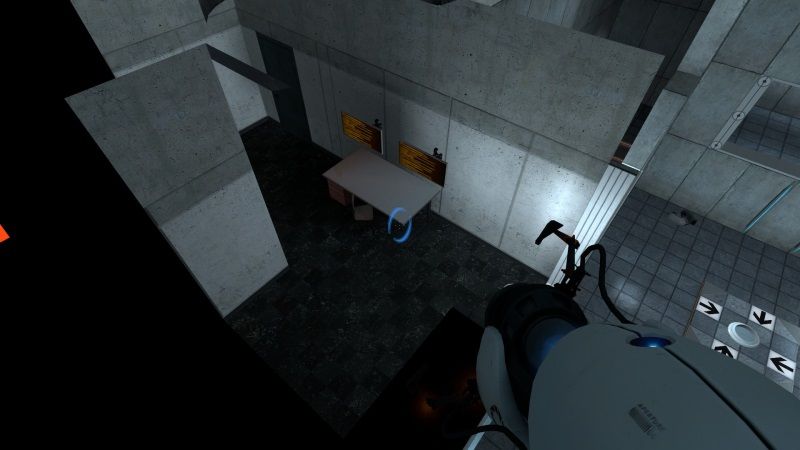
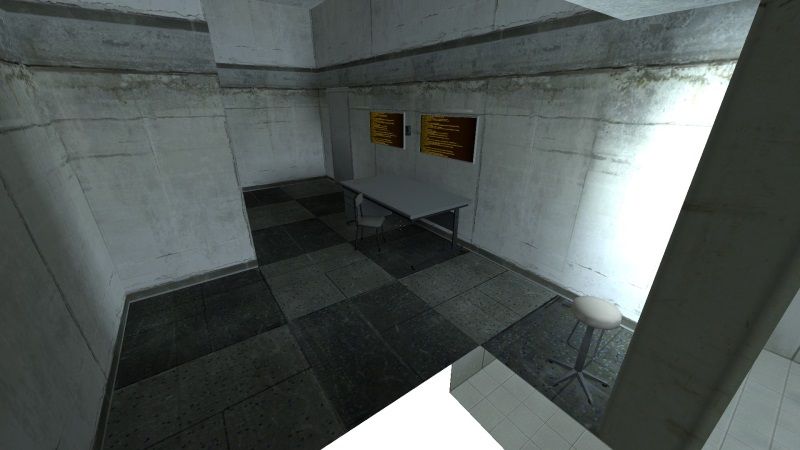
On a completely unrelated note, because of limited space and limited choices in observation rooms, I made an observation room based off of one in Test Chamber 2 of the first Portal. Can I get some opinions?
Said Lab
Portal 1:
Portal 2:
I realize I'm not the best with screenshots... But I'm pretty happy with this. I clipped the edges by the window and nodraw'd the entire outside. It looks kinda like a Valve instance. I have no doubt there are enough observation rooms out there, so I probably don't need to upload this, but hey, I'm a showoff.

Advertisement
Registered users don't see ads! Register now!
Avatar
TeamSpen210
608 Posts
Posted Apr 16, 2014
Replied 3 hours later
1: You might want to check to make sure the projected texture is on/working, or that your compile settings are right.

2: Portal 2's elevators have functionality for this so that you keep looping through the same shaft if GLaDOS is still talking. (See the readyForTransition() RunScriptCode commands in the path_tracks, plus other logic). If you poke a bit you should be able to make this work for the ambient_generic, although I don't know a way to directly detect if a sound stops playing so it'd probably be easier to prevent the level load/vote screen until after a set time passes.

3: Best way to debug these sorts of things is to turn on developer 2, clear the log before you try then examine the I/O log after it fails to work.

4: Looks quite nice, I haven't actually seen many/any observation instances beside Valve's ones, and more can't hurt. You might not want to copy Portal 1's observation rooms so closely as Portal 2's don't use the same sort of layout. If you haven't, bevel the front edge of the walls surrounding the window so the nodraw won't conflict with the walls. You could also try nodraw/removing props from the interior, where the player won't be able to see. (Maybe clip the left-most wall and nodraw the closest part, though I'm not sure how much this would matter optimisation-wise.