Strips of light near walls. Can't get them to work.

Avatar
CassataGames
98 Posts
Posted Jul 11, 2008
So I've tried everything I could think of, including searching the forum and even copying and pasting directly from the working wall lights in the example level, which seem to work perfectly.

No matter how hard I try, nothing I do can seem to get me around this issue. Basically what's happening is, in the actual game, 1 long strip seems to be capable of giving you 1 long strip of light that shoots up from below the little creases along the walls. However when I try to do that, something causes it to only work in 2 locations over the coarse of the whole strip. In addition to that, the same exact light texture used in the example map, comes up black rather then a nice light blue, like you see when you run the example map.
I've tried:
Resizing textures.
Repositioning textures.
Rotating textures.
Changing textures.
Chopping the brush up and placing them along the length of the wall.
Raising and lowering the light.
Making the crease in the wall thicker and thinner.
Changing the wall textures.

Every single thing I can think of, and not a single thing seems to be working.

PS: I took the overlay off because I was seeing if that was the cause too, it wasn't. I just didn't put it back yet.


This is the result that I want. This is run directly from the example map, and as you can see, the lights in the wall light the whole length of it.
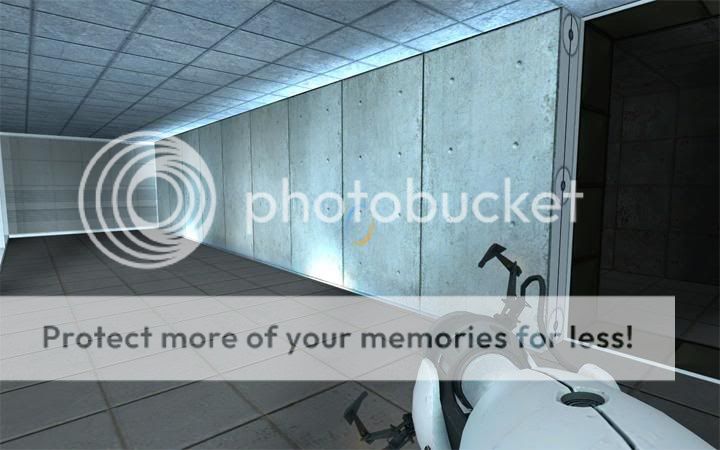

This is what happens to mine when I try to produce similar results.

Advertisement
Registered users don't see ads! Register now!
Avatar
msleeper
4,095 Posts
Admin
Posted Jul 11, 2008
Replied 5 minutes later
Change the lightmap scale on the light texture to 8, I believe. And make sure it is aligned properly.
Avatar
Tigger
100 Posts
Posted Jul 11, 2008
Replied 12 minutes later
Also make sure your map has no leaks. The strips won't show up correctly if there are any leaks at all in your map.
Avatar
CassataGames
98 Posts
Posted Jul 11, 2008
Replied 12 minutes later
Is there any sure fire way to either check for leaks or find them anywhere.? Sort of like a button that mimics the soap and water for a pool floaty?
Avatar
msleeper
4,095 Posts
Admin
Posted Jul 11, 2008
Replied 4 minutes later
Yeah, it's called compile your map and read the error log. If it says *** leaked *** then load up the point file and fix the problem.
Avatar
CassataGames
98 Posts
Posted Jul 11, 2008
Replied 7 minutes later
Thanks, I giving that a shot right now.
Avatar
reepblue
894 Posts
Posted Jul 11, 2008
Replied 33 minutes later
Make sure you are making it right too. I made my strips once and looked horrible. Then I redid it and it looked a lot nicer with out changing the lightmap. Lately, I can't get them to work now.

Quote:
Is there any sure fire way to either check for leaks or find them anywhere.? Sort of like a button that mimics the soap and water for a pool floaty?

There is also an in game check on leaks. If you noclip out of the map and if things look trippy, you have a leak. Your lighting will be horrable and water will also look trippy.

Advertisement
Registered users don't see ads! Register now!
Avatar
CassataGames
98 Posts
Posted Jul 11, 2008
Replied 2 minutes later

reepblue wrote:
Make sure you are making it right too. I made my strips once and looked horrible. Then I redid it and it looked a lot nicer with out changing the lightmap. Lately, I can't get them to work now.

Quote:

Is there any sure fire way to either check for leaks or find them anywhere.? Sort of like a button that mimics the soap and water for a pool floaty?

There is also an in game check on leaks. If you noclip out of the map and if things look trippy, you have a leak. Your lighting will be horrable and water will also look trippy.

It worked! Beautifully too. I checked up on Valves help topics to find leaks and such, and I used the technique they gave me. My lights are working perfectly now, thanks guys, I never would've put 2 and 2 together.