Blue lines
31 Posts
Posted Dec 17, 2011
When editing in-game maps, there are a bunch of things in the levels that are blue lines on the building windows. What are these and would it be okay to remove these?

Registered users don’t see ads!
Register now!
944 Posts
Posted Dec 17, 2011
Replied
5 hours
later
You can't remove them.
31 Posts
Posted Dec 18, 2011
Replied
15 hours
later
I'm not referring to the gridlines. I mean the markings that look almost like scaffolds.
1,080 Posts
Posted Dec 18, 2011
Replied
4 hours
later
Um? Screenshot?
54 Posts
Posted Dec 20, 2011
Replied
1 day
later
Those are the outlines of the brushes you have laid out (the blocks).
It may look very strange and overwhelming, but they are quite helpful at times. There is no way to remove them as far as I know.
However, if you look at the top left corner of any of the 4 windows, you can adjust the settings on which view you want. (ie, you can make all windows of 3d textured from different angles if you wanted)
It may look very strange and overwhelming, but they are quite helpful at times. There is no way to remove them as far as I know.
However, if you look at the top left corner of any of the 4 windows, you can adjust the settings on which view you want. (ie, you can make all windows of 3d textured from different angles if you wanted)
205 Posts
Posted Dec 20, 2011
Replied
7 minutes
later
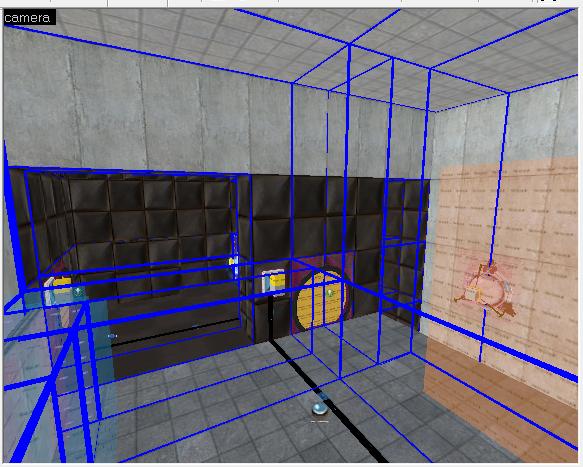
Are you talking about the blue lines that show only in the 3d window? i.e.,
image
blue_lines.jpg
If so, you can turn those off by selecting "Map"->"Unload Portal File" in the file menu, although I have never known those to load by default.
image
blue_lines.jpg
If so, you can turn those off by selecting "Map"->"Unload Portal File" in the file menu, although I have never known those to load by default.
Images
1
1,080 Posts
Posted Dec 20, 2011
Replied
1 hour
later
I have never known these at all? Are those the visleafs or something?
204 Posts
Posted Dec 20, 2011
Replied
31 minutes
later
Yep, they are the Visleafs, the file gets created every time you compile, and then you can load it into hammer.
Registered users don’t see ads!
Register now!
290 Posts
Posted Dec 20, 2011
Replied
18 hours
later
Robdon wrote:
Yep, they are the Visleafs, the file gets created every time you compile, and then you can load it into hammer.
And you really should.