ENV_SPLASH

Avatar
Fracture
797 Posts
Posted Jun 18, 2012
I got falling brushes that drop into the water progressively in my map. The water doesn't react to them so i looked up splash effects and only found the env_splash. I attempted executing it but it does NOTHING. Someone mentioned env_water_splash but no such entity was found.

What do I do here?

If there are working models of tiles that can cause splashes all on their own when dunked, that would be an acceptable substitute... If i could locate such models in hammer.

Advertisement
Registered users don’t see ads! Register now!
Avatar
josepezdj
2,386 Posts
Posted Jun 18, 2012
Replied 1 hour later
What are those brushes? are they func_physbox or prop_dynamic models maybe? Because I think if you use those, your water will react when they fall into it.
Avatar
zivi7
649 Posts
Posted Jun 18, 2012
Replied 31 minutes later
I had a similar problem with physboxes. They kept floating on the surface instead of sinking. I used one trigger to dissolve !activors like cubes, one that killed !activators like physic objects and a trigger_hurt for the player.
Avatar
Brainstone
401 Posts
Posted Jun 18, 2012
Replied 7 hours later
I think all prop_dynamics cause splashes, because I once had a tile rubble pushed down into a pit and even though it had no collision model, the water splahed.

so just create a prop_dynamic and search for "panel".

Avatar
Fracture
797 Posts
Posted Jun 18, 2012
Replied 29 minutes later
I am currently just using move_linears. In retrospect it was a poor choice for flooring. I guess i can make them the anchor to parent models, but unfortunately the size of tile i want doesn't exist. they are one size larger than catapult_panel_gibs_01.mdl

EDIT: I just looked up func_physbox it does exactly what I need it to. I will just change all the tiles properties to func_brush, shift+drag them down a square, change the copies to func_physbox and remove the use flag and alter the input to the originals to KILL. The tiles will fall ever so dramatically and splash like fish.

Thanks for the help

Avatar
zivi7
649 Posts
Posted Jun 18, 2012
Replied 2 hours later
I don't understand what you said there. But if you just want to have the physboxes stay in place and only fall when you want to, you can just set them to "motion disabled" in the flags. Then have a trigger or whatever you want targeting them with the output "enable motion" or something similar. They will stay "frozen" until that moment and fall down like physical objects once motion is enabled.
Avatar
Fracture
797 Posts
Posted Jun 18, 2012
Replied 16 minutes later
oh that makes it way easier. I got an overload of friction errors that lagged the hell out of the game because they were still moving.

I never bothered to find out how to add outputs with triggers. What would be the correct way of adding such an output?

Avatar
zivi7
649 Posts
Posted Jun 18, 2012
Replied 40 minutes later
Yeah, if there are too many items crashing into each other, it can get too much to compute.

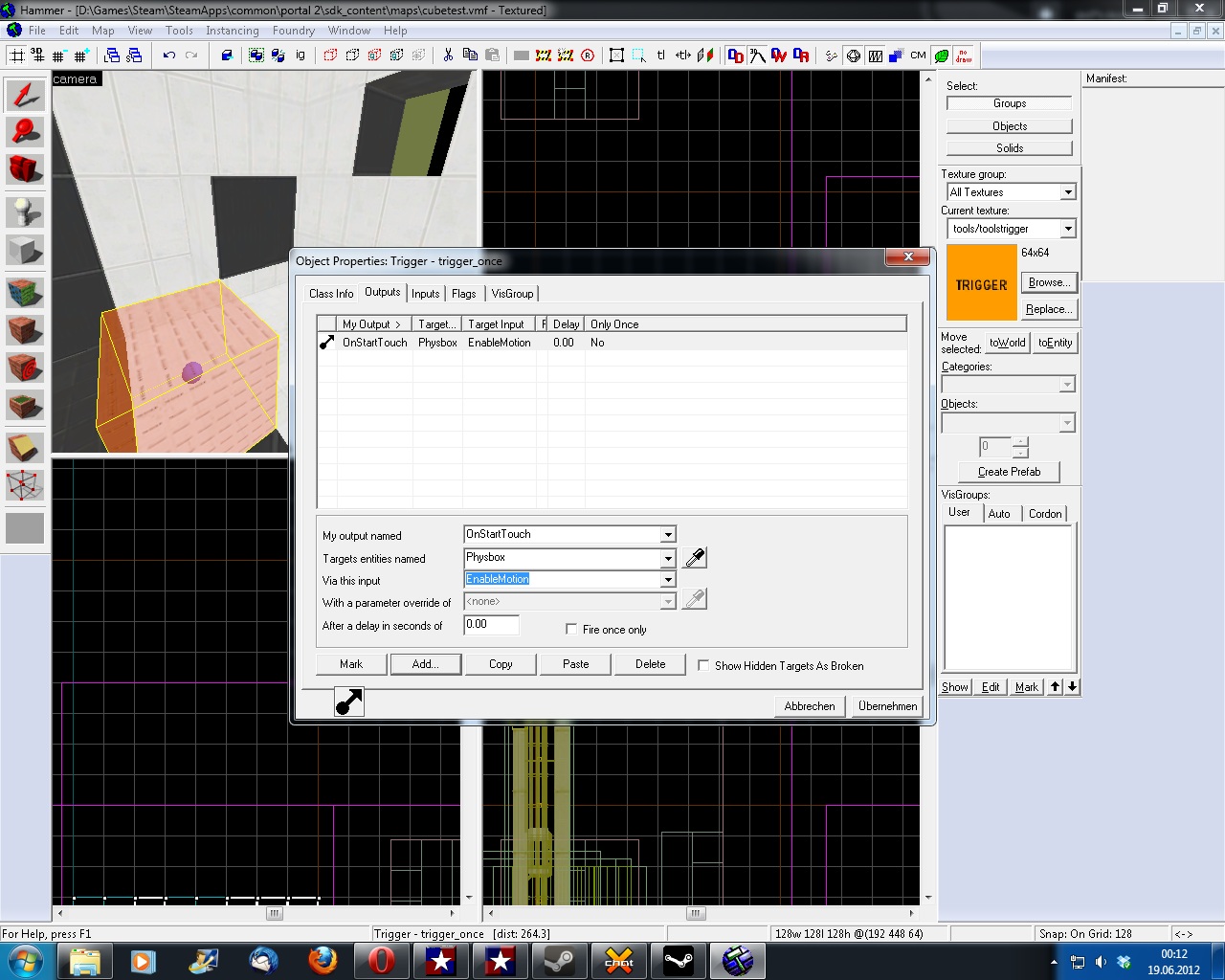
Thet trigger is easy: Create a box and select it, press CTRL+T and make it a trigger_once, go to the outputs and create a new one: OnTouch, Target Entity: your physboxes, Output: Enable Motion or whatever the exact name is.

edit: There are usually people in the Irc who can answer such questions, too.
Avatar
Fracture
797 Posts
Posted Jun 18, 2012
Replied 57 minutes later
i cant seem to get it to work. I think the line after addoutput might not be correct.
Avatar
zivi7
649 Posts
Posted Jun 18, 2012
Replied 26 minutes later
Here you go.
Images 1
Post image 1
Avatar
Fracture
797 Posts
Posted Jun 18, 2012
Replied 2 minutes later
ah, i had the wrong output

edit: Can they be fizzled?

Avatar
MWP
25 Posts
Posted Jun 19, 2012
Replied 16 hours later
I also made falling pannels with the physbox, like ivi suggested. It all works well but the panels don't cast shadows.. (?) The light is comming from a prejected_texture that has the flag anable shadows to Yes.
Avatar
Habzs
225 Posts
Posted Jun 19, 2012
Replied 11 minutes later

MWP wrote:
I also made falling pannels with the physbox, like ivi suggested. It all works well but the panels don't cast shadows.. (?) The light is comming from a prejected_texture that has the flag anable shadows to Yes.

Make sure that the 'Disable Shadows' option on the func_physbox is set to No.

Avatar
MWP
25 Posts
Posted Jun 19, 2012
Replied 45 minutes later

unfortunately I did.. ^^

Habzs wrote:
Make sure that the 'Disable Shadows' option on the func_physbox is set to No.

Avatar
Fracture
797 Posts
Posted Jun 19, 2012
Replied 1 hour later
i couldn't fizzle them, so i added kill outputs timed just for when they splash and disappear.

And I don't have a problem with the shadows not being cast. But what about moving shadows? I see them being super imposed despite the many moving brushes, objects, and lighting

Avatar
zivi7
649 Posts
Posted Jun 19, 2012
Replied 50 minutes later

Fracture wrote:
Can they be fizzled?

Fracture wrote:
i couldn't fizzle them, so i added kill outputs timed just for when they splash and disappear.

I don't think they can be fizzled. But you don't need to kill them with a timer. Just add a killing trigger to your water:

zivi7 wrote:
I used one trigger to dissolve !activors like cubes, one that killed !activators like physic objects and a trigger_hurt for the player.

You could also make a trigger that breaks the !activator on touch. That will make the physbox break witha sound instead of having it disappear.

Avatar
MWP
25 Posts
Posted Jun 21, 2012
Replied 2 days later
Is it posible to let water react to func_brushes?

Oh the shadow casting problem is solved btw... :smile:

Avatar
Skotty
671 Posts
Posted Jun 21, 2012
Replied 2 hours later
You would have to make it via env_splash, there is no other possibility.

Maybe parenting to a func_brush works. Try it out.

Avatar
Fracture
797 Posts
Posted Jun 27, 2012
Replied 6 days later
After mindlessly testing my falling brushes i suddenly noticed that the acid that they were falling in were not reflecting any brushes that were no func_detail. You can see everything behind the walls and doors that are func_door or func_brush, and so on... How can i fix this?
Advertisement
Registered users don’t see ads! Register now!
Avatar
Skotty
671 Posts
Posted Jun 27, 2012
Replied 59 minutes later
Enable fast reflections in the brushs' keyvalues.