Hello, I need some help...
I can't make a hole in the wall to put the door 01. I need help! I will post some screenshots of the map. It is very easy. If anyone can, please make a hole for the door and send it by mail. My email address is [email protected].
Thanks!

There are basically 2 ways you can do this:
1) Create a brush the size and shape of the hole you want. Drag it over to the spot you want on the wall (make sure it is inside the wall). Then press "carve," located on the left of one of the top toolbars. Note that the practice of "carving" is generally looked down upon by more experienced mappers, so this method may not be the best one to get in the habit of doing.
2) Resize the wall so that it forms one side of the hole. Then create 2 more brushes for the other sides of the hole. Difficult to explain, but easy to do.
So I've have to do walls more thick, like 16 units thick, to make the doors look well.
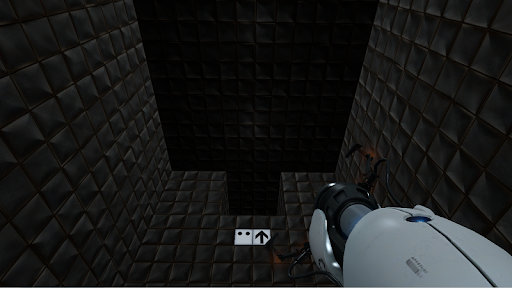
But now I have another problem. The ceiling look very dark. Look:
Thanks for the help.
3 things could be at play here.
-
You have a leak, a hole to the black void that causes your map to explode with problems. Sealing said leak fixes most, if not all oddities in a map.
-
You made the ceiling func_brush and set it's FX color to a dark grey (also this would cause it to leak unless there'a another world brush just above it sealing the void) This is unlikely however.
-
You used the cheap version (no reflections/bumpmap) of the metal wall tiles for the ceiling, which are lit darker than the uncheap version. Make the ceiling tiles the same as the wall tiles, and if this is the porblem it should fix it.
Whysopro? wrote:
Couldn't be number 3 because he doesn't have cubemaps........right? o_0 I just confused myself. That was odd.
No, it is a completely seperate texture that doesn't have the bumpmap on it; it is purely the metal tile texture itself. (and thus when lit is lit darker. Hard to explain. Look for the metal tles, you'll find a _cheap version)
Even if you dont have cubemaps, the bumpmap still applies. Here the ceiling does not have it, and so is darker. Normally it is not so drasticlly obvous but his lighting is simple whch is why it stands out more.
Loading D:\PortalMod\mapsrc\TestChamber01\testchamber01.vmf
fixing up env_cubemap materials on brush sides...
ProcessBlock_Thread: 0...1...2...3...4...5...6...7...8...9...10 (0)
**** leaked ****
Entity prop_static (716.05 -53.75 448.00) leaked!
I have to find the leak an fix it.
Thanks to everyone for the help.
ScicoPax wrote:
Every object has a leak. I remove one and then it's another that have a leak. Should I start it from the scratch? Or try to do something else?
I think you don't understand what a leak is. A leak is caused by your map not being completely sealed by world geometry. The object in the log is an object that is probably close to the leak. It is not the source of the problem, (unless it's just sitting alone in the void) and deleting that object will fix nothing. You should read about what a leak is and how to fix it here:

Goes over non-Portal specific stuff as well. Let's not forget this thread. Read it if you haven't done so!