Improper Slime Water Reflections
cat_singleplayer0000.jpg
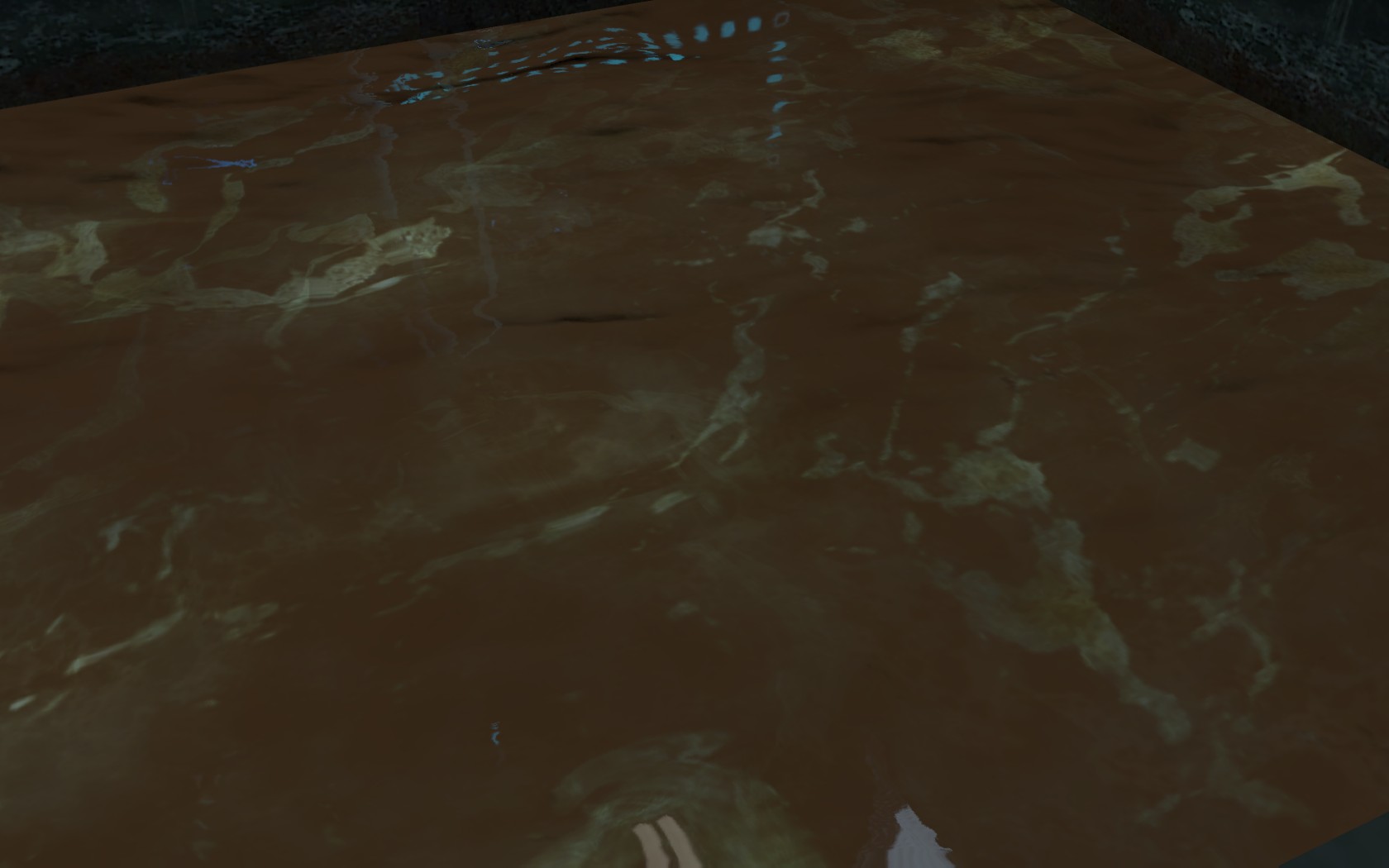


I've spent quite some time trying to get my reflections right recently.
There seems to be some bugs and things regarding them.
The 'problems' seem to be effected by the 'Shader Details' settings in the main video settings.
Low - No Reflections
Medium - Reflect just 'lights', including props like lasers, lightbridges, indicator lights etc.
High - Lights + Brushes
Very High - Not sure what else this adds
However, there must be some way to override these settings in the code or compile. Because Valve do it. For example, in sp_a2_brige_intro, even if you have Shader Details set to 'Low' you still get reflections in the water. But if I decompile that map, and recompile it, the new compile then doesnt override the settings, and reflections stop when on 'low' and 'medium'.
Then there are some bugs:
If you have the settings set as 'Medium' then it doesnt reflect the Brushes you have around the water as it should, BUT it also then makes all those Brushes not block light from any light entities, so they reflect on the water. I'm guessing this is why Valve have forced their water to always reflect in their maps somehow.

One way around it is, you could set all your Brushes that are around the water to func_brushes, and then force them to reflect buy setting the 'Render In Fast Reflections'. That seems to make it work better.
Also, there is a problem with reflections on the 'edge' of the water.
If you have an entity that emits light near water but blocked by a brush, and you move to certain angles, then it doesnt actually reflect in the water, but it does reflect a little bit of its light along the edge of the water. This happens in Valves maps also in some places.

There is a way around it though.
Its a bit difficult for me to word it, so its probably better to look at the attached example I've knocked up to test it.
It seems that the light leaks through brushes on the edge of the water. So we need to block them with brushes that have a texture. I picked tools/toolsblack.
If you look at the map attached:
Point '1' has no 'fixes' and in 'medium' shader mode you will see the lightbridge, laser and indicator lights reflecting in the water when you shouldn't, however in high or very high mode you dont see them.
Point '2' has the fix to stop those reflections in 'medium' mode (By making the brushes that should block the light a func_brush and setting the 'Render In Fast Reflections' property), but there is still a small amount of light leakage on the edge of the water at certain angles. noclip around and you should be able to see them come and go. If you cant find a point where you can see them, then noclip up to the ledge at the end near the point '4' and face them while your feet are on the white bar up there.

Point '3' has the above fix and also the one to stop light leaking (This is done by putting another func_brush with 'Render In Fast Reflections' property set and the bottom textured with 'tools/toolsblack' and sides and top with nodraw, 8 units thick, and placed ontop of the floor brush. There should be no reflections from the lights above or leakage now.
HTHs,
Rob.
Ok a bit more info on the first problem, where light entities seem to not get blocked when in 'Medium' mode.
I've spent today trying to figure out what the difference waw between me compiling and Valve compiling.
Using pakrat I found that Valves bsp files all have the following extra files in them, that arnt in the bsp if I compile it.
simpleworldmodel.mdl
simpleworldmodel.dx90.vtx
simpleworldmodel.vvd
simpleworldmodel_water.mdl
simpleworldmodel_water.dx90.vtx
simpleworldmodel_water.vvd
simpleworldmodel.vmt
simpleworldmodel.pwl.vtf
simpleworldmodel.vtf
simpleworldmodel_albedo.pwl.vtf
simpleworldmodel_albedo.vtf
simpleworldmodel_lightmap.pwl.vtf
simpleworldmodel_lightmap.vtf
Every single one of Valves bsp files have these, but no one else do.
If I extract them from Valves bsp they are actually models of the whole map but just flat purple textures for faces, I'm guessing its being used to block light and reflections, and are built at some point.
If I then inject them into my compiled version with pakrat, my compiled version blocks the light entities like valves map does. (The leaking bits of light dont get fixed though, that defiantly looks like a bug)
I then found the console command buildmodelforworld
This command fails though with:
] buildmodelforworld
Compilation of "c:\program files (x86)\steam\steamapps\common\content\portal2_dlc1\materialsrc\models\maps\sp_a2_bridge_intro/simpleworldmodel.tga" succeeded
Compilation of "c:\program files (x86)\steam\steamapps\common\content\portal2_dlc1\materialsrc\models\maps\sp_a2_bridge_intro/simpleworldmodel_lightmap.tga" succeeded
Compilation of "c:\program files (x86)\steam\steamapps\common\content\portal2_dlc1\materialsrc\models\maps\sp_a2_bridge_intro/simpleworldmodel_albedo.tga" succeeded
Compilation of "c:\program files (x86)\steam\steamapps\common\content\portal2_dlc1\models\maps\sp_a2_bridge_intro/simpleworldmodel_water.qc" succeeded
Compilation of "c:\program files (x86)\steam\steamapps\common\content\portal2_dlc1\models\maps\sp_a2_bridge_intro/simpleworldmodel.qc" succeeded
Unable to remove c:\program files (x86)\steam\steamapps\common\portal 2\portal2_dlc1/models/maps/sp_a2_bridge_intro/simpleworldmodel.mdl! (errno 2)
Unable to remove c:\program files (x86)\steam\steamapps\common\portal 2\portal2_dlc1/models/maps/sp_a2_bridge_intro/simpleworldmodel.dx90.vtx! (errno 2)
Unable to remove c:\program files (x86)\steam\steamapps\common\portal 2\portal2_dlc1/models/maps/sp_a2_bridge_intro/simpleworldmodel.vvd! (errno 2)
Unable to remove c:\program files (x86)\steam\steamapps\common\portal 2\portal2_dlc1/models/maps/sp_a2_bridge_intro/simpleworldmodel_water.mdl! (errno 2)
Unable to remove c:\program files (x86)\steam\steamapps\common\portal 2\portal2_dlc1/models/maps/sp_a2_bridge_intro/simpleworldmodel_water.dx90.vtx! (errno 2)
Unable to remove c:\program files (x86)\steam\steamapps\common\portal 2\portal2_dlc1/models/maps/sp_a2_bridge_intro/simpleworldmodel_water.vvd! (errno 2)
Unable to remove c:\program files (x86)\steam\steamapps\common\portal 2\portal2_dlc1/materials/models/maps/sp_a2_bridge_intro/simpleworldmodel.pwl.vtf! (errno 2)
Unable to remove c:\program files (x86)\steam\steamapps\common\portal 2\portal2_dlc1/materials/models/maps/sp_a2_bridge_intro/simpleworldmodel.vtf! (errno 2)
Unable to remove c:\program files (x86)\steam\steamapps\common\portal 2\portal2_dlc1/materials/models/maps/sp_a2_bridge_intro/simpleworldmodel_albedo.pwl.vtf! (errno 2)
Unable to remove c:\program files (x86)\steam\steamapps\common\portal 2\portal2_dlc1/materials/models/maps/sp_a2_bridge_intro/simpleworldmodel_albedo.vtf! (errno 2)
Unable to remove c:\program files (x86)\steam\steamapps\common\portal 2\portal2_dlc1/materials/models/maps/sp_a2_bridge_intro/simpleworldmodel_lightmap.pwl.vtf! (errno 2)
Unable to remove c:\program files (x86)\steam\steamapps\common\portal 2\portal2_dlc1/materials/models/maps/sp_a2_bridge_intro/simpleworldmodel_lightmap.vtf! (errno 2)
*****************It is recommended to quit the game after running buildmodelforworld!  Leaks rendertargets!****************
But, it does actually inject simpleworldmodel.vmt into the bsp file before it fails, so it seems like its something to do with it.
I cant find anything on Google about buildmodelforworld or simpleworldmodel.
I think it has something to do with either buildmodelforworld or some switch or something to get VRAD to add in the simpleworldmodel somehow maybe, but I cant figure it 
If anyone else has any clues?
Rob.
Buildmodelforworld is the same, it only updates maps in portal2_dlc1\maps since the dlc.
Maybe they broke it more... but I cant find ANY map, even that was built before the dlc that has this simpleworldmodel in them, apart from Valves.
Rob.
EDIT: Woah i'm a community contributor... didn't notice that
Robdon wrote:
Buildcubemap works though, you just have to have your map in the portal2_dlc1\maps dirBuildmodelforworld is the same, it only updates maps in portal2_dlc1\maps since the dlc.Maybe they broke it more... but I cant find ANY map, even that was built before the dlc that has this simpleworldmodel in them, apart from Valves.Rob.
Try some maps for other source games.
P.S The commands work, but they dont function, I cant see my cubemaps, even though I have built them. so are for the buildmodelforworld, if only someone still has pre-dlc p2
spongylover123 wrote:
Robdon wrote:Buildcubemap works though, you just have to have your map in the portal2_dlc1\maps dirBuildmodelforworld is the same, it only updates maps in portal2_dlc1\maps since the dlc.Maybe they broke it more... but I cant find ANY map, even that was built before the dlc that has this simpleworldmodel in them, apart from Valves.Rob.
Try some maps for other source games.
P.S The commands work, but they dont function, I cant see my cubemaps, even though I have built them. so are for the buildmodelforworld, if only someone still has pre-dlc p2
Hmm, well they work for me, so I guess something isn't quite right.
Check this:
Firstly, make sure you have gotten rid of any bsp files of your map in the dirs. Portal will look for bsp files in this order and these dirs, so check them, baring in mind these paths are for Win 7 64, so you might need to change the 'program files (x86)' bit to 'program files':
C:\program files (x86)\steam\steamapps\common\portal 2\update\maps\yourmap.bsp
C:\Program Files (x86)\Steam\SteamApps\common\portal 2\portal2_dlc1\maps\yourmap.bsp
C:\Program Files (x86)\Steam\SteamApps\common\portal 2\portal2\maps\yourmap.bsp
C:\program files (x86)\steam\steamapps\common\portal 2\platform\maps\yourmap.bsp
Then, to make it easier for building cubemaps and things its probably best if you change hammer to automatically copy the bsp file to the 'C:\Program Files (x86)\Steam\SteamApps\common\portal 2\portal2_dlc1\maps' dir when you compile, since the buildcubemap command will only try to write back to the bsp in that dir. (and will crash portal if the file isnt there)
So close portal and hammer, and edit the file C:\Program Files (x86)\Steam\SteamApps\common\portal 2\bin\GameConfig.txt in notepad and change the following line:
"BSPDir" "C:\Program Files (x86)\Steam\SteamApps\common\portal 2\portal2\maps"
to
"BSPDir" "C:\Program Files (x86)\Steam\SteamApps\common\portal 2\portal2_dlc1\maps"
Now hammer will copy your bsp file to the dlc1 dir when you compile, so you dont need to move it around and stuff when building cubemaps.
In hammer place your cubemaps and stuff, and then compile, make sure you are in 'expert' mode and you select the 'Full compile -both -final (slow!) config
Now start portal and type the following in the console.
map yourmap
mat_hdr_level 2
buildcubemaps
mat_hdr_level 1
buildcubemaps
mat_hdr_level 2
Thats it, they should be there now.
If you recompile or rename the bsp file, you will need to do the build again, as this destroys the cubemaps.
I would recommend also closing and reopening portal each time you re-compile and change env_cubemaps or things. Sometimes portal seems to 'cache' the cubemaps and sometimes it doesnt. If it does then it can confuse you as to what your last change actually did or didnt do.
Note that cubemap reflections will only show if your settings for 'Shader Detail' are 'high' or 'very high', they wont show in Medium.
Also, not all entities will reflect in cubemaps, for instance env_portal_laser doesnt display correctly and only 2 red points will reflect at the origin and at the end point that the laser hits something. The actual laser 'line' wont reflect.
Another thing that can be helpful is to use the cubemap weapon. Have a look at bottom of this thread at Skotty's post and it will give you a link to getting the weapon and how to install/use it. Its a good tool for seeing which cubemap is active and what it can see.
http://forums.thinking.withportals.com/mapping-help/buildcubemaps-crashes-game-t4828-30.html
I've attached some demo vmfs, to show some reflections from cubemaps, and some prebuilt bsp files with cubemaps built and also not built to show the differences.
The best things to use for testing are glass vactubes and lightbridges
cubemap1: no env_cubemap in map

cubemap2: env_cubemap in map, but no cubemaps built

cubemap3: env_cubemap in map, and cubemaps built

Bare in mind, I've set my cubemap in hammer to have a size of '256x256' which can cause possible performance problems because its the highest quality. Its just so that it shows a good image of it in this test and its a simple map. I'm not sure 'how' bad this is for performance so you need to test which is the best for your map and performance, or just use 'standard'.
HTHs,
Rob.
I started with the original version from the game and took a shot showing most of the area and another of just the water. I also took these on both Low and High shader detail.
After doing that, I renamed the map file and retook the screenshots from the same areas as I took the others. Aside from the cubemaps being broken, the map looked the same on High shader detail. When I put it on Low, I noticed the water wasn't the same as it was before in the original. So if the water gets broken because of the rename, could that mean that there's a file somewhere (perhaps in one of the several vpks) that controls this?
I could have stopped there, but I didn't. I decided to decompile the map and do a full recompile to see what happened. So I recompiled the map under a different name and found that the map was a lot darker than the one in Portal 2. I also noticed that the water has weird marks all over it on High Shader detail, but they aren't present on Low. Now not every decompile is perfect, but could this also mean that Valve had some sort of special compile tool to make the maps appear the way they do?
Then to finish the little project I was doing, I decided to rename the file to the official name and found the same results as the one above. It should be noted that these were taking without building the cubemaps. I was going to take more with the cubemaps built, but I didn't have the time to do so.
I still have all the screenshots and I can try to post them here later today if you want to see them. Thanks for reading.
What decompiler are you using and what version?
A while ago, I found a bug in BSPSource, that it was converting all boolean parameters to 'true'/'false' text instead of 0/1, and reported it to them.
This caused errors with those parameters, because the compiler takes 'false' and 'true' and turns them both in to '0', ie disabled.
This specifically effects lighting (but not only), because the models used for glass panels (glass_lightcover) have to have the 'Disable Shadows' set on the model, so that the light panel behind them shines through.
So because of this bug, all the glass_lightcover wont allow light to pass and therefore decompiled maps are always darker if light panels are used.
This was recently fixed in BSPSource release 1.3.4, so check your version and update if needed and re-decompile your maps.
http://ata4.info/bspsrc/downloads.html
Hopefully this should help the lighting and maybe other problems.
Rob.