Mapping Tips and Useful Links


Invaluable site, full documentation on every entity. Be sure to read the Discussion pages as they have some pricesless info, too.
Halfwit-2.com: http://halfwit-2.com/?page=tutorials
A long time ago, Interlopers used to be the number one place for mapping tutorials, but this site has come a long way and has some really kick ass stuff. From the basics to the specific, advanced stuff.
Interlopers.net: http://www.interlopers.net/index.php?page=tutorials
Speaking of Interlopers, they are still a great site with a lot of tutorials and one of the oldest forums around.
GCFscape: http://nemesis.thewavelength.net/index.php?p=26
Awesome tool, allows you to view and extract the contents of GCF files.
VTFedit (VTFlib): http://nemesis.thewavelength.net/index.php?p=40
Another priceless tool, a GUI for creating images into VTF textures.
Everyone needs to read this from front to back atleast once. This is the most comprehensive, in-depth, and thorough explaination of how the Source engine works and how to optimize your map. Read this right now.
Pakrat is a graphical replacement for the BSPZIP program, that allows you to embed external files, such as textures (vtf), material (vmt) and model (mdl) files into a HL2 bsp file. Using this, you don't have to have a lot of files spread out among many folders. It's tricky to use, but can be very effective when done well.
Few tips you should know:
-
!Activator is the first thing that triggers something (in trigger's case the first thing in it's volume that can trigger it), !player is the player.
-
When the player touches Fizzlers in or touching hurt triggers, Portal will crash. To remedy needing to remove boxes, have a trigger_multiple with a filter so it only is triggered by physics objects. (or if needed just the box) then add an output to kill !Activator, and resend a new box.
-
You can parent objects, entities, etc. to portals by use of Prop_Portal. Have it's ID set to 0 (the portals the gun shoots) and name it. BE SURE YOU HAVE IT ACTIVE AT THE BEGINNING OF MAP LOAD! If you don't the parenting never works, or can be glitchy.
-
If you find a light produced by a texture (for example, lightrecessedcool002) is not bright enough or too bright, you can change this via how big the texture scale is - higher scales on both the X and Y axis decrease brightness, while lower scales (below 1) on the X/Y axis increase brightness. Be careful not to make it TOO small (usually below 0.05) or the light will be way too bright. Too high (5+ usually) nulls the light completely.
-
When making a prefab, be sure to set all things in the prefab with an "&i" ending. This ending allows you to place multiples of the prefabs without one activating the other, moving the other, etc. Also, be sure to place your prefab close to the map origin so that when you use it, it is not far away from where you clicked.
Just found this awehsum page on interlopers for solving ALMOST EVERY bug in Hammer compiling. So useful I just thought it deserved a straight link to instead of having to browse their website.
A .bsp file decompiler with support for Portal 2 maps. Useful for looking into the official Valve maps, to discover how certain effects are produced etc.
Smartnormal: http://www.smart-page.net/smartnormal/fl10.htm

Groxkiller585 wrote:
5. Also, be sure to place your prefab close to the map origin so that when you use it, it is not far away from where you clicked.
If you hid everything in your map except your prefab then created the prefab at the origin to begin with, you wouldn't have this problem.
Nice tip with the &i grox.

msleeper wrote:
Or you can just use instances.
Unless you are making a prefab.

chickenmobile wrote:
msleeper wrote:Or you can just use instances.
Unless you are making a prefab.
I would prefer to use instances over prefabs any day. Alot less horsing around. Unfortunatly, I can't use instances with certain games. 
EDIT: Anyone may PM me If they need help. I always search the vdc on a regular basis, and will find somthing useful. In some cases I might make examples for some to work with. All you need to do is ask.
flashlight_border

flashlight_moon (just white)
flashlight_security001

flashlight001

flashlight001_improved

flashlight001_intro

flashlight002

flashlight003
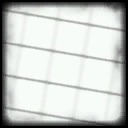
flashlight004

flashlight006
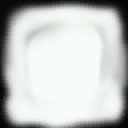
flashlight007
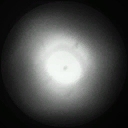
Don't use any texture with existing .vmt. In nearly every case you will get tiling textures, even outside the FOV of the env_projectedtexture.
Changing the grid size is also possible by using ALT+s (increase) and ALT+a (decrease) thus you can keep your right hand holding the mouse. Usually you had to use 'ALT GR+8' or 'ALT GR+9' which isn't that convenient. It helped me a lot and sped up my working in Hammer...
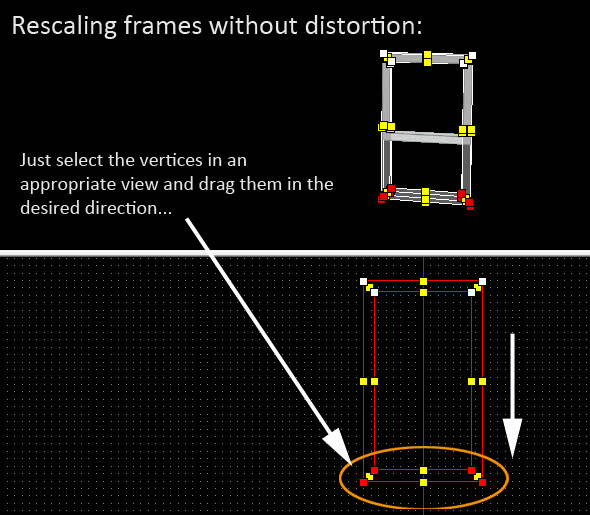
Rescaling frames without distortion:
Came across this method while rescaling several frames for a map and thought it might be useful for others, too.
Usually the frame will be distorted and the 45 degree angles won't be maintained when using the resize transformation handles. You can prevent this by resizing the frame using the vertex tool.
Also creating the frame manipulating the vertices of rectangular brushes is easier than using the clipping tool.
After having resized the frame you can solo the object by pressing CTRL+H, then using the face editor (SHIFT+A) to select and mark the pertinent texture and simply hit 'fit' to realign all faces at once.
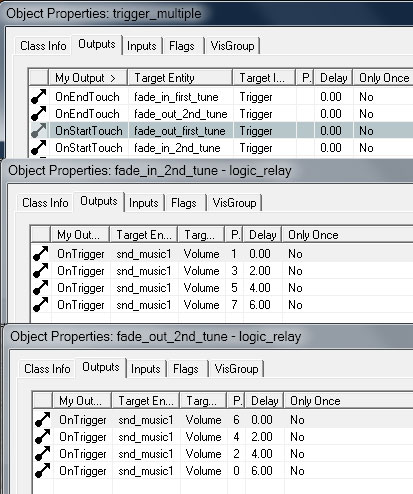
Another useful thing I found out was to create your own 'rectangular' soundscape areas using trigger_multiples replacing the env_soundscape entities.
Create your own fade-in/fade-out logic_relays and let them trigger your desired sound files when 'start_touching' or 'end_touching' the area defined by the trigger_multiple.
The trigger_multiple method also has also the advantage to be exactly a large as the room if desired.
When it come to testing coop maps, there are a few basic things you have to know! It took me months to figure this all out, when I first started making coop maps. So I hope you stumble across this before you reach that point.
When you create a coop map, it must be named *mp_coop_mapname. If you don't have the mp_coop_ in the name, then it won't work.
*When you want to test your map by yourself you need to use the split screen. After you have compiled your map, go to the main menu of Portal 2, then type in "ss_map mp_coop_mapname" into the console(press the ( ` )key at the top left of the keyboard, to open the console)*. This will start the map in split screen mode.
Once your in split screen mode you start only controlling the blue robot. SO to control the orange robot, type in the console "sv_cheats 1" which enables cheats. Then you type in "in_forceuser 1" That will allow you to control the orange robot. If you want to control the blue robot again, then type in "in_forceuser 0"
***Hope this helps.
When using custom sound/music in your level, possibly it won't play when activated and you may get this error:
"[Sound] S_StartSound(): Failed to load sound 'destination music/mymusic.wav'. File is missing from disk/repository."
Well now you fix this problem, I give you two options.
First(recommended):
Go to your "\steamapps\common\portal 2\portal2\cfg" and create file called autoexec.cfg then
write this snd_updateaudiocache in the file. Now every time you run Portal 2, it updates audio caches. And that fixes the 'mute' ambient_generic entitys. And why this way? Because when you have custom sounds in your level, you can include this file, when releasing the map, and everyone who plays the level can hear custom sounds. 
Second:
Just write snd_updateaudiocache to console and restart map.
Hope this helps everyone who is willing to use custom sounds!