Moving objects and lightmaps / dynamic lights
New to the board so go easy on me! I'm in the process of creating my first portal 1 level and have hit a problem I can't seem to work out how to solve. I have created a moving platform that hides a bottomless pit (which casts light). My problem is twofold.
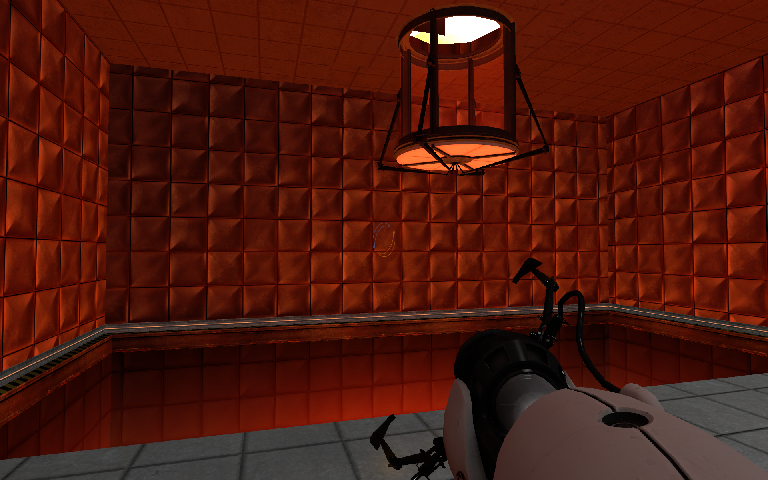
Firstly the lightmap created by the orange texture on the bottom of the pit is cast on the surrounding walls when the platform is hiding the pit. I know its baking the lightmap while the pit is not covered as the pit platform starts hidden but I'm not sure how to go about fixing this (putting the platform on top when baking would only cause the opposite problem of no light cast when the pit is open).
Secondly, as the moving platform is out of the environment when light is baked, the surfaces are unlit when they enter the world. I've added a couple of screenies so you might understand my problem better.
Cheers,
Door Open
Door Closed
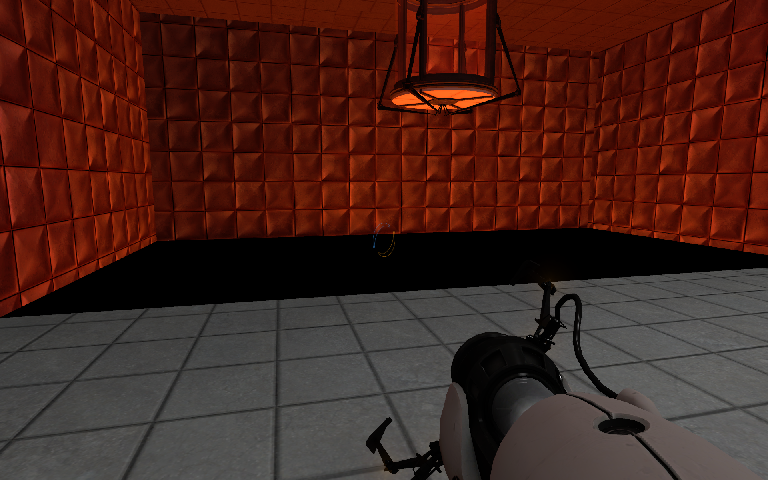

If the door starts closed, the lights will never shine through the door, even when it opens. The solution to this problem is to add a dynamic light at the bottom of the pit. Dynamic lights are entities called light_dynanamic and are calculated during playing the map. Therefor they cost a lot more power for your PC. Only one dynamic light can be active at a time. The orange textures which you have at the bottom of the pit emit light, but can never be dynamic. You will have to delete them.
Also, your door must be a entity, which is able to cast shadows.
Hope that helped and you understood. 
Cheers for all the help!
Shadows are determined by positioning of lights and objects blocking those lights, in combination with lightmap texture sizes and less commonly, light-emitting textures.
You can't just magically create shadows. Try placing a light_spot behind a beam, and lower the lightmap size on an opposite wall. EXPERIMENT! learn the different kinds of light and how they work.
The Valve wiki is your friend:
http://developer.valvesoftware.com/wiki/Lighting
Most people here, myself included, started out like you with very little knowledge. Don't be disheartened or daunted. We're here to help, provided your questions aren't too stupid :-p
Source has its roots in the original Quake, and uses BSP, which doesn't fully support real-time dynamic lighting, or per-pixel lighting which is what idTech uses.
I used to map for idTech and whilst it has some nice features, like thre complete lack of a compile stage (because it's all realtime) - it's not as versatile, modular or flexible as Source.
Advanced lighting techniques in Source are easy once you learn the tricks.
A bad workman always blames his tools...
Thanks for all the positive input. I do have an understanding of how lightmaps work and understand the compile process to an extent. My reply was simply to understand which objects cast dynamic shadows as it appears that my bsp brushes are not i.e when my door is closed the dynamic light can be seen in the room and casts light on the walls, though I wish for a shadow to be cast by the closed doors(currently func_brushes).
It seems like a really nice community here, thanks for all the help

I'm assuming that you already know about the tool textures?:
http://developer.valvesoftware.com/wiki/Tool_textures
There's one called 'Blocklight' 
It's normally used for casting artificial shadows (it blocks light) but it may be useful in this case, though without examining your VMF, this is just a guess:
try placing some thin brushes textured on all sides with blocklight, on the floor surrounding your pit, where the unwanted shadows are. The blocklight brush will either remove all the shadows, or create a larger solid black one :-p
Also try raising the lightmap size on the brush that is the floor, to 24 or 32 to smooth the shadow effects out