Bottomless pits?
 Anyway, I wanna know how to make bottomless pits the Valve way (or the closest possible). Can anyone help?

FelixGriffin wrote:
Set your skybox and fog values appropriately, then make a deep skybox-textured pit with an env_fade and a trigger_hurt.
Instead of skybox I recommend tools_black texture for the put 
https://www.youtube.com/watch?v=Mz-qwPfYpbs
This should be helpful when it comes to making fog and bottomless pits. Just make the open area at the bottom instead of at the front and top.
Arachnaphob wrote:
https://www.youtube.com/watch?v=Mz-qwPfYpbsThis should be helpful when it comes to making fog and bottomless pits. Just make the open area at the bottom instead of at the front and top.
Ahh thanks. Love that guys vids. 

Create your test chamber as normal, make sure everything works and its the way you want it. Then create areas you don't want the player going, similar to how you would make toxic goo, but without the goo or floored area obviously.
Next create the pit area, which could really be any shape or size, but really an extension of the outside walls of your chamber will suffice. Extended this 'pit' down and give it a floor. Maybe give the floor the tools/toolsskybox texture and make the sky black. You may want to texture the walls with plastic wall textures or other BTS textures depending on the style of map you are going for. Add some BTS props like ext wall arms, vactubes, ducts, water pipes, hanging cables, trusses etc.
Add some triggers to the bottom, like a trigger_hurt, which could also trigger a fade to black. If you have cubes or turrets in your level you may want to add a portal_cleanser to get rid of those (or spawn a new one). You may also want to add some fog via the global_ents instance. There are several in there that give a nice effect. Extended your bottomless pit down so the fog cuts of the bottom of the pit when view the top. And there you go, "Bottomless" Pit.
Like I said earlier, this will all make a lot more sense if you look at a valve map. But the absolute best way to make anything, is just to muck around with it until you get something you like.
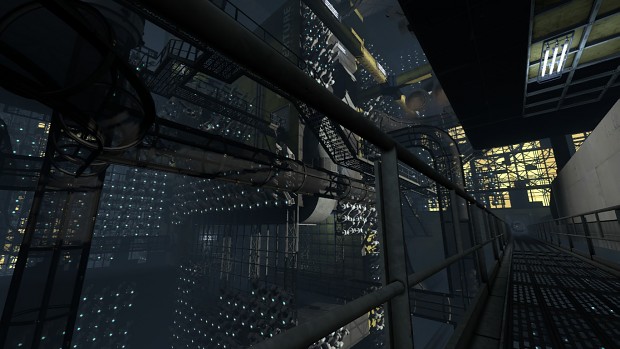
yishbarr wrote:
Detailing is the hardest part, because you might see this "emptiness" if you don't have enough props. Try to fill everything up and use 512 unit squares for designing those buildings. Just make sure the falling area doesn't have too many props.
Things for detailing I recomend are large trusses, the rows of arms, air ducts (the a versions as they are larger), the pressure_spheres, the ball_catcher and ball_launcher bts models, catwalks, number and letter overlays (make them bigger then what the info_overlay will spawm them in map as) the aperture overlay (ditto w/ numbers and letters), some floursecent lights for lighting up your pits, cables, and vac tubes (possibly stuff going through some if the tube breaks through the chamber like some in wheatley maps do (like sp_a4_tb_catch).
Hope that helps ,
In your sdk_content folder there should be a vmf called sp_a4_laser_catapault, which provides an offical example of these pits.
Just one thing. DON'T Put detail directly below the pit. In a custom map I played, there was a walkway right below the test, about 512 units down. Thinking that there was an easter egg, I tried to drop on it, but instead it killed me as I flew right through it's model.
Anyways, Behind the scenes is hard to get a grasp on, since it is very different from a normal test chamber. It took me 3-4 tries to get the feel of it, so try practicing a bit before doing something final. I would reccomend playing through any part of portal 2 where you're behind the scenes and looking real closely at the details. I took some notes, and in the long run, they really helped me. Good luck!
...
Oh you're still here? well... um... RANDOM POSSIBLE PLOT TWIST! He's not actually making behind the scenes.
Quote:
A good way I learnt to make them is looking at decompiled Valve maps.
What decompiler do you use? I can't find one that works on win8... Otherwise, that was gonna be my first option.
Quote:
I took some notes, and in the long run, they really helped me. Good luck!...
Oh you're still here? well... um... RANDOM POSSIBLE PLOT TWIST! He's not actually making behind the scenes.
 YES!!! But no, I am actually making BTS right now.
ezio160324 wrote:
Quote:A good way I learnt to make them is looking at decompiled Valve maps.
What decompiler do you use? I can't find one that works on win8... Otherwise, that was gonna be my first option.
First of all, that map is already decompiled. If you want to decompile a map, use BSPsource.
Quote:
First of all, that map is already decompiled.
???
As for using BSPSource, I completely missed that.
ezio160324 wrote:
Quote:First of all, that map is already decompiled.
???
As for using BSPSource, I completely missed that.
I think he meant the example map, sp_a4_laser_catapult. This map doesn't have a bottomless pit though. Ones that might be good are (sp_a4) tb_trust_drop; tb_wall_button; jump_polarity; tb_polarity; and tb_catch. You may also like to look at the tractor beam course in co-op. They also use bottomless pits, and have the prefix mp_coop_tbeam.
I decompiled every campaign map at once so I have them all for easy access later. You may like to do the same.
TopHATTwaffle wrote:
Here is every Portal 2 level VMF: https://www.dropbox.com/sh/3ufi2mcbgu2wanu/-xNtgK62ENHere is every Portal 1 level VMF: https://www.dropbox.com/sh/wu3kuasrus22lk4/JbbDyladP0
Enjoy!!!