Instances and random spawns
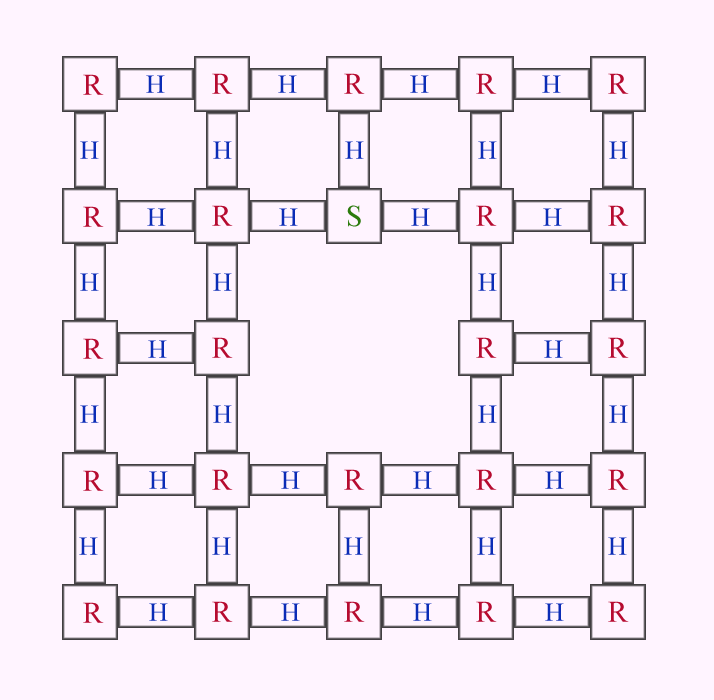
I have room instances and hallway instances which connect the rooms. My goal, as I said, every time the map is restarted, the rooms and hallways are in different places. The map consists of 24 rooms [5x5] (middle point is empty) and 26 hallways.
Any suggestions on how to achieve this?
So far the best tools I have found are logic_case (for random) and point_teleport (to teleport instances), but would be nice to hear some feedback on this, as the more I think on how to achieve this, the more it gets complicated with how many connections and entities it might need.

With that Oscar the Grouch thing out of the way, my first thought would be to use world portals. Wait no. My first thought would be to scale it way down to, say, four rooms with four hallways connecting them. See if you can get that working and go up from there.
Anyway my second thought would be to use world portals. The advantage is that you don't need to make the rooms movable, which is more work than it sounds like, especially when you want a room to have portal surfaces. (Each portal suface must be a separate func_brush, and moving a room while it has portals in it requires some trickery.)
World portals only display correctly when viewed through at most one other portal. To prevent display problems, you should design each hallway such that there is no line of sight between the two ends. (Corners, doors that only open when you're close, etcetera.)
Another solution might be to build a matrix of empty rooms with hallways connecting them, and build the interior of each room out of func_brushes, so they can be moved around. The advantage of this approach is that you don't have the GPU overhead of rendering all those portals, and because the hallways are static, they can be optimised in the traditional way, with areaportals and triangular hint planes in the corners.
As for the underlying logic, I would personally reach for vscript. As you said yourself, doing this with just logic entities is going to be very complex, and it will get exponentially more complex as you increase the number of rooms.
I'll try to come up with a vscript solution if / when I have the time.
Point_teleport was one of those ideas which I though it might work, the first one was point_template (which would be placed in the spots where the rooms/hallways are), but finding out how to make it random looked even more difficult.
When I though on testing on how to implement this mechanic, I did start with 4 rooms and 4 hallways, but the more I looked at the entities that hammer gives, the more complicated it got ( I know it is possible to do with the given entities, but it would require a lot of entities and it would be complicated).
The main point of the map is not to confuse players in a maze (nobodies like to be a lab rat), but to make players take countion in every room they step as it is probably booby trapped. If they die, the map restarts with a new generated layout of rooms. So in the end, players can memorize the traps, but they still have to find an exit in of those rooms.
I never used vscript for hammer yet, probably a good time to learn it if I want this to happen.
Map concept: R - room, H - hallway, S - start

I would definitely recommend vscript for this. Managing so many moving parts with just Hammer entities is going to be incredibly cumbersome.
I learned vscript mostly by looking at the existing scripts that come with the game (in $gamedir/scripts/vscripts) and occasionally looking at the list of script functions built into Portal 2 and the Squirrel language website. (Squirrel is the language used for vscript.)
However, I already have a lot of programming experience. The information on the Valve wiki is not targeted at beginners and there don't seem to be other beginner-friendly tutorials out there, unfortunately.
There are some threads here on TWP that try to explain the basics, such as this one.
A friend suggested to use env_entity_maker and point_template, and it seems to be the best way to accomplish this idea. But figuring out the script for it will take some time. I guess my programming skills got a little bit rusty.
The biggest issue I still can't think out is how to make it randomize in order so that the rooms don't repeat themselves. I need something similar to random_shuffle.
rand();

returns a pseudorandom integer in the range 0 to RAND_MAX
So to get a random number between 0 and 9 (inclusive), you could do something like this:
rand() % 10
rand() first gets a random number between 0 and some arbitrary large value we don't care about. The % divides it by the range we want and returns the remainder, thus resulting in a random integer in that range.
This is a pseudo-random number generator. This means that it works by keeping track of an internal state and running some formula on that, resulting in a "random" number and a new internal state, which is used to compute the next "random" number and so on. (Computers suck at true randomness.)
I don't know where the first internal state of this random generator comes from, but it's very plausible that it will always be the same (say, 0) when your map starts. There is another function, "srand", that you have to call once, to make the random numbers different between runs of the same map:
srand(time())
This uses the current system time to initialise the random state; this should give you different results each time the map is restarted.
You will need to program the "shuffle" part youself. I think it's possible to randomly pick elements from an array, add them to a result array and then remove them from the original array so they don't get picked again.
First randomizing the rooms then changing the portal doors in the hallways.
For example if room8 was randomized topleft andd rooom12 is on its right then room8right_door's partner is room12left_door etc but I guess it till needs some scripting, plus must close all other portal other than for example the 4 exit to not overhelm or bug Portal2.
At least this is what I would do
It turns out that Portal 2 has a RandomInt() function that is much easier to use than the standard rand(). It accepts a custom input range and it does not need to be initialised with a seed. So that's what I used in the script.
I added plenty of comments to try to explain what everything does. Please let me know if you have any questions!
Looking up the valve scripts and the one you just gaved, some are simple, some are just unknown as the language for this scripting I haven't encountered, so it is quite hard to understand what does what, but i guess that is how it begins with learning...
Now about the shuffle script, It is a great leaning material as well a great tool for my kind of map, I won't let it go to waste, the map will be finished or must be finished...
I thank you for your given time to make this script.
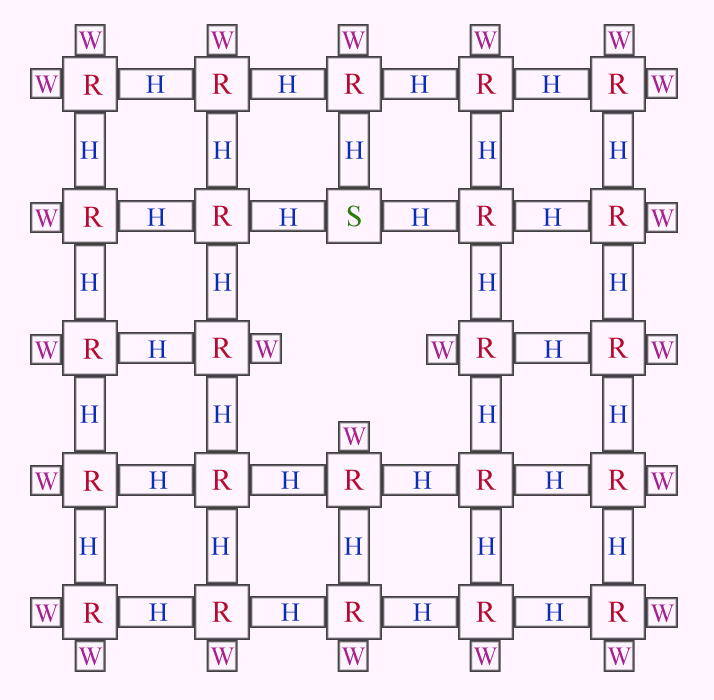
If you look to the map again [attachment], I added a new parameter for the shuffle W - Wall/dead end. These dead ends will be different from each other and 3 of them will be objective dead ends. Lets say there are buttons in those dead ends, to complete the map, a player has to activate them.
Now to scripting, I need an extra script for the "dead end" shuffle as there are 4 different angles for them, meaning the basic shuffle wouldn't work for them if I wanted to shuffle them all as some would be facing the wrong direction. From what I read, I need GetAngles and SetAngles (or just SetAngles if I play around with its names). I think there are few ways around this, but don't know which is the best course of action.
Map concapt: S - Start, R - room, H - hallway, W - dead end.

TeamSpen210 wrote:
You could do that using just entities. Put the button wherever you want. Then at each dead-end put another copy of the button where you want it to appear. Change the classname to point_template, and it'll be positioned correctly for you. Put the name of the real button in all the teleports. Then make a logic_case, and for each teleport add a different case output to trigger the Telepor input. Then just send the logic_case a PickRandom input onMapSpawn.
The thing is, I want some of the dead-ends to be more detailed, some would have specific mechanics (like 2 dead-ends are connected by linked portals) and one of the dead-ends is the actual exit (find the 2 switches and the exit). Plus logic_case only has 16 spaces and there is 23 dead-ends.
While looking and playing around with the scripts, I think it is possible to do it with scripts, but encountering errors and don't fully know what is the problem.
GetAngles returns a vector (just like GetOrigin) that contains the pitch, yaw and roll components.
SetAngles is a little bit different: it expects three parameters, one for each of the pitch, yaw and roll components.
For example, you can transfer the orientation of one entity to another like so:
local angles = first_entity.GetAngles()
second_entity.SetAngles(angles.x, angles.y, angles.z)
I have updated my script to also look at the orientation of each entity, and maintain those orientations for each position, after swapping the entities. If you don't feel like messing around with GetAngles and SetAngles yourself, then feel free to use this script. But note that "messing around" is also commonly referred to as "learning" 
shuffle_ents V2 Change notes
||I changed the name of the "main" function to "shuffle", to better indicate what it does.
The script now also records the orientation (angles) of each entity and applies them to the other entity that is moved to that position. The find_positions and shuffle_ents functions are modified to enable support for this. Instead of passing just location vectors, they now use composite objects that contain both a location and orientation (angles).
For some entity types, setting the proper starting angles in the map can be slightly tricky. For example, in the test map, I could not set the angles on the func_brush objects directly. (I tried adding an "angles" property outside of smart edit, but it just gets ignored.) So instead, each brush is attached to an info_target entity and the script is told to move these info_target entities. Rotating an info_target in Hammer does not set the angle unfortunately, so you have to edit the "angles" property directly. (There are controls for it in the top right corner of the properties window.)||
Though I keep getting this error:
AN ERROR HAS OCCURED [the index 'GetName' does not exist]
CALLSTACK
FUNCTION [shuffle()] shuffle_ents.nut line [60]
FUNCTION [main()] InputRunScript line [1]
The script doesn't pick up the names, from what I understand and changing names doesn't fully work. Could this be that it doesn't fully pick up instances names (which is probably the case), because well... they just become the world.
Edit: This is becoming a major problem, didn't expected to run into this wall. Is there even a possibility to move instances? point_template doesn't work on it, output SetParent as well.
A painful procedure I see is to make everything to a brush so that it would have names and than move it around, but that may cause some lighting issues as brushes aren't keen on having good lighting.
Any suggestions anyone?
What I have tried:
Tried making everything movable in the instance, making world brushes to func_brushes and changing some props. The script than started to work, but the lighting is quite horrible (especially as func_brushes lighting likes to turn 90 degrees for some reason).
Other solution was using Propper, making the rooms world brushes to a prop. The lighting is a lot different from making it into a func_brush, but it hardly catches any, it is just plain lighting. Though that what I expected after turning it into a prop...
Would be nice to hear some extra suggestions from other mappers.