p2map_publish fix!!!
download the files and extract to portal2/bin
HOWEVER! Use the fix only when you need publish! if you will replace the files immediately you will get non-working portal 2, so when you need to publish, place the files, publish, and validate portal 2 files.
I also guess its only for 64 bit windows, 32 bits, please try.


I could've add a detection of the publisher running and auto-restore when its closed, but people can't be that lazy!
Please test it and tell if it works or not.
Works for me... (worked for tmast too, thx for testing)
Only works if the path only contains english characters, with chinese russian arabic etc characters it cant replace beacuse I wrote it with an old program that cant handle unicode characters yet. In this case you must backup original files and then replace them manually with the fixed 3 dll which within the zip...
DaMaGepy wrote:
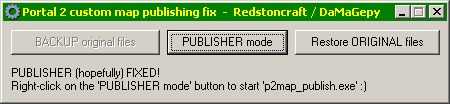
I quickly write a small program that replaces files with one click, and then restores them after publishing. Just for lazy people
You mean EFFICIENT people, silly.
Steam\SteamApps\common\portal 2\bin\
first checks
'System\CurrentControlSet\Control\Session Manager\Environment','sourcesdk'
if there is a 'portal 2' in the value then uses it, otherwise reads:
'Software\Valve\Hammer\General','Directory'
if there is a 'portal 2' in the value then uses it, otherwise reads:
'Software\Valve\Steam','SteamPath'
and adds: SteamApps\common\portal 2\bin\
If I need to add alternate paths as well for replacing, tell me
I'm using my steam installation for 6-7 year or more now, kept the files while changed computers or reinstalled windows, without reinstalling steam, so new steams may store things in different folders
How will we know when to stop using the program when the Valve fixes the issue (hopefully!)?
or just always try to launch the publisher first, and only use my program if still not working.
if the publisher starts, then just stop using the program
DaMaGepy wrote:
I wrote a small program that replaces (fixes) files with one click, and then restores them after publishing. Just for lazy people
I could've add a detection of the publisher running and auto-restore when its closed, but people can't be that lazy!Please test it and tell if it works or not.
Works for me... (worked for tmast too, thx for testing)
I can confirm that it works
And DANG it's been a long time since I've logged on here! But I still can't believe that they haven't fixed it themselves, especially because there was an update today with no fix >:(

(random note, care to play my somewhat new test I've made? http://steamcommunity.com/sharedfiles/f ... =541272333)
For me it gives the same error about "Steam must be running..."
Sejievan wrote:
Yes, Publisher is still broken =(, silver cave rock walls r fixed tho.
took like 5 of us emailing them about it to get that fixed
