Sprouting leaks without changes to the map.

I suggest you use the vis group dialog to hide particular types of entities until you find the leaky culprit.
Things like walls accidentally tied to entities or entity origins outside the map can create leaks.
This button can also create a tonn of lag when moving through the 3D camera because it is constantly hiding and showing brushes/entities.
Shame you had to redo your map. Leaks are always fixable.
Not it this case. As mentioned, the leak showed up again when I did the map from scratch, and reached roughly the same spot in the map. Good news, however, is that making the map smaller, and rethinking the ending has worked. Now I only have to deal with my tanktrain issue, then the level will be complete. It'll be a few days before I can get to that, though. Thanks for your responses. Its nice to see somebody still supporting P2 mappers.
1- A hole in your geometry
Solution: Map/Load Pointfile, then look at the red line pointing at the hole's location. Unload pointfile once done
2- Some entities's origin outside the map
Solution: Double click on a random entity / Edit / Selectall / delete the coordinates of the line "origin", so all the entities will have their default origin back
Quote:
even though the room was created completely isolated from the rest of the working map, and it was completely sealed itself
You're typically struggling with the case N2

Sometimes even if I select all entity and set origin back to the center (rightclick, "Center origins", some still have their origin outside the map (when I accidentally move objects or entities they sometimes stay at the original position). So its a good way - as someone said - to hide all trigger and object/entity and only leave the playerstart. not even lights (compile with fullbright) and see if still leaks.
Also if too many solid object (even if far away from hammer's limit) can cause problem, so: convert some func_detail (you can group many) into a func_brush.
Kwinten06 wrote:
As said by ChickenMobile, your leak can be only 2 things:1- A hole in your geometry
Solution: Map/Load Pointfile, then look at the red line pointing at the hole's location. Unload pointfile once done2- Some entities's origin outside the map
Solution: Double click on a random entity / Edit / Selectall / delete the coordinates of the line "origin", so all the entities will have their default origin backQuote:
even though the room was created completely isolated from the rest of the working map, and it was completely sealed itself
You're typically struggling with the case N2
Well, it did it to me again in an entirely new map. I'm attempting solution #2, but I'm clueless on what you mean by "delete the coordinates of the line "Origin". Could you please be more specific of the steps involved? Thanks.
If you are specifically looking for something that has an origin outside the map: this is usually categorised by the pointfile line starting itself outside the map and circling aimlessly.
I think what Kwinten is saying to reset all origins of entities by deleting the origin key in the object properties window for all entities. Usually you have to turn off Smart Edit to do this.
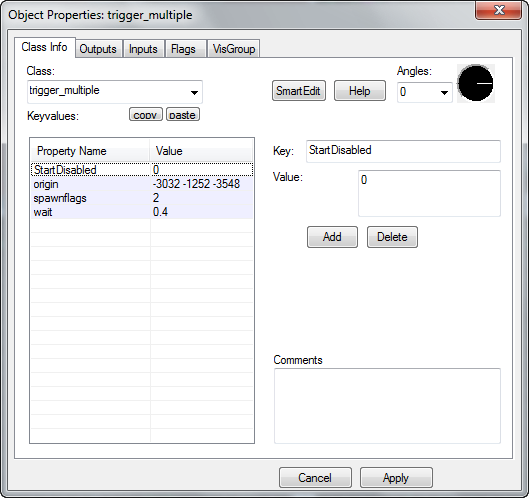
e.g. in this picture turn off smart edit by pressing the button, select the 'origin' key and press delete to the right.