Models not showing up in map ("ERROR")
I followed this guide:
http://wiki.thinkingwithportals.com/wiki/Hammer_Setup
I can create a room, put an player start, and set up basic geometry. When I'm creating a "lamp" so theres a logical light source in the map, I get a big red "ERROR" model instead of the lamp I chose.
I'm assuming this is because the model is in HL2 or something other than Portal. Correct?
How can I find just portal models? I tried to filter "portal" but that only shows about 10 things in the world model window, and I know there are more than that.
Thanks for any advice you can give. I'm new to this whole hammer thing but portal inspired me to learn.
-G

I have HL2, HL2:DM, and CS:S.
Following that guide I posted above...it looks like i'm importing everything into HL2:DM.
Is there a better way to do it?
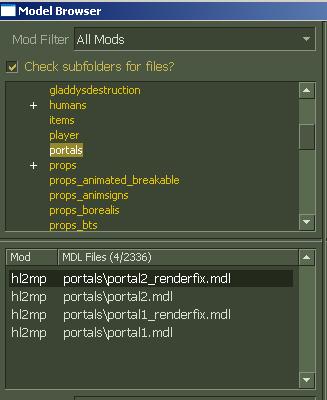
 enjoy, and make us something aweseome! haha

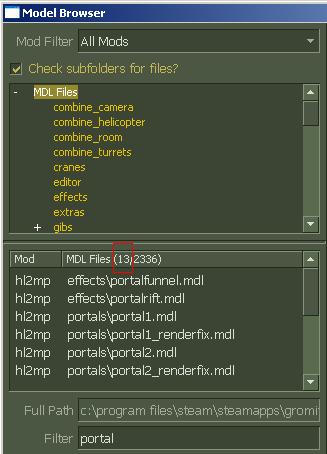
Ok, here's all props...says only 13 have 'portal' in it. See screenshot....

Also, if you are getting ERROR in-game, then you probably mis-extracted something. I'd suggest deleting everything you extracted and starting over from step 1 on the Hammer Setup Guide.
C:\Program Files\Steam\steamapps\username\HL2DM
dir.
Re-download and reextract.
See how it goes
Thanks and cheers!
gromitigo wrote:
Ok, I'll try deleting HL2DM from steam, and the
C:\Program Files\Steam\steamapps\username\HL2DM
dir.Re-download and reextract.
See how it goes
Thanks and cheers!
All you have to do is delete the hl2 dm folder and then open it up again and it will create all the files u need again...
When I create a prop_detail I still have several hundred models to choose from.
Any other suggestions on how to filter what is only in portal?
Every 'mod' in my world model picker says either HL2 or HL2DM.
Is this not the case for everyone?
If not, I think they followed another setup tutorial where you create your own mod and then just extract ONLY the portal content.
Thoughts?
gromitigo wrote:
When I create a prop_detail I still have several hundred models to choose from.Any other suggestions on how to filter what is only in portal?
No, that is normal. All models are always available. This may or may not be the case when the SDK update comes, but I will put money on it staying the same. That's just the way it works.
There is a model guide on the Wiki for Portal-specific models.