Panels_rotate
Tutorial
The biggest problem I had was finding the right panel model.
So let's begin.
- Select Entity tools(CTRL+E) and create "prop_dynamic".
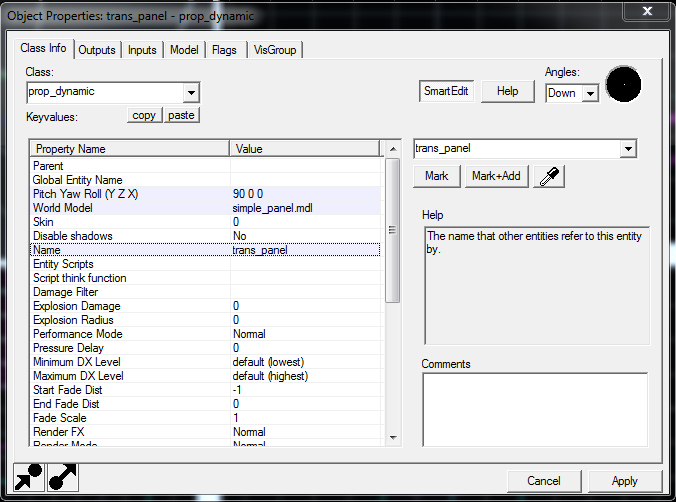
- Select Selection tool(CTRL+S), click on created object and press ALT+ENTER. This will open it's properties
- change the name to trans_panel and "X Y Z" to "90 0 0"
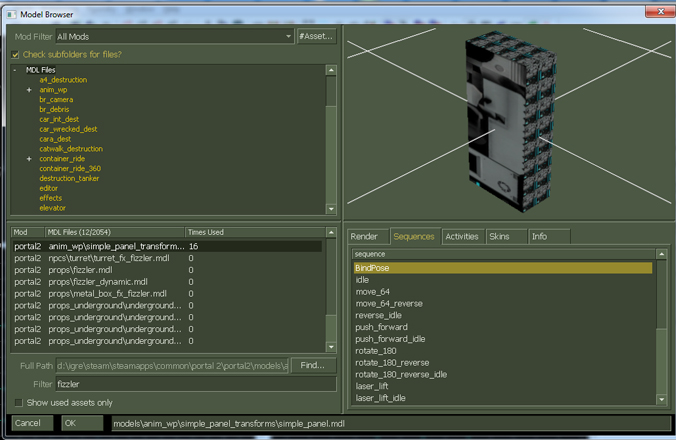
- Under "world model" click "browse", then in filter search for "simple_panel". Select the model and under sequences select BindPose. After that click ok.
- Go under "model" tab and select rotate_180. When you're done click apply and close the window.
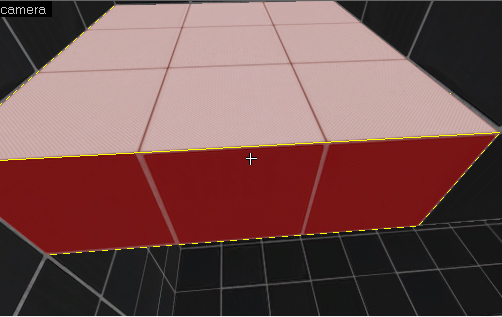
- Select block tools(Shift+B) and create a block.
- then select face edit sheet(Shift+A), select the top of your block, click browse and find white_wall_state and apply it.
- Then align the block so that "prop_dynamic" is in the middle of it.
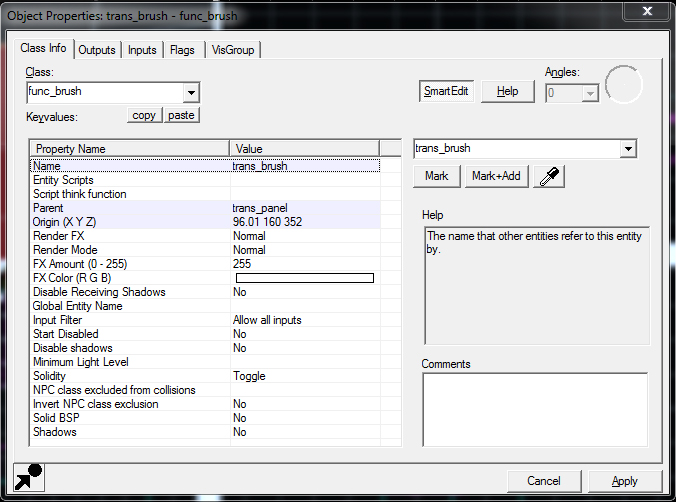
- Then select if it's not already and press ALT+ENTER then CTRL+T. Then change "func_detail" to "func_brush"
- Change "name" to "trans_brush" and "parent" to "trans_panel"
- apply and close
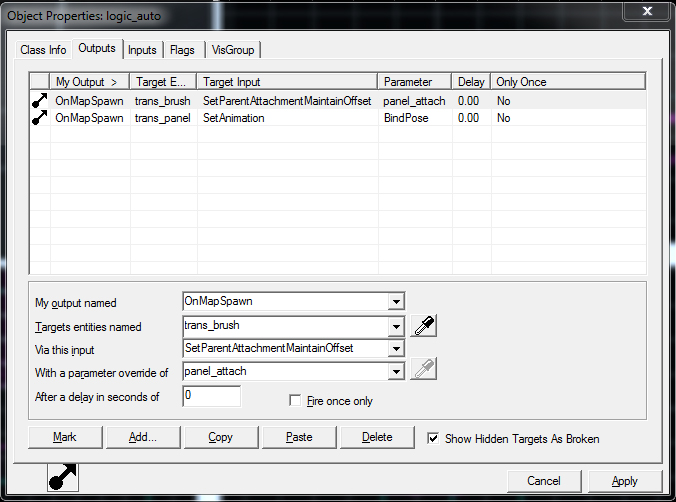
- Use Entitiy tool(Shift+E) again and create "logic_auto".
- open properties(ALT+ENTER) and go under "outputs" tab
- add following lines as shown on the pic.
- this will attach the brush to panel and it's animated and it will stop panel to animate on the spawn.
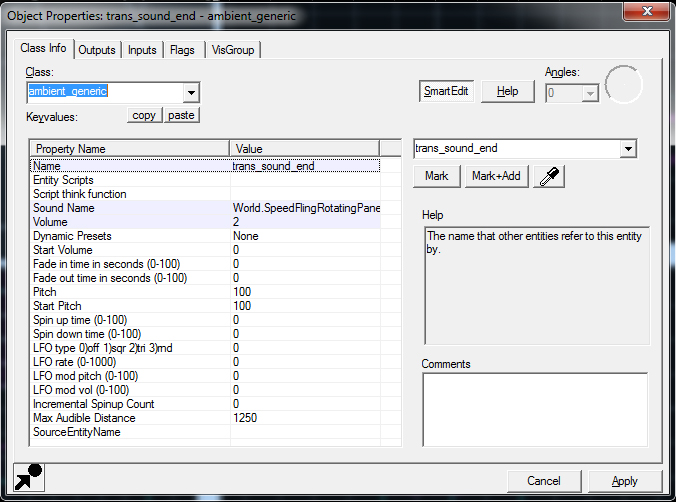
- Again use Entitiy tool(Shift+E) and create "ambient_generic".
- change the name to trans_sound_end
- under "sound name" click browse and search for World.SpeedFlingRotatingPanelStop
- When you're done save/apply it.
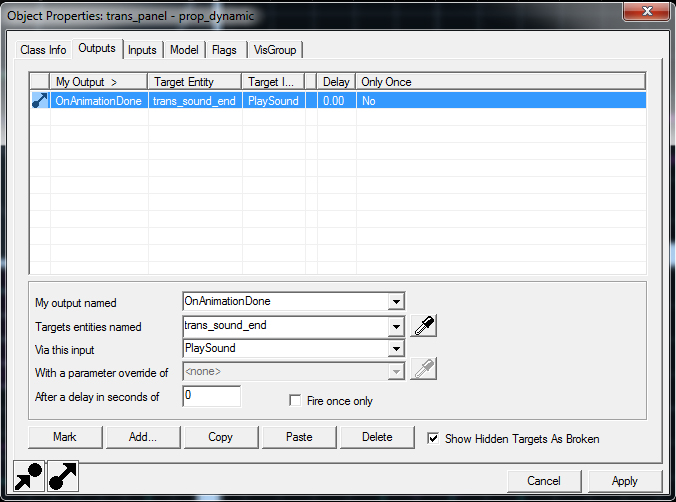
- Return to our prop_dynamic panel we made and open properties then go under "outputs" tab and add the line as shown on the pic.
- Apply and close
6.Now let's create prop_button
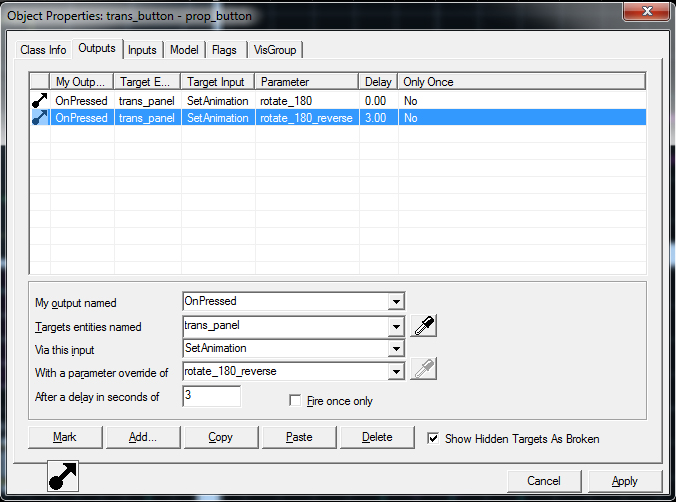
- name it trans_button.
- add outputs as shown on pic. This will rotate the panel along with brush. Second line is optional so if you don't intend to use it, so check "fire only once" on 1st line and deleted 2nd line if you already made it. What the 2nd output line does is, it rotates the panel back to normal position. There for you add delay letting it know how much time you want it to pass before it goes back.
- This is it. now you can try your rotating panels.
- Please note that you can name your objects how it suits you. this is just the way i did it.
-
Also take in mind that instead of a button you can also use trigger block.
-
I was also trying to add looping sound like it's done in official portal 1/2 maps but i didn't manage to make it work.
-
I've also added .vmf and .bsp files into a rar file so you can test it out in game and look it up in hammer.
Download panels_rotate prefib
I hope this helps you. Good luck.
Stylus

Applzor wrote:
any other models you know of that do 90 turns or 45 turns?
for those you can use normal panels that have those "handles" with them..
Quargos wrote:
couldn't you just use a normal panel and parent it to a func_door_rotating or something like that?
if you remember from portal 2 chapter The Escape where gl@dos trys to lure you in and there's a heart on the wall..that turns..that's what this does so i don't think there's a panel this small that can be used for rotating for 180?. also most of them have handles that would animate along with the brush.
just change:
SetAnimation -> SetRotationDistance
create another trigger on button that toggles the door and works easy
on a side note, where ever you place the trans_panel is where the block will rotate from

msleeper wrote:
You should post this as an article on the Portal 2 portal at the VDC.
Done. I hope it looks ok.

