Modifying Panel Movement
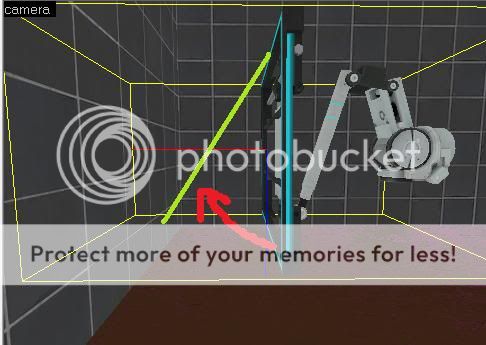

In the World Model browser you mean?
The most important parts of any animation are the "idle" and "idleend" animations. These will show you the starting and ending point of the given animation. Use those idles to figure out what you want, then run the models animation.
There are lots of arm models, and many of them have over 30 animations. Just keep looking around until you find the animation that suits your needs.

Don't spend your time looking for a perfect animation when your puzzle isn't even done yet.
msleeper wrote:
If you are thinking to yourself "Looking through dozens of animations for dozens of different panels is going to be time consuming!" then you are right. During the initial playtesting/puzzle creation phase of building a map, you can get away with using static brushes until the time comes that you absolutely need to replace them with moving panels.Don't spend your time looking for a perfect animation when your puzzle isn't even done yet.
yeah, this is very very very true. Not only is it time consuming, but it's a little buggy too. Sometimes the model defaults to an odd animation and trying to change it will crash hammer for no apparent reason. Changing the model animation suffers from some other problems too (which usually end in hammer crashing).
Anywho, if you REALLY want an acceptable animation set, try intro_collapse_XXXXXXX.
msleeper wrote:
If you are thinking to yourself "Looking through dozens of animations for dozens of different panels is going to be time consuming!" then you are right. During the initial playtesting/puzzle creation phase of building a map, you can get away with using static brushes until the time comes that you absolutely need to replace them with moving panels.Don't spend your time looking for a perfect animation when your puzzle isn't even done yet.
Thank you for this! I found this thread looking for a way to do something similar to the OP (articulating arm, with a brush attached, very clever). But it's tied me down for two days trying to figure this out, instead of getting the meat of my puzzle down.
Shut up and code!
K
RageCompeX wrote:
try SetPlaybackRate, First set it to 1 or half speed, 0.5 And then after a few seconds set to 0, the animation will stop, First start the animation and 0.01 seconds later set the playback rate
I've tried this method of halting a panel animation before it's complete and, unfortunately, it seems that the delays aren't implemented in the engine with sufficient precision for this to reliably stop the animation at the same point every time (my implementation involves setting the playback rate of the panel to 1, waiting 0.5 seconds, then setting it to 0). It's too bad, because it would otherwise be a very neat way of getting the panels to come out at "normal" angles that aren't 90 or 45 degrees. That said, if anyone's worked out a way of getting this to behave reliably or knows of another method to stop an animation at a specific frame before it's complete, please let us know!