Lightmaps on rotating doors

Avatar
Brainstone
401 Posts
Posted Jul 08, 2011
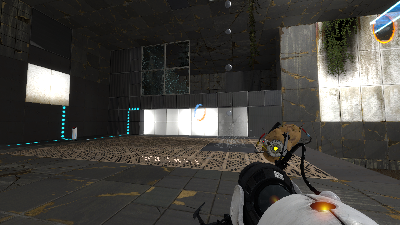
In my map are 4 func_door_rotating entities beneath each other, which turn around 180 degrees when pressed at a button. One side is black and the other white, so once the player has got to the button he can easily portal to the reached area again. The problem now is, that the sides of the panel, which are hidden at the start, are not lit and are black. But putting a light there only results in strange light appearances:
1. They can never simulate the actual lighting of the other side perfectly
2. When the four doors rotate by 180 degrees, the light is parted like in the uploaded picture.

So what I mainly want is to render the lighting of the doors again, when they turn around.
Images 1
Post image 1
Advertisement
Registered users don’t see ads! Register now!
Avatar
Groxkiller585
652 Posts
Posted Jul 08, 2011
Replied 19 minutes later
well judging from the lighting of the shot, you best bet would be to make the inner light have an extremely high constant (10000) no quadratic (0) and then balance color and brightness until it can blend with the room's lighting.
Avatar
ChickenMobile
2,460 Posts
Posted Jul 08, 2011
Replied 20 minutes later
Isn't there models for panels a certain size? Unless they are used for destruction purposes.
Avatar
Brainstone
401 Posts
Posted Jul 08, 2011
Replied 21 minutes later
What do you mean with models? You can't place portals on props, can you?
Avatar
taboo54
34 Posts
Posted Jul 08, 2011
Replied 9 minutes later

http://developer.valvesoftware.com/wiki/Panels

I don't 'know how advanced in Hammer you are, but don't look at this and say it's too complicated without trying

I learned a lot about hammer just making panels

Avatar
Kasc
77 Posts
Posted Jul 08, 2011
Replied 23 minutes later
Make it so they spawn in the open position and close them with a logic_auto at the start of the map.
Avatar
Brainstone
401 Posts
Posted Jul 08, 2011
Replied 1 minute later
I have already created lots of panels, but these here have to rotate 180 degrees. You can`t do this via the method described there, using these robot arms. I think I'll try creating a func_brush and parent it to a func_door rotating. That may work.
Avatar
PrejudicedNanobot
39 Posts
Posted Jul 08, 2011
Replied 38 minutes later
A quick (if not particularly elegant) way to deal with this type of thing is to specify a minimum light level for the brush entities in question.
Avatar
Another Bad Pun
516 Posts
Posted Jul 08, 2011
Replied 23 minutes later
You could try using smoothing groups or maybe info_lighting.
Avatar
Vordwann
767 Posts
Posted Jul 08, 2011
Replied 5 hours later
Also, I feel like it would confuse the player in general if pressing the button turned some panels white for a short time, but didn't apply to the puzzle. They would think that they had to do something speedy with elements in the puzzle portaling on to those faces. Just a suggestion: Make a normal static portalable object for them to portal back down with and only use rotating panels for puzzle elements.
Avatar
Brainstone
401 Posts
Posted Jul 09, 2011
Replied 13 hours later

Vordwann wrote:
Also, I feel like it would confuse the player in general if pressing the button turned some panels white for a short time, but didn't apply to the puzzle. They would think that they had to do something speedy with elements in the puzzle portaling on to those faces. Just a suggestion: Make a normal static portalable object for them to portal back down with and only use rotating panels for puzzle elements.

Well, the panels never rotate back, they stay white forever, and you also have to use them in the puzzle. But how do you mean that with the static object? The whole function of the stuff is, that the player can only portal to the second area, after he once reached it.

Advertisement
Registered users don’t see ads! Register now!
Avatar
Vordwann
767 Posts
Posted Jul 09, 2011
Replied 5 hours later
Alright. I just wanted to know if the portalable surfaces also had something else to do with the puzzle other than just getting to the second area.
