Push Buttons
Heya there,
Just a first note: I am not looking for floor buttons or timer buttons.
What I am trying to do, is to make a working button of the button shown in the picture below, such as it being pushed and then reset...
However, I have no clue how to do it. Every google search I do directs me to the floor button tutorial. Any help would be appreciated.
button.png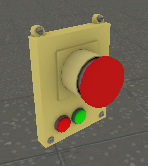

- Make a nodraw textured brush roughly the same size as the prop.
- Ctrl+T to tie the brush to an entity.
- From the dropdown list, select func_button
- Set whatever options you want for the button and whatever actions you want the button to do in the output tab.
If you google search for func_button, you'll find a good tutorial on it.
synthemesc wrote:
1. Make a nodraw textured brush roughly the same size as the prop.
2. Ctrl+T to tie the brush to an entity.
3. From the dropdown list, select func_button
4. Set whatever options you want for the button and whatever actions you want the button to do in the output tab.If you google search for func_button, you'll find a good tutorial on it.
Thanks. What settings need to be to activate it? As I set it up to activate via 'e' and it doesn't seem to work.
MasterLagger wrote:
Make sure that you can "use" the button. Y'know for the E/Use button to work.
I have that selected. As when I first set it up, that was the first thing selected in the flags tab.
To see what animations are aviable, you have to select the prop button and open the keyvalue window. There you can switch to "Model" and there you can view the animations.
Oh be sure that your button prop is a prop_dynamic.
Skotty wrote:
If you have your invisible button over the prop button you need to set outputs. You func_button needs the following output: OnPressed SetAnimation .To see what animations are aviable, you have to select the prop button and open the keyvalue window. There you can switch to "Model" and there you can view the animations.
Oh be sure that your button prop is a prop_dynamic.
Thank you for the help. However when I try and find an animation for the push button it doesn't appear to have any. the only thing listed in 'Model' is the 'bindpose'.