Small questions for begginers
51 Posts
Posted Jul 18, 2011
Hello everyone and thank for the help you give me so far.
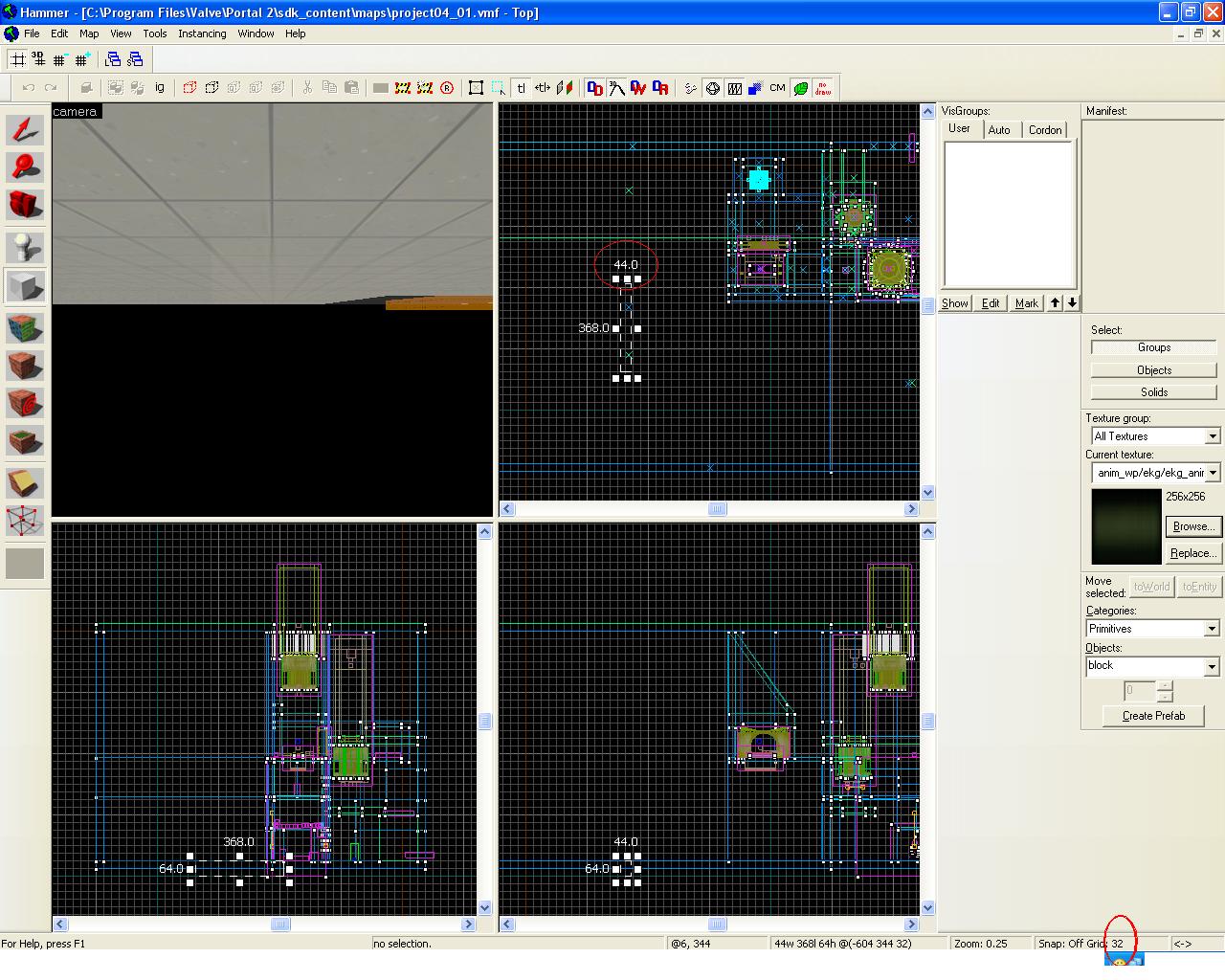
But i need more help from you guys... today i was strating hammer and a wierd bug has occured. Whem i
Thx you in advance
But i need more help from you guys... today i was strating hammer and a wierd bug has occured. Whem i
m tryng to make a brush or anyhing with the grid size 32 i cand do it .. It behaves like the grid size is set to 1 ... I am a bad enghlish speaker so maybe a picture can make you understand what im saing ...Thx you in advance
Images
1

Registered users don’t see ads!
Register now!
163 Posts
Posted Jul 18, 2011
Replied
3 minutes
later
Look just to the left of the number you circled in that image - it says "Snap: Off." Your snap-to-grid is disabled. Press Shift+W to re-enable it.
It's an annoying "feature" in Hammer, as it's easy to bump on/off and it isn't particularly useful as grid size 1 is typically enough...
51 Posts
Posted Jul 18, 2011
Replied
4 minutes
later
GOD DANGIT ! I`m new so pls excuse me for beeing a noob. Thank you!!
1,180 Posts
Posted Jul 18, 2011
Replied
5 minutes
later
No sweat, dude.
68 Posts
Posted Jul 18, 2011
Replied
6 hours
later
Additionally, if you want to move an object less than 1 unit without take the snap off, hold down 'Alt' while moving the object.
51 Posts
Posted Jul 19, 2011
Replied
15 hours
later
Hey, i don`t want to make another topic and i have another question. What do i do to make that little blue squares on overlays disapear ?
163 Posts
Posted Jul 19, 2011
Replied
1 hour
later
The blue square won't appear in-game. It's the only thing you can click on to select an overlay in the editor though, so you definitely don't want to get rid of it. 
51 Posts
Posted Jul 19, 2011
Replied
4 hours
later
Will T. wrote:
The blue square won't appear in-game. It's the only thing you can click on to select an overlay in the editor though, so you definitely don't want to get rid of it.
I didn`t know that is the only thing you click on to select a overlay.. Thx
51 Posts
Posted Jul 21, 2011
Replied
1 day
later
Thx for the help you givven me so far but i have another question. Where do i find backround sounds ? I want to play a sound when someone is playng. Srry for my bad english
671 Posts
Posted Jul 21, 2011
Replied
4 hours
later
env_soundscape.
Ingame you can "browse" the soundscapes by typing "playsoundscape <name here>" into the console.
In portal 2\portal2\scripts\ you can find some textfiles with soundscapes in it.
Ingame you can "browse" the soundscapes by typing "playsoundscape <name here>" into the console.
In portal 2\portal2\scripts\ you can find some textfiles with soundscapes in it.
51 Posts
Posted Jul 22, 2011
Replied
1 day
later
I need to put this entity in every room ?
305 Posts
Posted Jul 22, 2011
Replied
2 minutes
later
No; as soon as the player is able to see it (don't worry, though, it's invisible) and it's the soundscape they're closest to, it will remain the current soundscape until anther one fulfills this criteria. The player must also be in the soundscape's radius.
Registered users don’t see ads!
Register now!
51 Posts
Posted Jul 23, 2011
Replied
11 hours
later
Aha so I must put it in the first room. That`s wky is not working. Thx