SkyBox in exterior map.
I want to do some tests mapped to the outside, as it could be a street or a city L4D for the portal 2.
The case is not getting the SkyBox be displayed correctly.
To test, I took the final map of the Portal 1 and the skybox is working properly (in the Portal 1), but ... to compile the Portal 2 goes wrong me (obviously copy all textures)
Can anyone tell me how to do to have a heaven right?.
Thank you.
Compile Portal 1 (THIS IS WHAT I WANT)

Compile Portal 2


And I personally, never got the sky_l4d_c4m1_hdr one to work.
http://developer.valvesoftware.com/wiki/Portal_2_Sky_List
The OrangeBox games do.
satchmo wrote:
Portal 2 does not support a 3D skybox.
Yes it does, Valve even uses a 3d skybox to add windows to the factory levels.
baca25 wrote:
These are the only Portal 2 Skybox's you can use, unless you make a custom one.
And I personally, never got the sky_l4d_c4m1_hdr one to work.
http://developer.valvesoftware.com/wiki/Portal_2_Sky_List
Thank you for responding, I probe the Skybox sky_l4d_c4m1_hdr comets and looks weird ..

You only have to change the Map> Map Propieties right?
Omnicoder wrote:
Yes it does, Valve even uses a 3d skybox to add windows to the factory levels.
know how to get it?
Thank you.
Omnicoder wrote:
Yes it does, Valve even uses a 3d skybox to add windows to the factory levels.
I have no doubt whatsoever that you're right, but I think there's some problem where 3D skyboxes just show up black when looking at one through a portal. Maybe that was just in Portal 1 though.
Just create a smaller box outside your map with a sky_camera inside. See the VDC: http://developer.valvesoftware.com/wiki/3d_skybox
Wouldn't have a clue what the 3D skybox would do when you look through portals though.
chickenmobile wrote:
Wouldn't have a clue what the 3D skybox would do when you look through portals though.Quote:
Portal 1 developers: 3D skyboxes do not render properly when observed through portals.
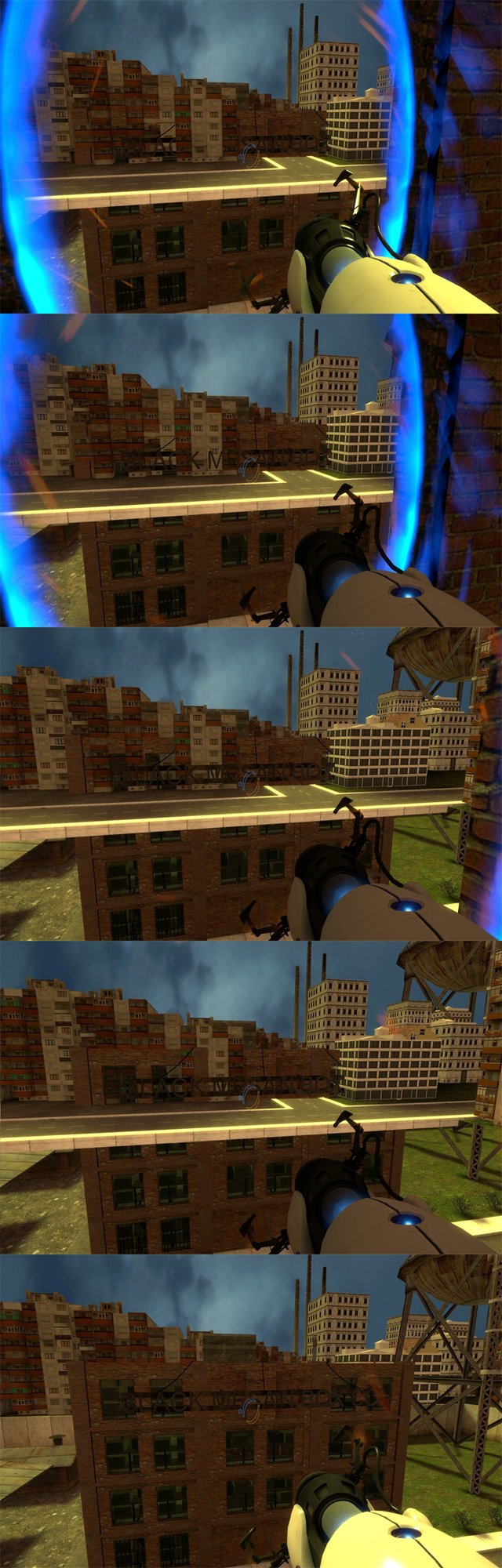
The fact that the VDC page says Portal 1 rather than just Portal probably means that the 3D skybox through portals problem was fixed in Portal 2. Either that or nobody has bothered to test it yet in Portal 2 and submit their results to the VDC. At any rate, here's the example picture from that VDC page.
3D skybox through a portal
chickenmobile wrote:
Doesn't Portal 2 follow the same guidelines for making a 3D sky box in any other Source game?
Just create a smaller box outside your map with a sky_camera inside. See the VDC: http://developer.valvesoftware.com/wiki/3d_skyboxWouldn't have a clue what the 3D skybox would do when you look through portals though.
+
Hello.
Since the projection used skybox with "sky_camera."
I used the original sky "portal 2"
I followed a tutorial that herein, does not work well if Portal2 but L4D2; perfectly.
Any ideas? someone managed to create a 3D sky properly?
Test Portal 2 - Sky: sky_fog

Test Portal 2 - Sky: sky_l4d_c4m1_hdr

Test L4D2 - Sky: sky_l4d_c1_2_hdr

Happens to Portal 2, anyone got a 3d sky?
Tutorial Assistant and my VMF for both the Portal 2 as L4D2
Download Test: http://puu.sh/52OQ
I will get back to you if I find out what it is.
=================================================================================================
EDIT: By putting the $hdrbasetexture value inside the vmt's of my skybox textures, the sky_camera suddenly worked. Edit the .vmt's so all your skybox .vmt's (all 6 of them) should look something like this:
"UnlitGeneric"
{
$basetexture "skybox/sky_name_BK"
$hdrbasetexture "skybox/sky_name_BK"
$nofog "1"
}
chickenmobile wrote:
From your tests it looks like the custom skybox is the problem. My test map has not worked either, so I'm assuming that there is some kind of property inside each of the skybox's .vmt that is missing...
I could spend your test project with textures?
I always use the sky inside the Portal 2.
In the test I did with the inner sky "sky_l4d_c4m1_hdr" I realized that the textures are very small, you pass a catch, then it seems to work perfectly, but ... the heavens are also external problems.

I'm creating a sky with custom e-on Vue, you pass a catch, when you render completely passed it on to see if we can make it work.
EDIT: Term panoramic rendering, if it does not I will make a SkyBox (6 renders).
Have someone you can create textures.
Download sky_mountain.HDR
carlymx wrote:
I could spend your test project with textures?I'm creating a sky with custom e-on Vue, you pass a catch, when you render completely passed it on to see if we can make it work.
First of all, your English is very bad. Secondly, I have been able to make mine work. Have you added all the $value thingys that was in the code box?
I feel my English, it is possible that your Spanish is better?
In the original sky (Portal 2) the symbol "&" is always present.
I created a custom sky under your instructions and http://developer.valvesoftware.com/wiki/2D_skybox.
Attachment: HDR, VTF. (is only a test but it works)
There is a problem with the gamma adjustment, but it works.
sky Blue.rar (44,5 MB)
I managed to create a heaven a little more correct.
I attached the Sky_Test02 to see if you can help me improve.
Download: Sky_Test02.rar (9,8 MB)
http://www.multiupload.com/Z9TSPABNW3

