Tried Searching for this, but I have a cube/button question.
So I am trying to use an aerial faith plate to launch a cube down a corridor of death.
Basically I want the cube to fall past some lasers and "stick" to the button at the bottm, but if Chell goes then the player will die.
Is there a way to create a form of magnetism for the cube to attach to the button? or do I need to redesign my trap?
thanks
-Crash

I'm still new to Level Design, but isn't a brush the basic block you use to create walls and such?
EDIT* So I think I figured out what you meant. I have to change my trap a little bit but it's all good. Thanks for the tip.
Crash wrote:
Is there any way you could explain what you mean by a "funnel" of brushes?I'm still new to Level Design, but isn't a brush the basic block you use to create walls and such?
What they mean is something like that:
vphysics_clip_funnel.jpg A funnel above the prop_floor_cube_button made with brushes. You have to tie those to an entity called: func_clip_vphysics by selecting them and pressing CTRL+T. Edit: Forgot to mention that you should properly texture it using the *toolsclip* texture!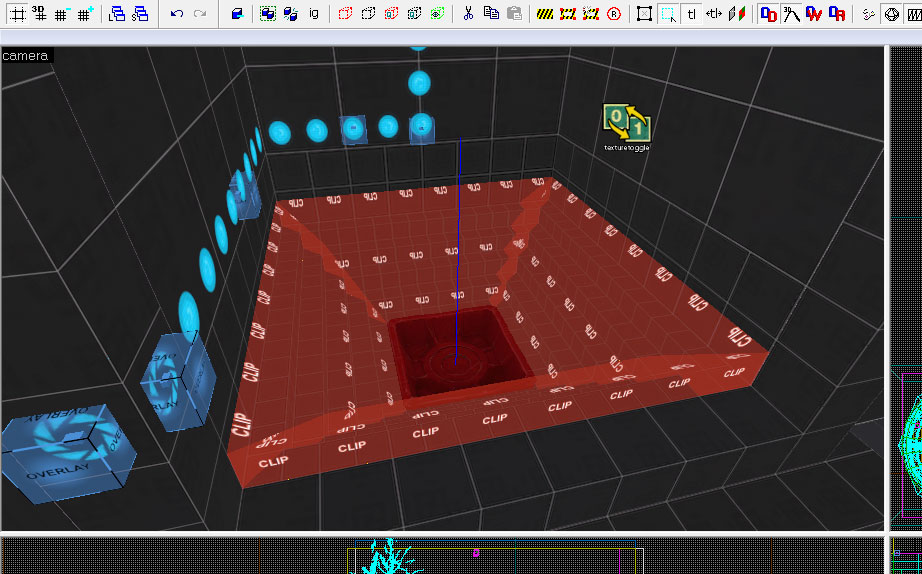
Thanks a lot that is very informative. I'm gonna go try this right now
Crash wrote:
Oh Wow.Thanks a lot that is very informative. I'm gonna go try this right now
Gladly! Keep in mind that you can also restrict player movement similarly using a brush textured with toolsplayerclip. You don't even need to tie that to an entity. It is only solid to the player. This is a good place to drop by for more info:
http://developer.valvesoftware.com/wiki/Tool_textures
Index page: http://developer.valvesoftware.com/wiki/Level_Design