Portal Flow Taking very long time

Could this be the reason for your problems with the compilation time? Are you using a cordon area while compiling? Just an idea...
neco wrote:
I once had a similar issue when compiling with cordon bounds. Despite existing leaks the file will compile but take much longer when calculating the portal flow.
Could this be the reason for your problems with the compilation time? Are you using a cordon area while compiling? Just an idea...
A cordon area? What is that? 
EDIT: I am having an area (Like Valve has) down below where other (sealed off) rooms are. nothing is inside them. Its just brushes giving the player the effect of being inside of on test chamber out of hundreds... (Note. there is only a few brushed down below. You die if you try jumping down)
beecake wrote:
A cordon area? What is that?
Read here:
neco wrote:
beecake wrote:A cordon area? What is that?
Read here:
Never tried it 
EDIT: and so far i've got 5 helpers
Spam Nugget wrote:
Basically, the bigger your map, the longer it will take to compile. Another option is to split your map into several visgroups (make sure you seal them too), and when you compile just hide the visgroups your not using so its never compiling the entire map. Then, when you want to test the map as a whole, put all the vissgroups back, remove the brushs sealing them from each other and go for it.
Yea... i could do that I came to the thought that it is 2 minutes of my life... i can deal with that I just have to compile fewer times and build more before i compile.
Cant remember exactly, but I had that happen to me sometime ago where the PortalFlow part took a long time.
I think it was to do with bad positioning of prop_statics.
If I remember correctly I had some that were right on the edge of the outer walls of my map.
But I cant remember exactly, sorry.
But I know now my portal flow takes probably less than a second, and thats on a quite big map.
Rob.
Robdon wrote:
Hi,Cant remember exactly, but I had that happen to me sometime ago where the PortalFlow part took a long time.
I think it was to do with bad positioning of prop_statics.
If I remember correctly I had some that were right on the edge of the outer walls of my map.
But I cant remember exactly, sorry.
But I know now my portal flow takes probably less than a second, and thats on a quite big map.
Rob.
I do have prop_statics in my map... some of them are very far below in my map... maybe i should try deleting them?
beecake wrote:
Robdon wrote:Hi,
Cant remember exactly, but I had that happen to me sometime ago where the PortalFlow part took a long time.
I think it was to do with bad positioning of prop_statics.
If I remember correctly I had some that were right on the edge of the outer walls of my map.
But I cant remember exactly, sorry.
But I know now my portal flow takes probably less than a second, and thats on a quite big map.
Rob.
I do have prop_statics in my map... some of them are very far below in my map... maybe i should try deleting them?
Make sure they are all fully within your map boundaries 100%. Sometimes little bits stick out... I think that was the thing that made mine slow down alot.
I could also say look at lightmaps. Smaller lightmaps make it longer to compile, so use larger lightmaps in areas that are not as important for shadow casting.
Is everything that does not contribute to the physical layout of the map func_details? Splitting the leaves incredibly will increase time to compile. Also hints and skips in the right places can reduce compile times and have a look at putting in func_visclusters.
So quick questions
1: how complex can a func_detail get before it should just be a normal brush? eg: a 24 piece hollow cylinder
2: If I can walk around it, should it or should it not be a func_detail
3: is it even feasible to have all non world brushes as func_detail.
4: why not just use nodraw instead of skip?
5: how far can an areaportal be stretched in limits of own complexity and brushes it can fit in between
Fracture, you should read this guide at least one time. Then use it as reference for your optimisation doubts
About your questions:
-
Read the post right above yours by Chickenmobile, the answer to this question is "turn into func_details everything that does not contribute to the physical layout of the map". Every column, outstanding border, plank or whatever you made out of brushes that is not blocking important visibility in your map (like walls). Take into account that walls (world brushes) help you out to not render everything at the same time near the player, ok?
-
Same approach as above.
-
Essentially all brushes that aren't walls dividing your chamber into rooms should be turn into func_details.
-
Every tool texture has its purpose and is interpreted by the engine differently. Hint/Skip brushes tells the engine to cut the space into visleaves, you are potentially helping the engine to know the space where the player can be, or where he won't ever be, therefore helping optimisation and performance in game. Nodraw does just that, it doesn't render or draw the brush face texture in the nodraw texture. Use it for those brush faces the player won't ever see. Or to texture entirely some brush entities that you won't the player to see like func_tracktrains, func_doors, func_buttons, etc. For some of these purposes you could also use the invisible tool texture...
-
I don't know if I understood the question correctly. The areaportal can be of whatever size, however, it can't be made out of several brushes but straight and simple ones... try to make it as thin as possible too. Think of this like a blockage to fill a gap (door or window aperture), and use it like so, covering every gap as you were sealing a room entirely without leaks.
I dont even know how to understand what the fuck a visleaf is even after reading about it.
Followup on func_detail, what if its a giant segment of a several brushes jetting out of an even bigger displacement? Does that compromise anything or is it good?
I got a more nodraw in my map than literally any other texture right now and I know what it is for. Still dont understand skip in the slightest. PLEASE DUMB IT DOWN
I once built an areaportal out of 6 brushes, covering a wall with 4 windows and 2 doors and now I know why it crashed the game. 
If I seem like an idiot for asking all this crap, and any other crap before, its because my english isnt great and my portalflow too exactly 12 HOURS to work its way through and I am trying to understand why.
Fracture wrote:
Still dont understand skip in the slightest
I'm gonna try explain and hopefully I can make it clear, although it's kinda tough if you don't understand visleafs already. I had trouble understanding first as well but here goes.
The Skip texture is used very rarely. Basically, you use it for invisible faces you don't want to be involved in any visibility calculations. They are almost always used in conjunction with Hint textures.
Hint textures define the edges of visleafs. Sometimes, you might like to manually create a visleaf - for example, a diagonal visleaf edge at a corner (which means the game won't needlessly render things around the corner because the player can't see, but the compiler thinks they can - see the diagram below). But! Let's say you have a 3 sided (not including top and bottom) triangular hint brush. You don't want those edges to creates leaves! So you would texture the sides you don't want (i.e. the sides that aren't diagonal) with Skip, so the compiler will only cut the leaves along the Hint textured (diagonal) line. Once again, see the diagram below to visualize this. - the diagonal line is where you'd texture the brush with Hint, and the other two sides of the triangle are where you'd texture the brush with Skip.
Skip isn't used for much other than this.
Hopefully this clears it up a little.
TLDR - Skip brushes tell the compiler to skip that face. Handy for optimizing when you want a Hint face included but not the other faces on the brush.
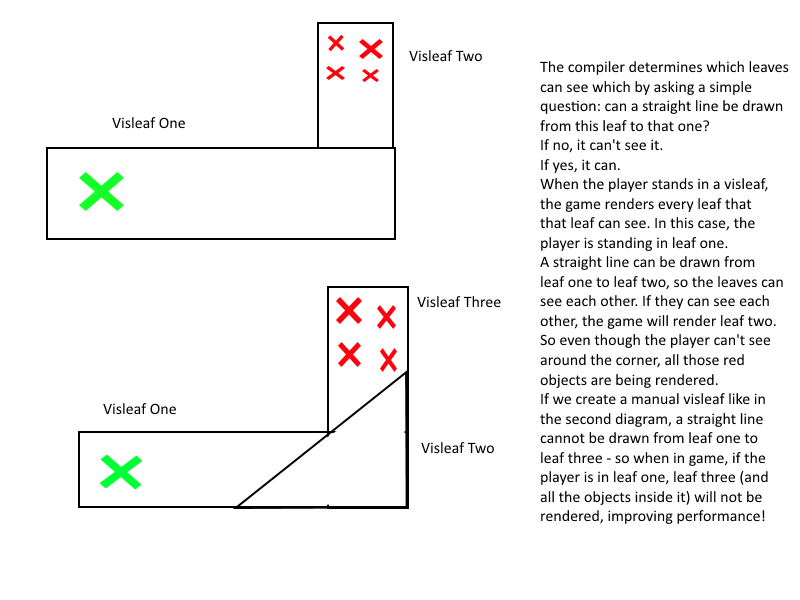
All I got to do is just slap a hint texture in front of all your hallways where they turn at half the angle of the hallway's bend, then texture the top and bottom of the hint with skip and it will cut down the in game rendering of areas you aint looking at and reduce lag.... and that's it!??
I could have summarized that entire website as indicated into a single page from out of all that nonsense, ya know.
I think it also reduces your compile time. Something else that reduces compile time is using the func_viscluster brush entity. It tells the compiler that all the visleaves inside the viscluster brush can see each other so it skips the calculations between those leaves.