Horizont in skybox
right now im making an outside map.
In this map the skybox is all around you. You walk on a normal brush, but it looks so bad when the brush just ends... is it possible to have the brush continue to infinity? And it still looks realistic?

Here's a helpful video tutorial that should sum up everything I've told you:
HOLY MOLY USEFUL VIDEO TUT LOLZ
ObtDnPlX30I
Good luck!
PS. The tutorial I posted is old so don't use CTRL H to hollow. They changed it and now it will hide everything other than the brush selected. Actually, don't hollow at all. Please. For the sake of humanity. Don't carve either. Please. Thank you.
Another Bad Pun wrote:
HOLY MOLY USEFUL VIDEO TUT LOLZ
ObtDnPlX30IGood luck!
Never thought of watching the video! Thank you  i think it will help. gonna check it tomorrow
Another Bad Pun wrote:
PS. The tutorial I posted is old so don't use CTRL H to hollow. They changed it and now it will hide everything other than the brush selected. Actually, don't hollow at all. Please. For the sake of humanity. Don't carve either. Please. Thank you.
Haha i know but what i dont know is, what carve does...
Spam Nugget wrote:
here ya go
Yay i just learned something!
beecake wrote:
Spam Nugget wrote:Yay i just learned something!
Now forget it before you start using it 
lpfreaky90 wrote:
beecake wrote:Spam Nugget wrote:
Yay i just learned something!
Now forget it before you start using it
Forget what?
beecake wrote:
Forget what?
How to break the game by using the carve tool.
(if you carve out a door shivers the game will crash due to mircobrushes...)
DON'T EVER USE THE CARVE TOOL!!!!!! 
lpfreaky90 wrote:
beecake wrote:Forget what?
How to break the game by using the carve tool.
(if you carve out a door shivers the game will crash due to mircobrushes...)
DON'T EVER USE THE CARVE TOOL!!!!!!
Yes yes i know It was a joke You know like i already forgot what it was
Anyway! New problem:
My 3D skybox is now having an infinite platform. But the fog in the skybox makes me unable to see it.
The fog in my map, and the fog in the sky_camera is exactly the same.
Is it possible to make only the brush unable to fog, but the statics in the skybox still "fog-able"?
2011-11-20_00001.jpg
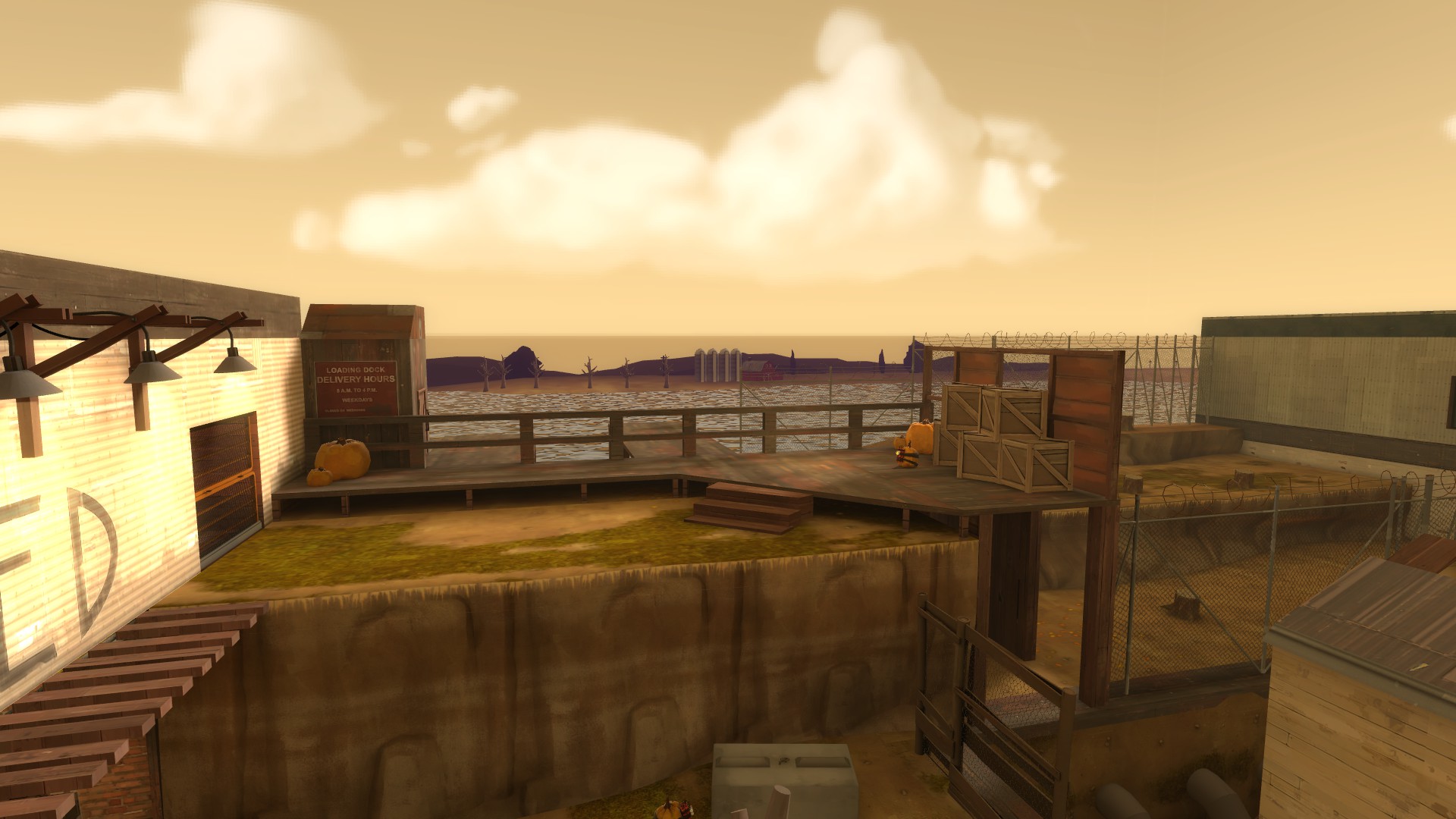

The fog showing excactly where the skybox begins...
Fog start: 3000
Fog end: 7000
Real level
Fog start: 1000
Fog end: 3000
beecake wrote:
Sky_camera:
Fog start: 3000
Fog end: 7000Real level
Fog start: 1000
Fog end: 3000
7000 isn't enough for a 3d skybox. Judging from you're picture, I would suggest doing something along these lines:
Fog Start: 100.0
Fog End: 20000.0
Skotty wrote:
The fog settings in the skybox camera are not scaled. If you write 5000 in there, it will be really 5000 units in Portal, but your skybox content will get scaled.
So is there anything i can do?
Skotty wrote:
For example set the same values like in your fog_controller, so both fogs witll behave the same.
That was what i tried but what came out of it was what you see on the picture i uploaded
lpfreaky90 wrote:
DON'T EVER USE THE CARVE TOOL!!!!!!