Portals and Panels.
492 Posts
Posted Nov 25, 2011
Trying to make some panels that move out of the wall that portals can be placed on but im having a few porblems.
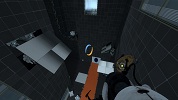
1)first of all, the lighting on them is atrocious. 2011-11-26_00001.jpg
1)first of all, the lighting on them is atrocious. 2011-11-26_00001.jpg
I cant use dynamic light, too many light sources on them. is there any way i can at least give them uniform lighting all over or something?
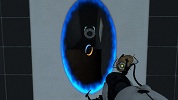
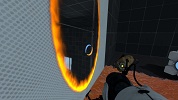
2)when i put portals on them, you can see the back and sides of the panel through the portal.
2011-11-26_00002.jpg 2011-11-26_00003.jpgI assume this is becaue the brushes are only 2 units thick, but is there anything i can do about it?
3)i cant get info_placement_helpers working on them. tried parenting them to the brushs, tried parenting to the arm with the whole "maintain offset" stuff. damn things still dont work. does anyone know how to make this work?
Images
3

Registered users don’t see ads!
Register now!
171 Posts
Posted Nov 25, 2011
Replied
59 minutes
later
For the first problem: I think the "minumum light level" value should work, but you'll have to experiment with it to get it to look right with its surrounding. This wouldn't make it dynamic though, so it won't look darker while it's in the wall, but it shouldn't have that nasty effect anymore.
492 Posts
Posted Nov 26, 2011
Replied
6 hours
later
cool thanks, that looks like what i wanted.
Registered users don’t see ads!
Register now!
484 Posts
Posted Nov 27, 2011
Replied
1 day
later
What about placing the info_placement_helper at where the panel ends up. This doesn't make any parenting problems and they wont disturb any other parts in the level since nothing else that the panel is going to be there. Remember to check: Force placement