Post your Portal 2 Authoring Tool Bugs
Bob wrote:
Quote:I compiled my map then tried to build the cubemaps. Got a crash saying the game couldn't find my map in the portal2 dlc1 folder.
Same issue here. Does anybody have a clue about this?
Hmm, same with me 

Bob wrote:
Quote:I compiled my map then tried to build the cubemaps. Got a crash saying the game couldn't find my map in the portal2 dlc1 folder.
Same issue here. Does anybody have a clue about this?
I changed the path in Hammer to: $SteamUserDir\portal 2\portal2_dlc1\maps, that works for me.
You can find it under: Tools >> Options >> Build Programs Tab >> "Place compiled maps in this directory before running the game".
Change the path to:$SteamUserDir\portal 2\portal2_dlc1\maps
As I said it works but the reflections look different now. Have to find out why.
I use the Valve procedure:
mat_specular 0
buildcubemaps
mat_specular 0
mat_reloadallmaterials
mat_reloadtextures
This gave me the best results so far. Using buildcubemaps only, looked the way it does now....ugly...
Edit: Will post screenshoots to show the difference...
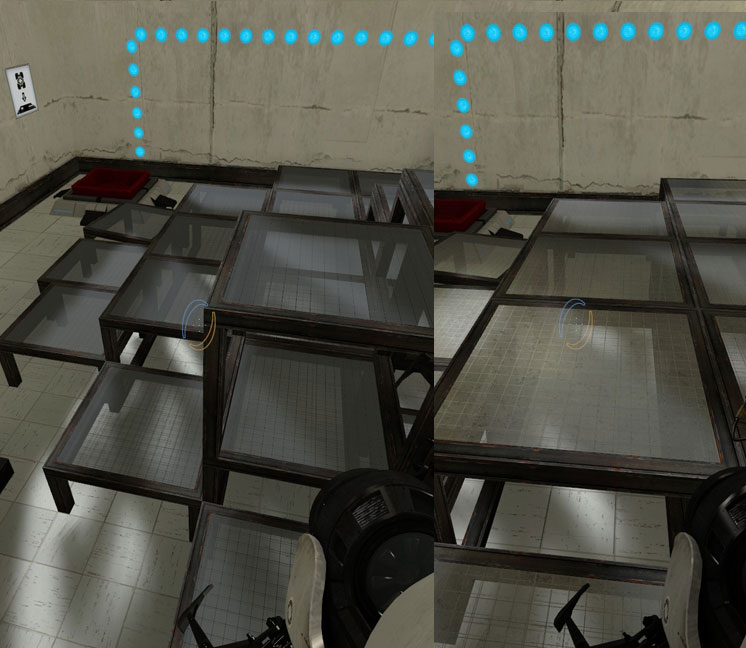
Okay here's a screenshot illustrating what I mean. Tried to find a similiar angle.
Right handside shows the reflections prior to the update with the above mentioned 'Valve-procedure'. On the left is the result with the same way of building cubemaps after the update:
EDIT: Oh dear, have found out why it didn't work. The command 'mat_reloadmaterials' only works with 'sv_cheats 1' now.
1. Any new walls I make are un-portable (in that portals cannot be placed on them). The rest of the walls which I have make work fine.
2.For some reason the catwalks I have placed in the level seem to have no collision detection or something because I just fall through them when testing the map.
I would really appreciate help, as I have been unable to finish my first map because of these issues
Quote:
For some reason the catwalks I have placed in the level seem to have no collision detection or something because I just fall through them when testing the map.
Did catwalks have collision for you before? In my experience (I haven't tried every model) I've needed to place invisible brushes on them to create collision.
Spam Nugget wrote:
Some of the catwalks have collision models, some dont. There should be one of each for each type of catwalk. To check, in the model browser check the box marked 'collision model' in the render tab. If it has a red mesh it will be solid, otherwise it wont.
It's easier if see "lod" in its name. If there isn't "lod" in its name, then it is solid
Spam Nugget wrote:
Some of the catwalks have collision models, some dont. There should be one of each for each type of catwalk. To check, in the model browser check the box marked 'collision model' in the render tab. If it has a red mesh it will be solid, otherwise it wont.
Thanks for the advice everyone I'll check these ideas and they'll probly work. I still need to figure out whats wrong with the walls though
I could only solve this by copying the sp_transition_list.nut to somewhere else ( made an sp_damagepy_03.nut), adding my mapname, and then adding it into my bsp during compiling with bspzip (ofc as scripts/vscripts/transitions/sp_transition_list.nut). Compiling is the same as before, F9 and then all works fine, and it only needed 2 extra row in my .txt that tells the compiler what files to add to the BSP (I already adding some custom mp3 music, thats why I use the bspzip list txt), but its annoying that I need to make/edit an extra .nut file for every custom map I make, there must be an easier way. other mapmakers custom maps show the potato too
BTW I dont use an elevator in the beginning of my map, but with the elevator instances, its the same, even with the older ones where months ago the gun showed up fine, without the potato.
Some discussion of it awhile back with a few choices
http://forums.steampowered.com/forums/s ... ?t=1904720
I have no problems with maps showing/not showing potato gun.I've seen both in a few different maps the last few days
Months ago, everything worked fine, my maps were fine, other maps I downloaded from here worked fine, but now loading the same maps look differently, all of them have a potato. For example, I if I copy any map or my older ones to the maps dir (doesnt matter if its the normal or dlc1 maps dir) all will start with a potato gun. For example patent pending, that I know for sure had no potato when I tried it long ago, and I started the same map now. So something had to change with the dlc, and mappers who not skipped months probably already know the answer how to hide the potato on custom bsps that I download. Its not really a mapping problem, but surely I can do something globally against it. I just dont know what.
So as I said, I can fix this easily on my maps upon compiling, but is there a way to do it in other custom maps too?
If you don't want to change your map name, try using this method to get rid of potatos:
-Create a logic_player_proxy, and name it.
-Give it an output of OnMapSpawn,(Playerproxynamehere),RemovePotatosFromPortalgun, with a delay of half a second.
The delay part is crucial, otherwise it will not work. The method works every time, and is credited to Rubrica. 
Those tutorials are from may/june and not helping, I already knew them back then, and they not working now. IF its only my settings then I'll continue making maps with the potato visible, cause it will not show up for others who download my map, and I will ignore the potato while testing them
edit:
Another Bad Pun, we posted it at the same time
Another Bad Pun wrote:
-Create a logic_player_proxy, and name it.
-Give it an output of OnMapSpawn,(Playerproxynamehere),RemovePotatosFromPortalgun, with a delay of half a second.
Thanks, I already knew that (my workaround works too), but that needs map modify/recompile therefore will not fix the 100+ custom maps I downloaded before. I tought there is a permanent global fix. Damn Valve
update:
I found a permanent solution. I modified the
Steam\SteamApps\common\portal 2\update\scripts\vscripts\transitions\sp_transition_list.nut
file, so I dont need to add names to it. If the map name is not in the predefined list, it will start the map without a portalgun, so there will be no potato gun prior to mapstart, and the gun can be changed by adding a weapon_portalgun or by a client_command giving/upgrading the gun.
I added this at row 424:
   // DaMaGepy workaround start
   local foundMap2 = false
   foreach (index, map in MapPlayOrder) {
      if (GetMapName() == MapPlayOrder[index]) { foundMap2 = true }
   }
   if (foundMap2 == false ) {
      portalGunCommand = false
      portalGunSecondCommand = false
      portalGunPotatoCommand = false
   }
   // DaMaGepy workaround end
After this, all my previous maps and other custom maps started with the normal portalgun as intended.
This code basically runs after the engine decides what kind of gun should be added based on the mapname. IF the mapname is not found in the list, no portalgun and upgrade is given. Finally I can continue testing without potatooo...
...or you can download the sp_transition_list.nut and overwrite ..\Steam\SteamApps\common\portal 2\update\scripts\vscripts\transitions\sp_transition_list.nut, save or rename the original file ofc. Custom maps will work fine now. if it works for others too, then I'll upload it to TWP.
I still need to embed this file to my BSPs to work for others who download my maps too, but at least no need to change mapname or to add the mapname to the .nut anymore
Edit: lol, nevermind.
SonaShaS wrote:
I have a two problems currently with the tools:
1. Any new walls I make are un-portable (in that portals cannot be placed on them). The rest of the walls which I have make work fine.
If you're making materials, then you should also adjust the .vmt files.
SonaShaS wrote:
2.For some reason the catwalks I have placed in the level seem to have no collision detection or something because I just fall through them when testing the map.
Make sure you are not using LOD-models, as they do not have collision detection (the ones which do have lod1 or lod2 or something similar on their names). If you want to use them, then you should make collisions manually with playerclip brushes.
EDIT: Sorry, I thought I was on the last page.
When you have multiple items selected in 3d view, and the POV in inside the grouping, and you click outside the grouping...then
bam!.. hammer crashes