energy Ball in Portal 2?
Now create a logic_relay with the name @Ballcatcher_Relay.
Now add to this logic_relay any output you want to get fired if the ball catcher has cought a ball.
(You can see this just by looking in my example VMF I made extra for you. Just look in and try to understand.)

Skotty wrote:
The func_instance that is the ball catcher has a keyvalue called $relay. There you can type in the name of a logic_relay. Just name it @Ballcatcher_Relay (keep the @!).
Now create a logic_relay with the name @Ballcatcher_Relay.
Now add to this logic_relay any output you want to get fired if the ball catcher has cought a ball.(You can see this just by looking in my example VMF I made extra for you. Just look in and try to understand.)
All that was already configured well with the VMF file you sent, the problem is with my door. I do not know how to make my door opening only when the energy ball hits the ball catcher and you didn't explain in the above post. What should I add to my door to do this ?

Secondly, dont have the output from the func_instance, create a new entity, a logic_relay and name it @Ballcatcher_Relay. This is where you should send your outputs from.
Thirdly, here is what it should look like: vbbxbnjwadfkjyagsBNfdjebvsN fgkaJNkjewdbshzfbszkfsjnelvfbasevjLBEVBZSEFBSZFSZB FBHEDFLHB.jpg
Fourthly, you shuld look at doing some basic tutorials on i/o, there are plenty out there.
Lastly, good luck!
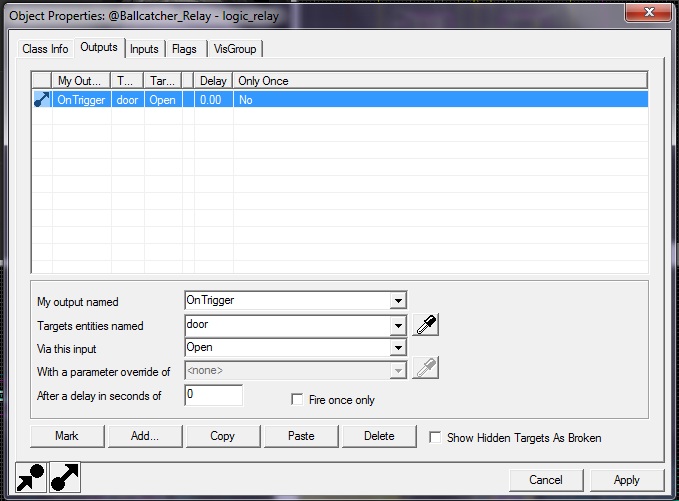
I don't see how to process then. I can choose my door and "open" but "ontirgger" still impossible yet for me.
Skotty has sound from Portal 1 of all the energy ball system but I do not hear them. I just wanted now, to know how to play these custom samples for have the same sounds as Portal 1. I got them as audio file thanks to Skotty but now the wuestion is how to play them while playing on the map ?
However, if you make a VPK file for your map or put the sounds into the BSP it should work.
If you want to hear them right in your game, look in the forums for something like soundcache update.

While trying to complete my level, I noticed that once the energy ball reached successfully the ball catcher, another ball is launched by the ball launcher and I don't understand why to be honest. How to be sure that the launcher stop to fire balls when one has already reached the right ball catcher ? Any ideas ?
Spam Nugget wrote:
Okay, to start with, to change anything in an output, click on it first in the list. This is why you couldnt type anything in, you hadnt selected the output. ( or, on second thoguhts it could be because you were trying to send it from a func_instance.)
Secondly, dont have the output from the func_instance, create a new entity, a logic_relay and name it @Ballcatcher_Relay. This is where you should send your outputs from.
Thirdly, here is what it should look like:
Fourthly, you shuld look at doing some basic tutorials on i/o, there are plenty out there.
Lastly, good luck!
Read this. And when you have read that, make this, OnTrigger > [Launcher instance name] > Disable
I want to bring back the sound effects of the "floor_button pressing" and a "door opening" from Portal into my Portal 2 level. To be honest I don't like these sound from Portal 2 and I think those from P1 were just awesome. Do you know if I can achieve this and replace the current sound effects for the old ones from Portal ?
I think this is what you're talking about. You'll have to extract the original sounds from Portal 1 before you can use them, though. However, I'm surprised that the button sounds from Portal 1 aren't in Portal 2, as there are a lot of HL2 sounds in Portal 2.