Cubemap sphere lights
anyway, the map is a WIP, so changes are still being made, as I see fit. the light has started appearing only after i built cubemaps, so is this normal or not?
if this is normal, would there be any type of brush i can use to cover it but not block the light?, because the light still shines through props and entities, so my "cool" lights are sorta messed up, w/ little balls of light showing under them. they are also visible through glass.
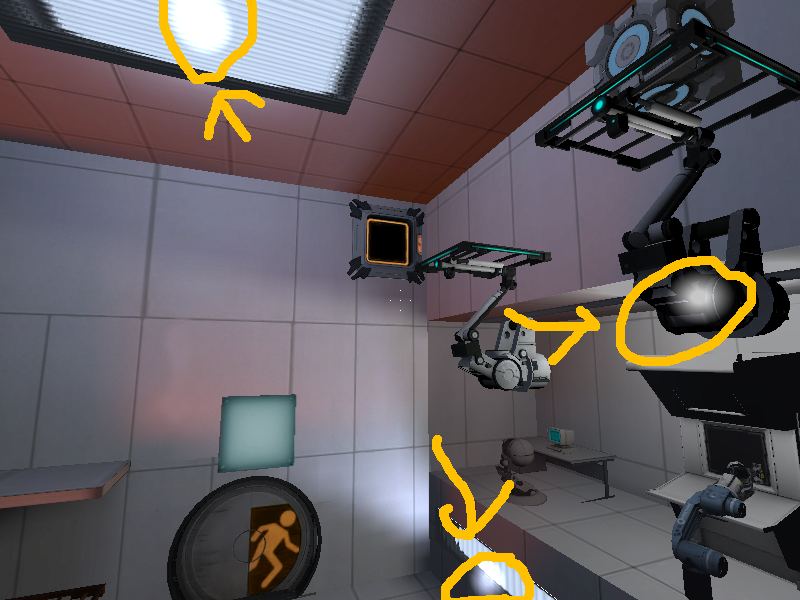

I don't see how these will cause a physical glow other than you inserted env_sprite by accident.
If all those are light entities, you should place them further from the light source as that focus effect is what you get when they're so close to the light source. Anyway, for the light_covers props and those ligh_panels (the ones you have on the ceiling and above the prop_testchamber_door) , I'd suggest to place a light_panel_texture brush behind them (texture only the front face, the rest with nodraw texture) varying the size of the brush in order to aboidd any focussing effect on adjacent walls or floor.
On the other hand, you should vary the textures in the map, and align them. You are using only wall textures, please check out and use ceiling and floor textures as well.
josepezdj wrote:
To be frank those effects look like light entities placed right in those places. Will you please confirm which light entities have you placed in your map? Did you use light_panel textures behind those light_covers near the floor or a light entity in front of them?
If all those are light entities, you should place them further from the light source as that focus effect is what you get when they're so close to the light source. Anyway, for the light_covers props and those ligh_panels (the ones you have on the ceiling and above the prop_testchamber_door) , I'd suggest to place a light_panel_texture brush behind them (texture only the front face, the rest with nodraw texture) varying the size of the brush in order to aboidd any focussing effect on adjacent walls or floor.
On the other hand, you should vary the textures in the map, and align them. You are using only wall textures, please check out and use ceiling and floor textures as well.[/quote1 ]
1 that must be my problem. this was my first map from a quite a while ago, and I havent bothered to really test out to see if it actually works with a cubemap, ive just been working on making new testing elements in another map. I hadn't known about those light_panel textures until you said that. thank for the info! 
2 but in some parts, i have my lights facing the time redirector, but the actual light entity is near the entrance to the big room and it still has the orb things, so i think i might just make my light entities into light_panels with a model over it.
3 yeah, the textures need a lot of work. i basically need to redo this entire thing, or just not release it, because it just sorta looks trashy in places. even GLaDOS's animation is choppy. I think the map needs a makeover. 