How to get that Sound before GLaDOS speaks?
But as you know, in the normal game there's a little noise which always can be heard before GlaDOS speaks and after she has spoken. I'll just call it "alert noise" now. I hope you know what I mean. So you always know "Ok, now she starts speaking." and "She has finsihed now."
But in my custom map these "alert sounds" aren't played. GlaDOS just starts and stops talking "surprisingly". How do I get that sound? Do I have to implement it separately for every scene?

EDIT: This is for you: http://chickenmobile.deviantart.com/#/d4v6g9p
GLaDOS CUBE wrote:
For me?
It is darn obvious you like rainbow dash 

You will need to use a "ambient_generic" with the sound "labs\ding_on.wav" and "labs\ding_off.wav"
Just put it before the logic_choreographed_scene
andu wrote:
And how?
see how long the on and off sounds take; (onwhateverstartstheannouncement; turnonsound;playsound;0.00
onwhateverstartstheannouncement; announcement; theinputtostartachoreochravedscene; time it takesfor turnoffsound.
I believe scenes have a onendscene thing; use that to trigger turnoffsound. If that doesn't work let the thing that triggers the scene play turnoff sound after a delay equal to the lenght of the turnonsound and announcement together.
Hope that helped.
lpfreaky90 wrote:
see how long the on and off sounds take; (onwhateverstartstheannouncement; turnonsound;playsound;0.00
onwhateverstartstheannouncement; announcement; theinputtostartachoreochravedscene; time it takesfor turnoffsound.
I believe scenes have a onendscene thing; use that to trigger turnoffsound. If that doesn't work let the thing that triggers the scene play turnoff sound after a delay equal to the lenght of the turnonsound and announcement together.Hope that helped.
Sure, that should work. But isn't that a little too complicated?
Does anybody know how Valve did it in their maps? I've taken a look at them, but couldn't find anything.
andu wrote:
Sure, that should work. But isn't that a little too complicated?Does anybody know how Valve did it in their maps? I've taken a look at them, but couldn't find anything.
If you did read my message (3rd post) you would know. The scenes are however played through Glados.nut not through a direct output. This is how you would play a scene file through a normal output:
- Put the glados_gen_actor.vmf instance from portal 2\sdk_content\maps\instances\choreo into your map
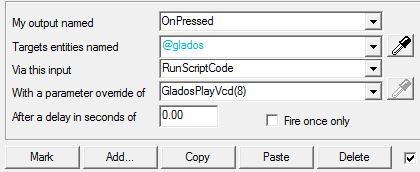
Remember: the coop GLaDOS lines are used with the coop_glados_ents.vmf instance and the singleplayer uses the one listed above. If you want to use lines from both coop and SP you will need to place both instances in AND collapse the instance, then change the name of @glados to something different.- Using a button or w/e output you are using to play the sounds; make it play your selected scene file:
outputs.jpg- Find the correct number of your wanted line through: **...\portal2\scripts\vscripts\choreo\*glados_scenetable_include.nut*** Be warned: many of the scene files play directly after each other -> you can tell what does by looking at the out-dented comments '//' and the lines that follow each other are indented '//' //BlueFirstToEnd
//Blue is awarded five points!
SceneTable["mp_coop_startBlueFirstToEnd01"] <- ...
//Again, those are science collaboration points, which you should not confuse...
SceneTable["mp_coop_startBlueFirstToEnd02"] <- ...
chickenmobile wrote:
I was thinking of contributing a VDC page showing the scene files with their subsequent numbers, but I would have to go through hundreds of lines also I bet there is an easier way.
I'll try to put a script together to match the vcd number to the voice line.
But when I try this I get an error message in my console:
AN ERROR HAS OCCURED [the index 'GladosPlayVcd' does not exist]
CALLSTACK
*FUNCTION [main()] InputRunScript line [1]
LOCALS
[this] TABLE
Entity @glados encountered an error in RunScript()
Any idea how this can be solved?
andu wrote:
@chickenmobile thanks for your great post!But when I try this I get an error message in my console:
AN ERROR HAS OCCURED [the index 'GladosPlayVcd' does not exist]
CALLSTACK
*FUNCTION [main()] InputRunScript line [1]LOCALS
[this] TABLE
Entity @glados encountered an error in RunScript()Any idea how this can be solved?
That error appears either when:
- You called a the wrong script- Your script input is in the wrong format (copy the picture).- Your script has a syntax error.I hope for your sake that there isn't a syntax error in your glados.nut otherwise portal won't play scenes.
Did you put the glados ents instance in your map? Also what input are you giving @glados?
BEARD! wrote:
chickenmobile wrote:I was thinking of contributing a VDC page showing the scene files with their subsequent numbers, but I would have to go through hundreds of lines also I bet there is an easier way.
I'll try to put a script together to match the vcd number to the voice line.
I did just that, and posted this to the wiki as a proof-of-concept. If anyone finds it useful or knows how to make it more useful, let me know. I'll try to get round to parsing more files (e.g. single player) too.

And of course the corresponding number.

Then I created a relay which is triggered when I want GlaDOS to speak. It has the following output:

(the // before the name) If that is the case the Vcd won't load either; I'm not 100% sure of it but try using one that doesnt have a // before the mapname.
lpfreaky90 wrote:
@andu: it seems like sp_a2_pull_the_rugstart01 is commented out on line 1356.
(the // before the name) If that is the case the Vcd won't load either; I'm not 100% sure of it but try using one that doesnt have a // before the mapname.
That is correct. If it is commented out, the game will pull an error because the SceneTable array cannot find that element. If this sound does exist and you really want to use it, you probably need to do it the original way lpfreaky or someone else mentioned above. ->
An ambient generic dingon sound played before your glados voice plays, a delay, and then the dingoff sound after she has finished speaking.
Not many people know that when Glados speaks, the game volume dims, is extremely 'ehoey' and some of the sounds pitch changes (usually pitch 100) because Glados sounds have a determined preset in the scene files. Presently, not many people will notice that is is missing. -> lp said that they didn't even notice the ding sound in the first place.
EDIT: Well done Beard. The tables though are a bit hard to follow. I suggest having 1 table for all the lines with The title whited accross the whole width of the table and the subtitle in an un-whited row.
e.g.
Title = mp_coop_start
subtitle = BlueFirstToEnd