Water texture help
the images below aren't full render, but the idea is the same, since the surface carried information over from the wrong location.
normal
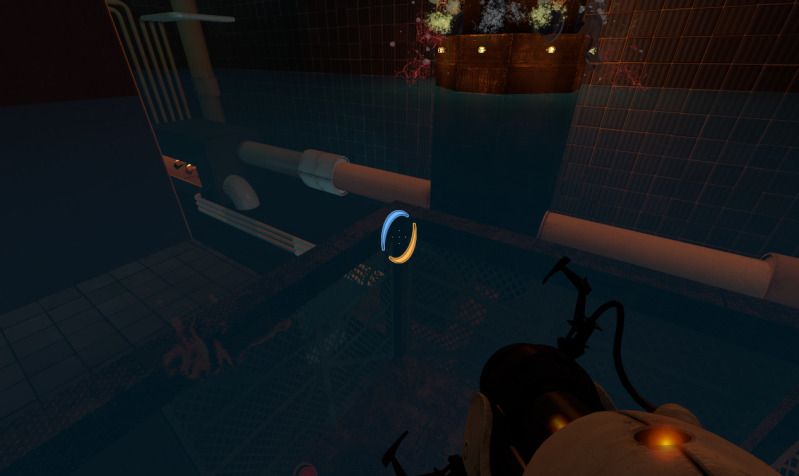
broken
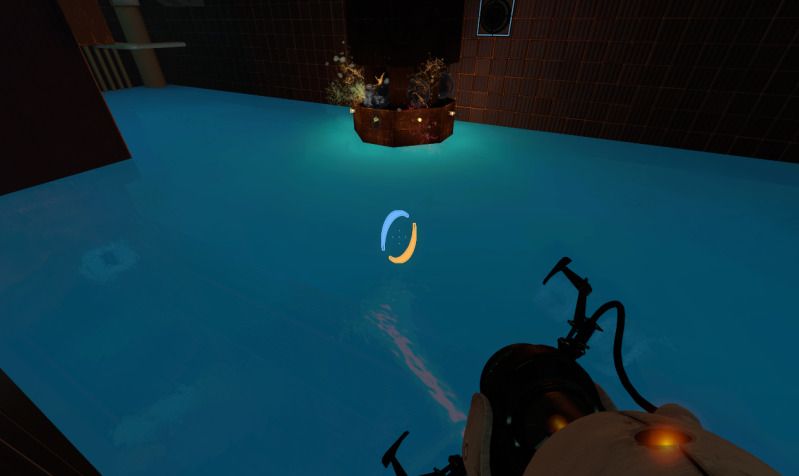

It could be that the cheap render is like this and the expensive render like intended. You might want to try messing around with that

You should try to check the VMT file again and maybe create a test map to find some things out. For example using hint brushes to split the surface of the water or split the brush itself. Sounds strange but sometimes it really helps.
https://developer.valvesoftware.com/wiki/Water_%28shader%29
The same as skotty, I don't really think that has to do with the water lod control entity...
One question: are those both pictures the SAME water .vmt file? I'm asking because for my it has no sense. The 2nd picture looks like if you would have chosen a blueish $fogcolor but not in 1st pic...
Also your problem could be the refract/reflect setup, or the parameter $translucent 1 (or 0)...
Have you taken one specific .vmt from the game to change it? which one? Post the .vmt so we can take a look at it...
@josepezedj: both pictures use the exact same texture, so thats not part of it. Here's the current setup.
$forceexpensive 1
$normalmap "liquids/water_river_normal_sharp"
$flowmap "liquids/c3m2_hflowmap_a"
$flow_normaluvscale 155.0
$flow_worlduvscale 0.5
$flow_timeintervalinseconds 0.2
$flow_uvscrolldistance 0.075
$flow_bumpstrength 0.4
$flow_timescale 0.35
$flow_noise_texture "liquids/water_noise"
$flow_noise_scale 0.0005
$flow_debug 0
$reflecttexture _rt_WaterReflection
$reflectamount "1"
$reflecttint "{ 190 205 205 }"
$reflectskyboxonly 1
$reflectonlymarkedentities 1
$abovewater 1
$bottommaterial "my_textures/clear_water_beneath"
$fogenable 1
$fogstart 0
$fogend 200
$lightmapwaterfog 1

$fogcolor "{ 40 107 141 }"
$flashlighttint 1
"%compilewater" 1
"%tooltexture" "nature/water_frame01_normal"
$surfaceprop water

$pseudotranslucent 1
$waterblendfactor 0.30
I modified one of the underwater textures as well to adjust some of the fog.
$forceexpensive 1
$normalmap "liquids/water_river_normal_sharp"
$flowmap "liquids/c3m2_hflowmap_a"
$flow_normaluvscale 155.0
$flow_worlduvscale 0.5
$flow_timeintervalinseconds 0.2
$flow_uvscrolldistance 0.075
$flow_bumpstrength 0.4
$flow_timescale 0.35
$flow_noise_texture "liquids/water_noise"
$flow_noise_scale 0.0005
$flow_debug 0
$refracttexture _rt_WaterRefraction
$refractamount "0.25"
$refracttint "{ 151 135 34 }"
$abovewater 0
$fogenable 1
$fogstart 0
$fogend 2000.00
$lightmapwaterfog 1

$fogcolor "{ 10 107 141 }"
$flashlighttint 200
"%compilewater" 1
"%tooltexture" "nature/water_frame01_normal"
$surfaceprop slime
[Edit]
I narrowed it down to one of the textures that were in view. It seems that one of the no draw textures was messing with the surface reflections. This is strange though, considering that none of the other toxic brushes has ever had this occur. I'm definitely missing something in this equation.
Wanderer2021 wrote:
Here's the current setup.
Well, the only variables I think that could be messing up with your water look are:
-
Your custom(?) texture "clean_water_beneath". Check out that. Try to substitute it for some other and check if it makes some difference. I don't really think you need a $bottommaterial if you want to create a clean water though, just remove that line and go changing the rest of parameters.
-
Parameter $fogend in first .vmt. I think 2000 is far too much and could turn buggy.
Also, you may want to give it a look to this: