I hate Soundscripts but I love them
I have problems using custom soundscripts in Hammer. I've been searching in several forums, wikis and blogs, found many answers but I'm still stuck. So here I am.
Here's what I'd like to do: I've got custom voice sounds (.wav), and I need to create soundscripts because I want to add subtitles and I read you can't do that with simple Raws. Okay.
So I made my .txt file, put it and the all the raws in the correct folders, and I think I did that well. My problem is in the "game_sound_manifest" file. I read you have to add a precache command for Hammer to correctly load your script. I tried that, here's what happenned:
-
when I use "precache_file" with my custom soundscript's name, Hammer doesn't detect the script (it's supposed to be in the "Game Sounds" section, right?).
-
when I add the Raw directly in an existing soundscript (game_sounds.txt for example), it works just fine and I can load, play and use my file in Hammer.
Basically, in the second method, I don't edit the "game_sound_manifest" as I am told to, but a existing soundscript that is probably already used in the game. It works, but I'm afraid it could cause fatal errors and stuff. And it could be complicated to share my map with those modified soundscripts. Actually I tried that only for testing!
If you've got anything, or need more details, please tell me! I'm getting desperate. 
EDIT: I tried to delete some lines in the game_sound_manifest file, and run Hammer. It doesn't seem to cause any bug, all soundscripts are working. So I'm a little confused: when do Hammer or Portal 2 execute the commands that are in the manifest file? How do I get them to do it?

I know for sure that this could be your problem because I was adding soundscripts / scenes for my mod today and wondered why when I went into SourceSDK the soundscript appeared in faceposer but didn't in P2AT faceposer.
Also if your console is popping up that your sound is missing from the disk repository when you play your soundscript, you need to put in the console command: 'snd_rebuildaudiocache' / snd_buildsoundcachefordirectory [pathname].
If I may ask you one last question though, I'd like to know what I'll have to do when I want to share the map. Should I upload the manifest too? Or maybe just instructions to modify it? Or does the hammer compiler take care of all this?
I'm sorry to bother you with all the question marks. Thanks again for your quick and very helpful answer!
Follow this tutorial (which consequently I made)
Generally when it says it needs to be a name of a soundscript, its just a name so then it can be referenced when you want to display your subtitles.
Make sure you look at the discussion tab to see an example.
I believe that using soundscripts makes you need to rebuild the sound cache but packing custom sounds in the bsp doesn't. Unless this was vpk's... can't remember...
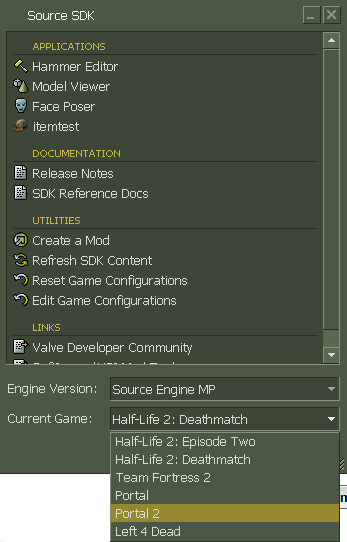
With SourceSDK: whenever you chooser a certain game in a version of source, it sets it as the active mod you are working on. (FacePoser etc.) Because Portal 2 is not automatically added into the SDK (it is in its own authoring tools) the directory is not set for certain SDK tools.
Go into Steam/steamapps/accountname/SourceSDK/bin/orangebox/bin (or ep1 if you dont have a orangebox) and open up a file called GameConfig.txt. Copy and paste another one of your games (it doesnt matter which) and change the "gameDir" value to the path of your Portal 2.
Here I just copied the config for Portal and changed the path of "GameDir"
      "Portal 2"
      {
         "GameDir"      "E:\Program Files (x86)\Steam\steamapps\common\portal 2\portal2"
         "hammer"
         {
            "GameData0"      "E:\Program Files (x86)\Steam\steamapps\accountname\..."
            ...
            "CordonTexture"      "tools\toolsskybox"
            "MaterialExcludeCount"      "0"
         }
      }
Your game should then be under one of the options in the sdk. Mine is located in Source Engine MP
gameconfig.jpgOnce you choose Portal 2 from the list, it should then make it the active mod, however also open up Hammer to make sure.
"Configs"
{
   "Games"
   {
      "Portal 2"
      {
         "GameDir"      "c:\program files (x86)\steam\steamapps\common\portal 2\portal2"
         "hammer"
         {
            "TextureFormat"      "5"
            "MapFormat"      "4"
            "DefaultTextureScale"      "0.250000"
            "DefaultLightmapScale"      "16"
            "DefaultSolidEntity"      "func_detail"
            "DefaultPointEntity"      "info_player_teamspawn"
            "GameExeDir"      "c:\program files (x86)\steam\steamapps\common\portal 2\portal2"
            "MapDir"      "c:\program files (x86)\steam\steamapps\baca25\sourcesdk_content\tf\mapsrc"
            "CordonTexture"      "tools\toolsskybox"
            "MaterialExcludeCount"      "0"
            "GameExe"      "c:\program files (x86)\steam\steamapps\baca25\team fortress 2\hl2.exe"
            "BSP"      "c:\program files (x86)\steam\steamapps\baca25\sourcesdk\bin\orangebox\bin\vbsp.exe"
            "Vis"      "c:\program files (x86)\steam\steamapps\baca25\sourcesdk\bin\orangebox\bin\vvis.exe"
            "Light"      "c:\program files (x86)\steam\steamapps\baca25\sourcesdk\bin\orangebox\bin\vrad.exe"
            "BSPDir"      "c:\program files (x86)\steam\steamapps\baca25\team fortress 2\tf\maps"
            "GameData0"      "c:\program files (x86)\steam\steamapps\baca25\sourcesdk\bin\orangebox\bin\tf.fgd"
         }
      }
   }
   "SDKVersion"      "5"
}
I also noticed your chicken has a hammer now. Did you ever get a chance to play whack-o-mole on my last map?
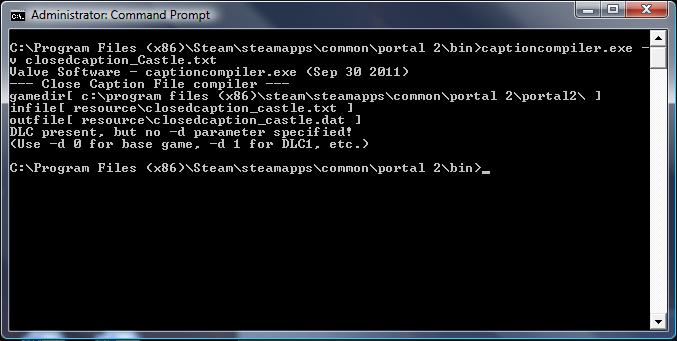
OR use the -game command to set the current directory.
EDIT: Did you even check if it compiled?
EDIT2: put a -d 0 in it like the console suggested. Problem solved
Edit
I also found another typo of yours. You said to name the files closedcaption_... when they need to be called closecaption_...
baca25 wrote:
I also found another typo of yours. You said to name the files closedcaption_... when they need to be called closecaption_...
Nonsense... the wiki didn't say that 
Everything is exactly the same, apart from the fact that you can switch "closecaption_Castle" with "closecaption_tAA_english".
The problem is: under Steam/username I don't have a folder named sourcesdk. I never installed any different sdk game than Portal. I can't change the active mod. It should always be Portal. Still, captioncompiling does not work.
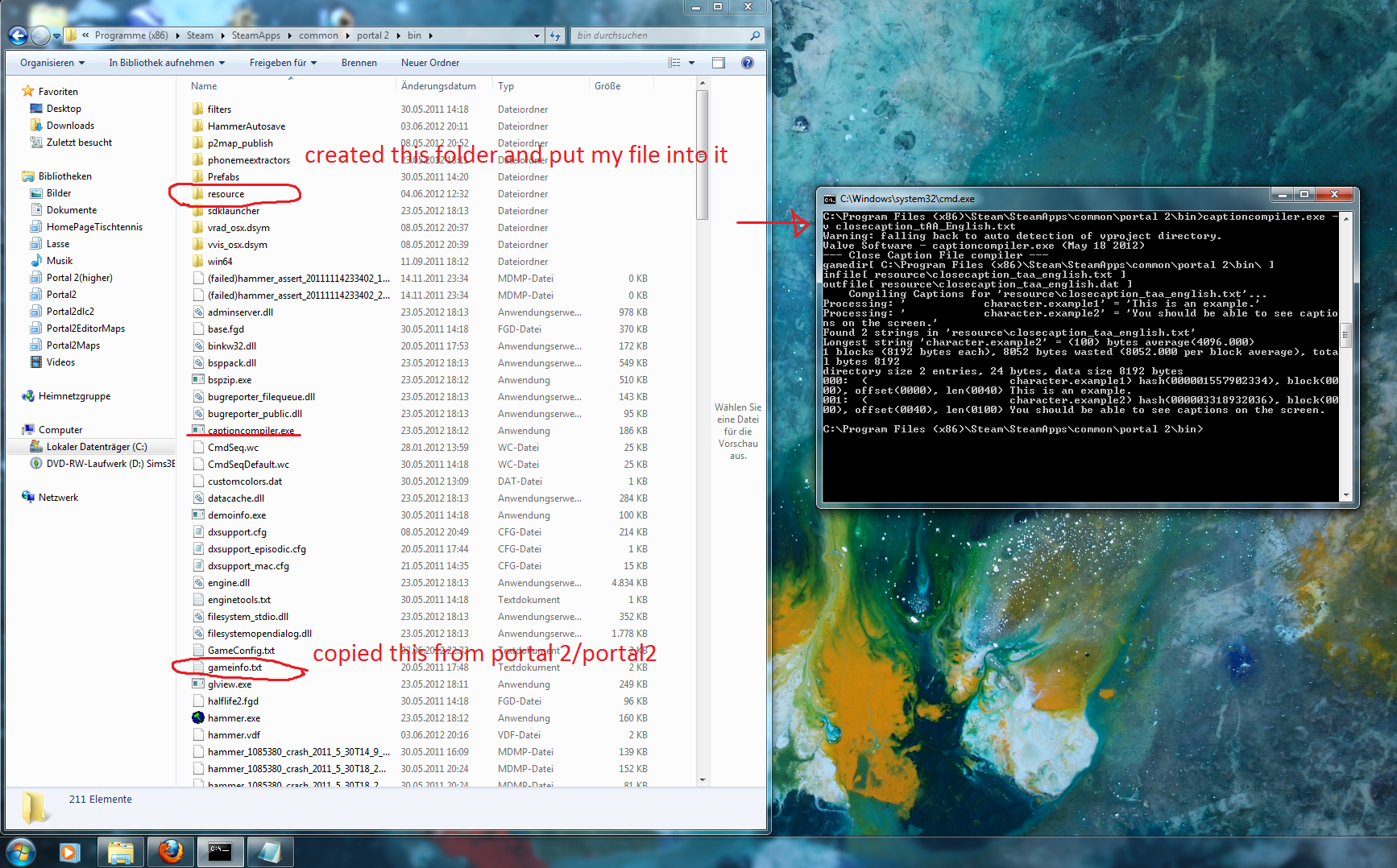
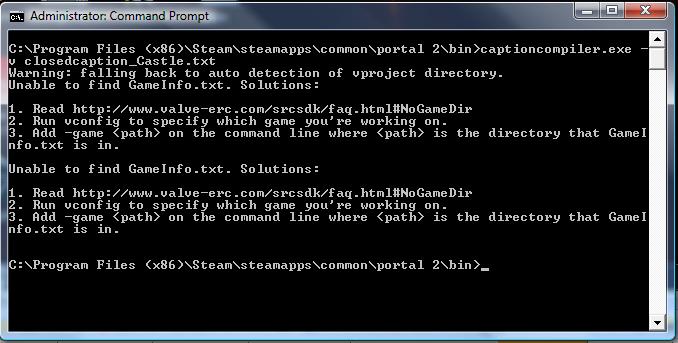
EDIT I've messed around a bit: It seems that (apart from the file called gameConfig.txt) inside portal 2/portal2 is a file called gameinfo.txt. If I just copy it and paste it into portal 2/bin (No idea what I am doing), I will at least get a different error, which looks a bit more progressive:
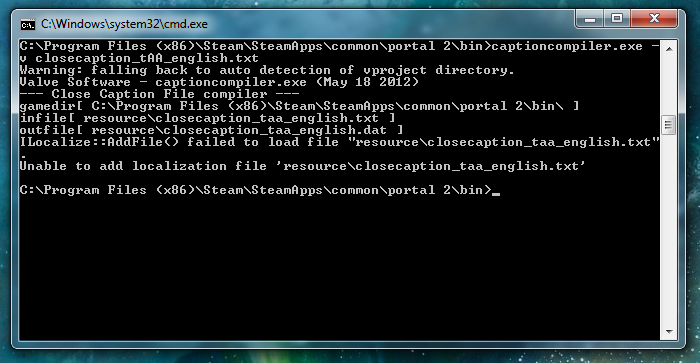
Victory!
After I have tipped 50 times the same command with different constellations, e.g. moving certain files to dlc2, copying gameInfo from Portal 2, from Portaal 2 dlc or trying something with the -game parameter, I finally did it the following way:
- Copied GameInfo.txt from Portal 2/portal2 into Portal 2/bin
- Created a new folder: Portal 2/bin/resource and put my desired closecaption_tAA_english.txt as the only file into it.
- Giving the common command to the console (captioncompiler.exe -v closecaption_tAA_english)
- Screenshot attached for future problems of the same kind.