[Solved] Glitch

Avatar
KFredje
55 Posts
Posted Jun 05, 2012
Hi,

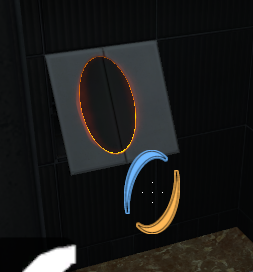
I'm having a glitch in my map.

Naamloos2.png

It's a panel wall 2 units thick. I'm also doing this in other places but it only gives here problems. The panel is attached at the right place. Anything else I can be doing wrong?

Images 1
Post image 1
Advertisement
Registered users don’t see ads! Register now!
Avatar
zivi7
649 Posts
Posted Jun 05, 2012
Replied 1 hour later
Have you tried to just make it thicker?
Avatar
Lpfreaky90
2,842 Posts
Posted Jun 05, 2012
Replied 3 minutes later
I would recommend making panels 4 units thick :wink:
Avatar
UsCobra11
272 Posts
Posted Jun 05, 2012
Replied 2 minutes later
A curved panel like that should be, maybe, 32 or 16 units thick. If it's 2 units thick, it will just look weird anyway. All portalable walls should be at least 8 units thick to prevent glitchy looks.
Avatar
KFredje
55 Posts
Posted Jun 05, 2012
Replied 38 minutes later
Tnx for the reply's. I was just wondering why it happened with this one and not with the other :wink:
Avatar
KFredje
55 Posts
Posted Jun 07, 2012
Replied 1 day later

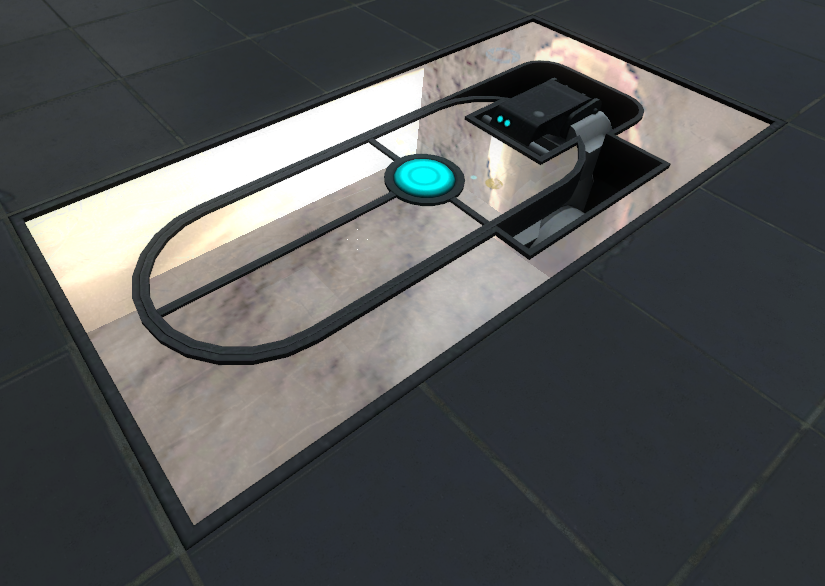
Sorry to double post on this but I don't want to make a new topic cause it's also a glitch I think. The faith plate on the picture is reflecting way to much compared to the faith plates in the story or coop. I also have maps with this exact same faith plate where it's not reflecting. I have also a "prop_dynamic_override" with as World Model "models/npcs/turret/turret_skeleton.mdl" that suffers the same reflection. Removing the prop_dynamic_override doesn't help. Removing or adding lights doesn't help. Letting the player spawn in dark or the same room where the faith plate is in doesn't help either. Does anyone has a clue about this?

Naamloos2.png
Images 1
Post image 1
Avatar
zivi7
649 Posts
Posted Jun 07, 2012
Replied 1 minutes later
Keep in mind I have only basic hammer knowledge. But I think what you have to do is attach a env_cubemap to this faithplate.
Avatar
KFredje
55 Posts
Posted Jun 07, 2012
Replied 28 minutes later
Tnx for the fast reply, adding a env_cubemap fixed my problem. But what does this thing actually do? I looked at https://developer.valvesoftware.com/wiki/Env_cubemap but this didn't make it much more clear for me.
Avatar
zivi7
649 Posts
Posted Jun 07, 2012
Replied 2 minutes later
I can't explain it in details. Tt takes care of good reflections.
Avatar
KFredje
55 Posts
Posted Jun 07, 2012
Replied 17 minutes later
Well, good it does :p

Tnx to you I got my teaser for my new map finished: http://steamcommunity.com/sharedfiles/f ... d=75619532

:smile:

Avatar
BEARD!
169 Posts
Posted Jun 07, 2012
Replied 40 minutes later
Cubemaps say to the engine "calculate and remember what reflections look like at this point". So shiny things (cube dispensers, for example) will use that reflection data to look pretty. Just putting them in isn't enough to get a proper reflection, though, because the reflection calculations aren't done at compile time. They need to be done in the engine (i.e. in Portal 2) so they don't look crap. To do this, use the console command buildcubemaps.

Some points to be aware of:
* Cubemaps have to be built separately for LDR and HDR modes
* If you change (recompile) or rename the map after building cubemaps, they won't work; you'd need to build them again.
* The command will fail if your map isn't in the right folder. I think this is currently portal2_dlc2/maps but I'm not 100% on that

As always, the VCD has more to say.

Avatar
zivi7
649 Posts
Posted Jun 07, 2012
Replied 52 minutes later
But a full compile in Hammer, the final, slow one, does build them, right?
Avatar
Nacimota
345 Posts
Posted Jun 07, 2012
Replied 1 hour later

zivi7 wrote:
But a full compile in Hammer, the final, slow one, does build them, right?

No, cubemaps must be built at runtime because they use the in-game engine to draw reflections.

Avatar
Skotty
671 Posts
Posted Jun 08, 2012
Replied 22 hours later

zivi7 wrote:
But a full compile in Hammer, the final, slow one, does build them, right?

Another offtopic tip:
Don't use final. It's supposed to improve lighting on maps with a lot of light_environment light and shadows (indirect lighting), but in general these differences are very little. For Portal 2 and most maps in general you don't need it.

Avatar
BEARD!
169 Posts
Posted Jun 08, 2012
Replied 11 minutes later

Skotty wrote:
zivi7 wrote:

But a full compile in Hammer, the final, slow one, does build them, right?

Another offtopic tip:
Don't use final. It's supposed to improve lighting on maps with a lot of light_environment light and shadows (indirect lighting), but in general these differences are very little. For Portal 2 and most maps in general you don't need it.

So what would the best practise be? A 'normal' compile with Static Prop Lighting turned on?

Advertisement
Registered users don’t see ads! Register now!
Avatar
Skotty
671 Posts
Posted Jun 08, 2012
Replied 11 minutes later
-both -textureshadows -StaticPropLighting -StaticPropPolys -game $gamedir $path\$file

Thats what I use everytime (HDR and LDR seperated, use instead of -both just -ldr or -hdr).

Just read on the VRAD page: Final is just for skybox light.