The ThinkingWithPortals Map Showcasing Thread
The only thing I would consider scary for a "pop-up" event would be a Stalker or an Advisor from Half-Life 2.

MasterLagger wrote:
I don't think a pop-up Chell would be a good idea. I've heard about some people trying it but nobody found it scary. Maybe having Chell walk through a inaccessible hallway might be more appropriate.The only thing I would consider scary for a "pop-up" event would be a Stalker or an Advisor from Half-Life 2.
Chell walking?! How can Chell walk? Which animation makes Chell walk? Or should I use a func_tracktrain/func_tanktrain etc...?
hand I'm replaying hl2, and I HATE those stiders. There is no word to describe how much I hate them. Hate...
I'd be pretty scared to meet one of those without my trusty rocket launcher.
Kaleido wrote:
Alexander Bell wrote:A pop up of chell would be easy, just have a prop_static if you don't want the player to collide with it, dynamic if you do. Then have a trigger_once connected to a timer set for however long you want chell to be shown, make the timer enabledraw on the prop.
prop_static has collision. Stop spreading your lack of knowledge.
I swear I've walked through prop_statics and didn't collide, even though I did with the dynamic version.
Alexander Bell wrote:
Kaleido wrote:Alexander Bell wrote:
A pop up of chell would be easy, just have a prop_static if you don't want the player to collide with it, dynamic if you do. Then have a trigger_once connected to a timer set for however long you want chell to be shown, make the timer enabledraw on the prop.
prop_static has collision. Stop spreading your lack of knowledge.
I swear I've walked through prop_statics and didn't collide, even though I did with the dynamic version.
Not all props collide, it dopends from its collision model, for example, "squarebeam" models can be used for static, and they don't collide.
EDIT: prop_static WILL NOT move, and can't be named = no popups in this case. Thats why there is prop_dynamic what can play animations or be parented into a brush/model.
And they can't be named? thats a problem. couldn't you just do prop_static enabledraw?
Alexander Bell wrote:
Kaleido wrote:Alexander Bell wrote:
A pop up of chell would be easy, just have a prop_static if you don't want the player to collide with it, dynamic if you do. Then have a trigger_once connected to a timer set for however long you want chell to be shown, make the timer enabledraw on the prop.
prop_static has collision. Stop spreading your lack of knowledge.
I swear I've walked through prop_statics and didn't collide, even though I did with the dynamic version.
So you made a global assumption instead of researching how models work...
Seriously, you're hindering other people's learning. Stop.
Robotics Area
sp_ml_watched0001.jpg sp_ml_watched0000.jpg sp_ml_watched0002.jpg sp_ml_watched0003.jpg sp_ml_watched0004.jpg
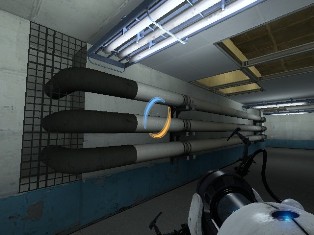
Robotics Area includes turret production, leftover projects, and an emergency button that lets all lethal military androids loose. The emergency button will open the emergency door to escape outside the facility into the train-yard; however, the military androids will also appear outside the facility.
With that last picture, I'm having trouble with those L-pipes to lighten up. Any advice would be appreciated.
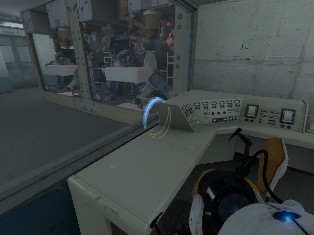
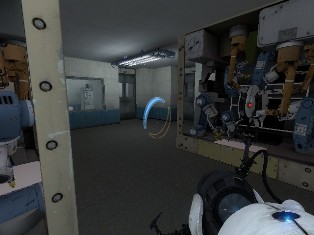
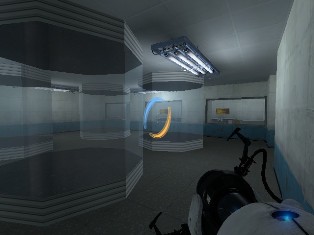
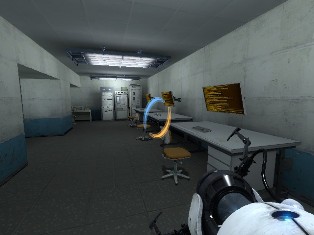
sp_ml_watched0000.jpg sp_ml_watched0002.jpg sp_ml_watched0003.jpg sp_ml_watched0004.jpg|| Robotics Area includes turret production, leftover projects, and an emergency button that lets all lethal military androids loose. The emergency button will open the emergency door to escape outside the facility into the train-yard; however, the military androids will also appear outside the facility. With that last picture, I'm having trouble with those L-pipes to lighten up. Any advice would be appreciated. The lighting origin perhaps? Tutorial on fixing that: [http://m.youtube.com/index?desktop_uri= ... V4rBlRJ5Bo](http://m.youtube.com/index?desktop_uri=%2F&gl=US#/watch?v=aV4rBlRJ5Bo)MasterLagger wrote:
To take our minds off on what may become a flame fest, some more pictures:
Robotics Area
|| sp_ml_watched0001.jpg
sp_ml_watched0000.jpg sp_ml_watched0002.jpg sp_ml_watched0003.jpg sp_ml_watched0004.jpg|| Robotics Area includes turret production, leftover projects, and an emergency button that lets all lethal military androids loose. The emergency button will open the emergency door to escape outside the facility into the train-yard; however, the military androids will also appear outside the facility. With that last picture, I'm having trouble with those L-pipes to lighten up. Any advice would be appreciated. Looks great! :biggrin: Maybe place a light beside the L-pipes?MasterLagger wrote:
To take our minds off on what may become a flame fest, some more pictures:
Robotics Area
|| sp_ml_watched0001.jpg
tanger2b wrote:
The lighting origin perhaps? Tutorial on fixing that:
http://m.youtube.com/index?desktop_uri= ... V4rBlRJ5Bo
Thanks, that did the trick! 
sp_ml_watched0000.jpg sp_ml_watched0002.jpg sp_ml_watched0003.jpg sp_ml_watched0004.jpg|| Robotics Area includes turret production, leftover projects, and an emergency button that lets all lethal military androids loose. The emergency button will open the emergency door to escape outside the facility into the train-yard; however, the military androids will also appear outside the facility. With that last picture, I'm having trouble with those L-pipes to lighten up. Any advice would be appreciated. It doesn't look that bad, but not that good. Not terrible but also not awesome... is what I would say. It's actually pretty aweome and I'm looking forward to it! My game's finally operational again, so I'm able to make some good maps (which I couldn't on my old, low-end computer) and this is my first attempt: ||  || The map's a short Singleplayer Map whith the same difficulty as most of the sp_a2 maps from the game. It's also part of my first map pack. The third screenshot isn't pretty new, I changed the width of the panel-brushes. Also, I almost got killed by the Turret, so I hope, this screenshot was worth it...MasterLagger wrote:
To take our minds off on what may become a flame fest, some more pictures:
Robotics Area
|| sp_ml_watched0001.jpg
I hope you like big maps, because my current map is going to be big (with appropriate save points). I thinks it's going to be bigger than my Halloween map. Due to some of the puzzles and events that take place in the map, I've recently started using env_instructor_hint for hints and information about certain objects.

Anyway, the mappack its called "Testing for Fun" and it contains 8 test chambers.
"Testing For Fun" screenshots

An overview of the Hub. A Frankenturret, a Companion Cube, a Radio, and an Oracle Turret ("I'm different...")

The Level Chooser, special thanks to ChickenMobile! I changed the screen background. ^^v

The Level Chooser again, just showing that it can be pressed and the slider can be moved.

Hallway before the hub and after the arrival elevator.

The departure elevator, notice anything different? (The Emancipation Grill/Fizzler has been removed xP)
Just to let you guys know, you spawn without a portal gun in the Hub map, then as you progress, you get your single-Portal variant Portal gun and eventually the dual portal device.
Tell me what you think about it!

MasterLagger wrote:
I think I can make out part of a hallway to an unseen room in the 2nd picture.
There's no secret hallway I needed this gap because, when you press a button, a panel's opening and a cube is flying out. But maybe I'm including something like this.> tanger2b wrote:
I'm pretty sure the stairs in the last picture are too big. They should be 2 units thick if I remember correctly. Everything else looks amazing!
Thanks! I already resized the panels.


d3m0l1sh3r wrote:
http://img40.imageshack.us/img40/1746/funnel1h.jpg
http://img854.imageshack.us/img854/2381/funnel2.jpg
http://img404.imageshack.us/img404/5792/funnel3.jpg
Very nice. Looks exactly like the ones in the demo video.
Here is the collection of images of Prolonged Exposure at Imgur. Still a work in progress, though.