[Solved] Any way to disable placed portal indicators?

Avatar
Lamb&TunaFish
10 Posts
Posted Sep 01, 2012
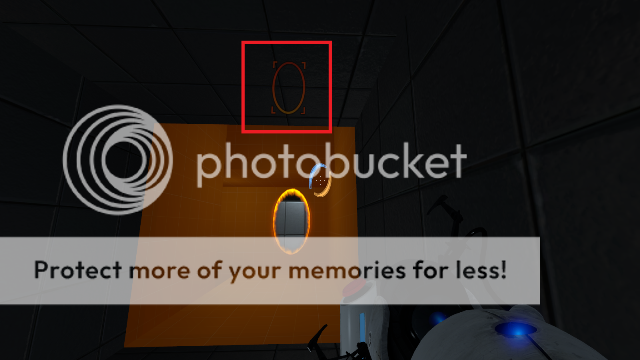
The subject basically says it all. I've tried to search but couldn't find anything. Is there any way to disable the portal indicators that you can see through walls after you place a portal. I have a map that uses linked portal doors and it's pretty goofy looking with them. If the image gets in this post you'll see what I'm talking about.

img

Advertisement
Registered users don’t see ads! Register now!
Avatar
ChickenMobile
2,460 Posts
Posted Sep 01, 2012
Replied 8 minutes later
I do remember there was a post about this a long time ago (last year). However I don't think they found a solution / how to disable it.

Could be wrong but: I have no idea how.

Avatar
zivi7
649 Posts
Posted Sep 01, 2012
Replied 7 minutes later
A certain Mister Nacimota says it's "portal_draw_ghosting 0" here: http://forums.steampowered.com/forums/s ... ?t=1859346

So you'd have to make a point_clientcommand with this command to turn the effect off on mapspawn for example.

But personally as a player I always found it annoying when a map had such "hidden" console commands. Changing the graphic effect for portals for example. The setting stayed like this after quitting the map and I had to change it back myself.

Couldn't you make it so that the portals get erased when the player goes through the world portal?

Avatar
Lamb&TunaFish
10 Posts
Posted Sep 01, 2012
Replied 4 minutes later
Thanks zivi7, that did it. What I'll probably do to address complaints like yours is to only turn off the effect while the player is in the room with the linked portal doors, and then turn it back on after they finish.
Advertisement
Registered users don’t see ads! Register now!
Avatar
HMW
806 Posts
Posted Sep 02, 2012
Replied 14 hours later

Lamb&TunaFish wrote:
Thanks zivi7, that did it. What I'll probably do to address complaints like yours is to only turn off the effect while the player is in the room with the linked portal doors, and then turn it back on after they finish.

Yeah, that should be OK. Some of the early maps in the single-player campaign turn the outlines off in the same way. (I don't exactly remember where though.)