"Bad Detail Brush Side" Error
SOLVED
You know how you get that "leaked" error and the text in the compiling window turns red? Well, I found another red text that says "Bad Detail Brush Side" and I have no clue how to fix it. I think it's also preventing my map from compiling. Here's a picture:
untitled.JPG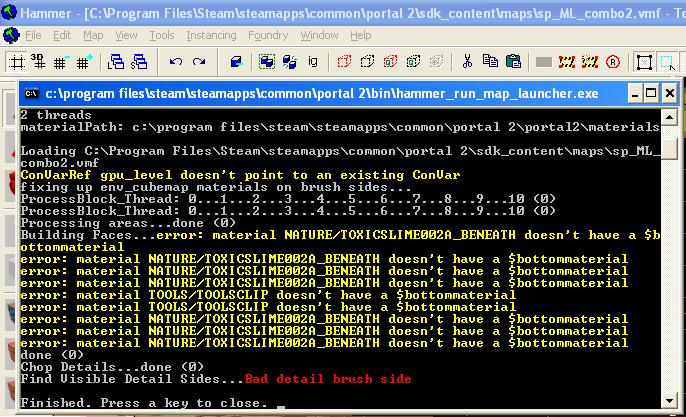

From the Interlopers error page:
Interlopers.net wrote:
Find Visible Detail Sides...Bad detail brush sideDescription:
The cause for this error is using multiple (incompatible) tool-textures on the same brush, or so it seems.
Apart from HINT and SKIP there aren't much combination of tool-textures allowed on the same brush, so any other combination is a possible cause. Tool-textures are the 'tools/' textures you can find using the texture browser in Hammer, and that have a special meaning.Solution:
You will need to find the brush(es) with these tool-textures and replace those textures. The easiest way to find the source of the error is to hide all visgroups except for the visgroups which are for tools textures and then just look around the map in 3d textured mode.See also:
WIKI: Tool texturesThis error will cause your map to fail compiling completely
About the detail brush side, maybe you have to find that brush and recreate it...
EDIT
Remember that other thread of yours about the skybox problem in which I told you about the cordon tool. This tool could be useful to identify where that detail brush side is located... Go compiling part by part of your map until you locate that offended brush
Edit: Well, I fixed it. I narrowed the area down (using the cordon tool)to two water areas. But there weren't two tools textures on the brush that caused the problem. But I ended up fixing it by putting more water textures on the brush. Huh, weird.
MasterLagger wrote:
But I ended up fixing it by putting more water textures on the brush. Huh, weird.
Hmmm... now that you found the area, please do not what you did. I'd suggest you to remove the water brush and create it again from scrach by making a nodraw textured brush and texturing later ***only*** the top external face of that brush with a water material.
josepezdj wrote:
MasterLagger wrote:But I ended up fixing it by putting more water textures on the brush. Huh, weird.
Hmmm... now that you found the area, please do not what you did. I'd suggest you to remove the water brush and create it again from scrach by making a nodraw textured brush and texturing later ***only*** the top external face of that brush with a water material.
This is water being viewed from the side, not the top. I was able to limit the which sides of this brush needed the water texture. I reduced it so 3 sides (top, side and bottom)would have the water texture. Before, I tried redoing the entire brush and adding the water texture on the side and kept getting the same error as before.
FelixGriffin wrote:
The "Water" shader doesn't work unless it's viewed from above the water or below it, and only on one flat horizontal face. The VDC has a tutorial on using "Refract" to make a vertical texture.
Correct. ML, this is what I think Felix is mentioning. I found it a while ago and bookmarked because it looks like a great touch to put in a map 
That one's nice, this one works as well. I like to combine them to get refractions as well as reflections.
FelixGriffin wrote:
That one's nice, this one works as well. I like to combine them to get refractions as well as reflections.
Oh, I know that one. It's made by Doug TopHattWaffle... in his website you can also gather some good waterfall textures already made by him (click on "Water Source")
It all ended up with me cursing Java.

So yeah, if you guys know what Java program is need and/or where to download it, that would be great. Oh, and I deleted PakRat. So I'll have to re-download that also.
I'm guessing you downloaded and installed the IE browser version (if you downloaded it from Microsoft) That link is the download for the JRE (Java Runtime Environment), which is what PakRat uses.
wrathofmobius wrote:
Java is developed by Sun/Oracle, and you can download it here: http://www.java.com/en/download/index.jsp
I'm guessing you downloaded and installed the IE browser version (if you downloaded it from Microsoft) That link is the download for the JRE (Java Runtime Environment), which is what PakRat uses.
This.
I'll retry PakRat and download Java on the weekend when I'm out of college. I'll also look for some nice water textures to download.
FelixGriffin wrote:
Get the one from TopHattWaffle's site.
Okay, I'll look into it.