Weird Wall Lighting Issues
My map's wall lighting is really weird. My walls are really carved up to make space for doors and other stuff. Even though the walls are adjacent to each other, one part will be shaded differently from the others. It rapidly changes when you move too. I think it has to do with the different textures that i used. I know its really hard to explain, so its probably best to see for yourself. Also when you move, the moss decal randomly starts glowing when you look at it at different angles; I figure it's related.
Here's the link: http://steamcommunity.com/sharedfiles/f ... d=72996891
Please & Thank You 
Oh and on a totally unrelated note. Is there a way to switch the skin on the laser catcher so that it's orange when its off and blue when its on? Thx a bunches
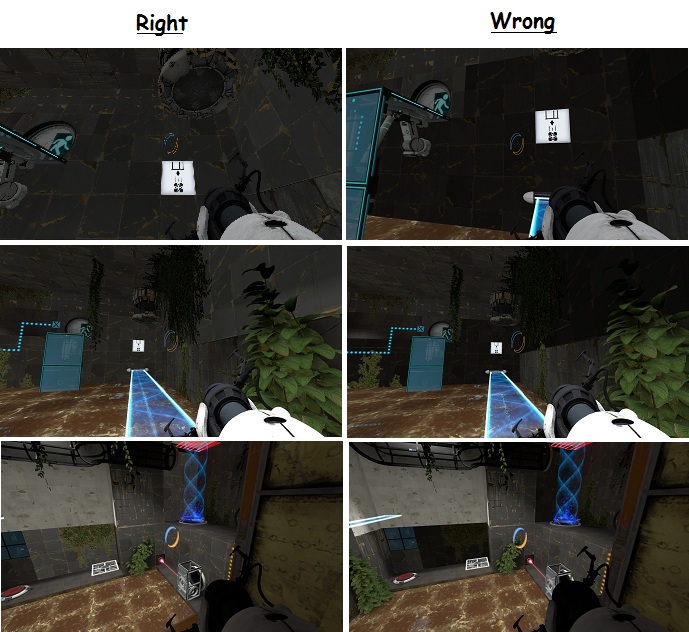

You haven't recalculated the visleafs. This means you most likely need to rebuild your cubemaps. It might also help to have a cube map object in your level.
CaretCaret wrote:
I'm guessing you are using a vertex texture... which you shouldn't, ever.
Yes, first of all check all those textures and make sure none of them has any "_vertex" in the name.
Secondly, it really looks like you didn't build cubemaps as photoborg mentioned, that water looks so odd, it hasn't got any reflections. Read this part of the Wiki to do it correctly.... but if you assign a cubemap to the water brush's top face, place another cubemap in the middle of that room for the rest textures reflection.
Also the lighting is a bit insufficient and that map looks like mat_fullbright. Because of the foliage, I'd say that opening the ceiling and letting any skybox in would look nicer. If not, place some light sources and improve the lighting a bit 
And a final suggestion: when you look at your water surface and see clearly that it looks like the goo is composed by many squares, you can open the face edit sheet, select the brush/es (if more than one hold Ctrl key down and select them all), check the box near "Treat as one" and then click "Fit". It'll look much better 
Moving on...
I did have a couple cubemaps, but I didn't know that the one for water needed to be exclusive. Also, I do have one texture that has vertex in the name, but I don't understand what's so wrong with using it. Before I change that texture, can someone explain why?
Also, I'm afraid of using a skybox since I've never done it before, but I will try it out. As of now, though, I still have that lighting problem.
Thanks for any and all assistance

Vertex textures determine the amount of light on them depending on where you are.
This can be useful for models, but not for walls.
KuroNekoMatt wrote:
I did have a couple cubemaps
OK, but you have to remember that the fact of having them into the map doesn't really mean that they are in use. You have to run the console command 'buildcubemaps' so the engine calculate the reflections and store them inside your bsp. For this you need a copy of your map (.bsp file) inside your portal2_dlc2 folder (and the cubemaps will be stored into THAT .bsp file into portal2_dlc2)
KuroNekoMatt wrote:
Also, I'm afraid of using a skybox since I've never done it before
The easiesst way is to use a 2D skybox. Simply texture some of the ceiling's (or wall's) textures you want with the toolsskybox texture. And select a skybox from the available ones and go to Map Properties > skybox name and put there the skybox name you chose. Eventually you can choose different (custom) skyboxes you can find out there by simply placing the files into portal2/materials/skybox folder (create it if it doesn't exist) and putting its name in map's properties.
Anyway, what I suggested you was to create lighting sources and locate the lights in your map, rather than use that generic way of lighting up... if you prefer not to use a skybox...
Here's the link: http://steamcommunity.com/sharedfiles/f ... d=72996891