Fake leaks in hammer
Hi, i have some issues in hammer (again  )
)
it's in the Portal 2 authoring tools
First : I have problems with the texture "nature/blendrockdirt_tunnel03b", compile with the Vrad this texture have color problem, the texture is white (bug like a model without env_cubemap) but i have put a env_cubemap...
http://cloud.steampowered.com/ugc/54293 ... 9E41F274E/
Second : I put water in the map and i can't see it ingame
third : maybe the most WTF problem , hammer found leaks when he want...(but he compile the map) to fix this i change nodraw textures to skybox texture and vice versa, and hammer have chances to compile the map without leak, but i have to change the textures everytimes and it isn't work everytime :/
have you seen this problems in yours maps ? Can you help me  ?
?

Did you make a WORLD brush, not an entity, with Nodraw on all sides but the top?
Map > Load Pointfile, look for the red line. See if it has anything to do with a nodraw or skybox brush.
About the water, which water material are you using? check if maybe you used a "_beneath" material... or maybe you do have a leak 
The red line go in the middle of a random wall(no entity) why i call this "FAKE LEAK"
@ josepezdj: i use "nature/water_a1_intro3" and isn't a leak
maybe the "chrome problem" and the water are linked ?
Edit: maybe not: http://cloud.steampowered.com/ugc/54293 ... 352D1ACAD/
we can see water here :/
BTW thanks for your answer
Jakiller wrote:
"Map > Load Pointfile, look for the red line. See if it has anything to do with a nodraw or skybox brush."The red line go in the middle of a random wall(no entity) why i call this "FAKE LEAK"
Exactly the same here.... Mine points directly to the center of a world brush. I've recreated it... checked all its surroundings... and everything is ok. Ofc I verifyed the integrity of the game / tools local files and the result was 52 files for each (???) I verifyed it again right 1 sec ago and again, 52 files... I feel like giving up for today, and try again tomorrow....> Jakiller wrote:
@ josepezdj: i use "nature/water_a1_intro3" and isn't a leak
maybe the "chrome problem" and the water are linked ?Edit: maybe not: http://cloud.steampowered.com/ugc/54293 ... 352D1ACAD/
we can see water here :/
Yeah... it shouldn't be related to that... on the other hand, I'm not having issues with the water, and I've checked that material and should work fine. Check the following points:
- You created a nodraw textured solid brush and only put water texture on the top face of that brush.
- That brush is not tied to any entity.
- You placed an env_cubemap on top of that brush separated from it at least 64 units. And you opened the properties of the cubemap and assigned that water textured brush top face to it in "brush face" box by picking and selecting it.
- You added a lod_water_control entity (only one per water level and same visleaf) also above the water and at least 64 units from it, and checked that the transition from cheap to expensive water are not too short distances.
Good luck 

Sometimes leaks can be hard to find, as they arnt obvious. I've had strange things happen with some models before that were causing leaks when they shouldnt have been.
Probably the best way for us to help is, either post your map here for us to look at, or PM me it and I can take a look for you.
Some things that arnt obvious always are that the centre origin point (the little circle graphic normally in the middle of the object) could have been moved far outside the boundaries, or you've used specific textures cant seal leaks.
Rob.
Thanks for your offering but in my case, man, I assure you that it wasn't anything on my end, no models nearby, and no model with uncentered origin... I had to leave my computer all weekend because I was going crazy. Each time I compiled a different leak appeared... and just 1 sec later, no leaks... without modifying anything at all 
I'll start mapping today again, as I've checked that now I don't get 52 or 57 files corrupted after verifying the local files (only a couple of them or none), and everything seems to have gone back to normality...
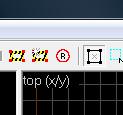
the button
radius_culling.jpg
Mevious wrote:
Make sure you guys have radius culling (the red circle with an R in the middle) unchecked. It will cause things outside of a certain range of the camera to be hidden and not compile causing random leaks.
Damn it! Mevious, that was it  Thank you man I remember reading in some other thread about this same mistake, but I simply forgot to check that icon. I might have clicked that little stupid button at any time accidentally
Mevious wrote:
Make sure you guys have radius culling (the red circle with an R in the middle) unchecked. It will cause things outside of a certain range of the camera to be hidden and not compile causing random leaks.
the button
|| radius_culling.jpg
||
Those icons at the top of the screen have disappeared from my window. I feel like this will make me sound like an idiot, but how do I get it back?
Thanks for that though