[SOLVED] func_instances inaccessable?

Avatar
innocentive
52 Posts
Posted Jan 28, 2013
I haven't been using func_instances in quite a while. Now that I want to Hammer somehow can't process them correctly anymore?!? When I add a vmf filename to the keyvalue of a func_instance firstly the appearance of the func_instance entity in the Hammer windows doesn't change. And when I try and compile the map there's an error message saying: "Could not open instance file instances/gameplay/crusher_ceiling_01.vmf".

I haven't changed the path of the instances folder. I even reinstalled Hammer ... to no avail. The Hammer VMF Directory is "$SteamUserDir\Portal 2\sdk_content\maps". Does anybody know what might cause this behaviour and how I can take care of it?

Advertisement
Registered users don’t see ads! Register now!
Avatar
josepezdj
2,386 Posts
Posted Jan 28, 2013
Replied 1 hour later

innocentive wrote:
When I add a vmf filename to the keyvalue of a func_instance firstly the appearance of the func_instance entity in the Hammer windows doesn't change.

Sometimes, because of lack of memory in some computers, rendering new stuff and showing in the hammer windows is buggy; have you tried to save (even though you can't see the instance), quit hammer and restart it? sometimes, it's just that.

Anyway, are you writing manually the path for the instance? try browsing it with the browser in the "VMF File Name" property instead.

Avatar
innocentive
52 Posts
Posted Jan 28, 2013
Replied 3 minutes later
Did all that... no change! :sad:
Avatar
josepezdj
2,386 Posts
Posted Jan 28, 2013
Replied 4 minutes later
Are your instances physically available into your computer? Maybe is it a problem of accessing that folder by your game (authoring tools)? this could be possible in restrictive settings in Windows7 for example in which you need administrator permissions and such... or maybe because of your antivirus?

Anyway, try validating your local files.

Avatar
innocentive
52 Posts
Posted Jan 28, 2013
Replied 5 minutes later
I didn't just validate local files, I even reinstalled Hammer. And yes, instance vmf files on my pc can be accessed without any problem because I can open them in Hammer. It looks to me that Hammer somehow tries to open the instance files from a different location than the one they're in even though I didn't change anything (or at least I don't recollect doing any change!).
Avatar
Brainstone
401 Posts
Posted Jan 28, 2013
Replied 16 minutes later
Instances are relative to the path of the actual map. Did you save your map in a different location than before?
Avatar
josepezdj
2,386 Posts
Posted Jan 28, 2013
Replied 9 minutes later
That's why I asked you about if you were using the browser to introduce the instance instead of doing manually. I think that if you lead hammer to the corrrect location your instence is in you shouldn't have any problem...

Revise your hammer options and check if you changed the "Hammer VMF Directory":
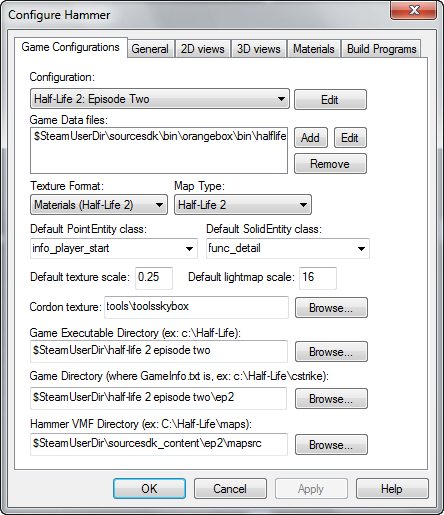
img

Avatar
innocentive
52 Posts
Posted Jan 28, 2013
Replied 6 minutes later

Brainstone wrote:
Instances are relative to the path of the actual map. Did you save your map in a different location than before?

Ah... that's a piece of information that I didn't have. In fact I'm saving my maps on a different hard drive than the one with the Portal and Hammer files. I'm not at home now but I will try later if that's the reason for the error...

Anyway, I did use the browser for the instance file name.

Avatar
Gemarakup
1,183 Posts
Posted Jan 28, 2013
Replied 54 minutes later
That's not good. You should always save your vmf's in sdk content folder. Otherwise instances won't load.
Avatar
Brainstone
401 Posts
Posted Jan 28, 2013
Replied 45 minutes later
That's false. All you need to do is copy the instance folder to the new save location.

However, the best save location is in my opinion the dlc2/maps folder, because if you use this one as default .vmf location, all .bsps will also be created there, what makes it a lot easier to create cubemaps.

Advertisement
Registered users don’t see ads! Register now!
Avatar
innocentive
52 Posts
Posted Jan 28, 2013
Replied 17 minutes later

Brainstone wrote:
That's false. All you need to do is copy the instance folder to the new save location.

That's exactly what I thought and what I'll do. Thanks so much for the immediate advice!

EDIT: Works like a charm ... THANK YOU GUYS!!! :thumbup: :lol: :thumbup: