multiple outputs based on conditions

What I want to achieve is: If I press a button and there are at least 4 (yep, 4) players in an area, it should fire a relay, and if there are less, trigger another. How do I do this?
I've been messing around with counters and stuff, but didn't get anywhere... Thanks

OnEndTouch > counter > Subtract > 1.
OnHitMax > do something.
CamBen wrote:
First of all, how would this relate to portal if it needs to detect 4players?
FelixGriffin wrote:
OnStartTouch > counter > Add > 1.
OnEndTouch > counter > Subtract > 1.
OnHitMax > do something.
Yeah, I got this far. What I can't figure out is that after the counter has maxed out, I need to check if the button is pressed. Or the other way around: if the button is pressed, I need to know if there are at least 4 players.
Seriously there isn't a way to decide if a statement is true or false?
I was actually thinking about this yesterday dawn, so I couldn't really think properly, but I was trying to do it with a second counter, but something felt off about it. If there are no other ideas, I guess I'll look at it again.
EDIT: I could do two buttons for both outcomes and enable-disable them using the player counter. How haven't I thought of this before? I guess next time I shouldn't try to do productive stuff after midnight...
lord_blex wrote:
What I can't figure out is that after the counter has maxed out, I need to check if the button is pressed. Or the other way around: if the button is pressed, I need to know if there are at least 4 players.
That's simply an AND gate.
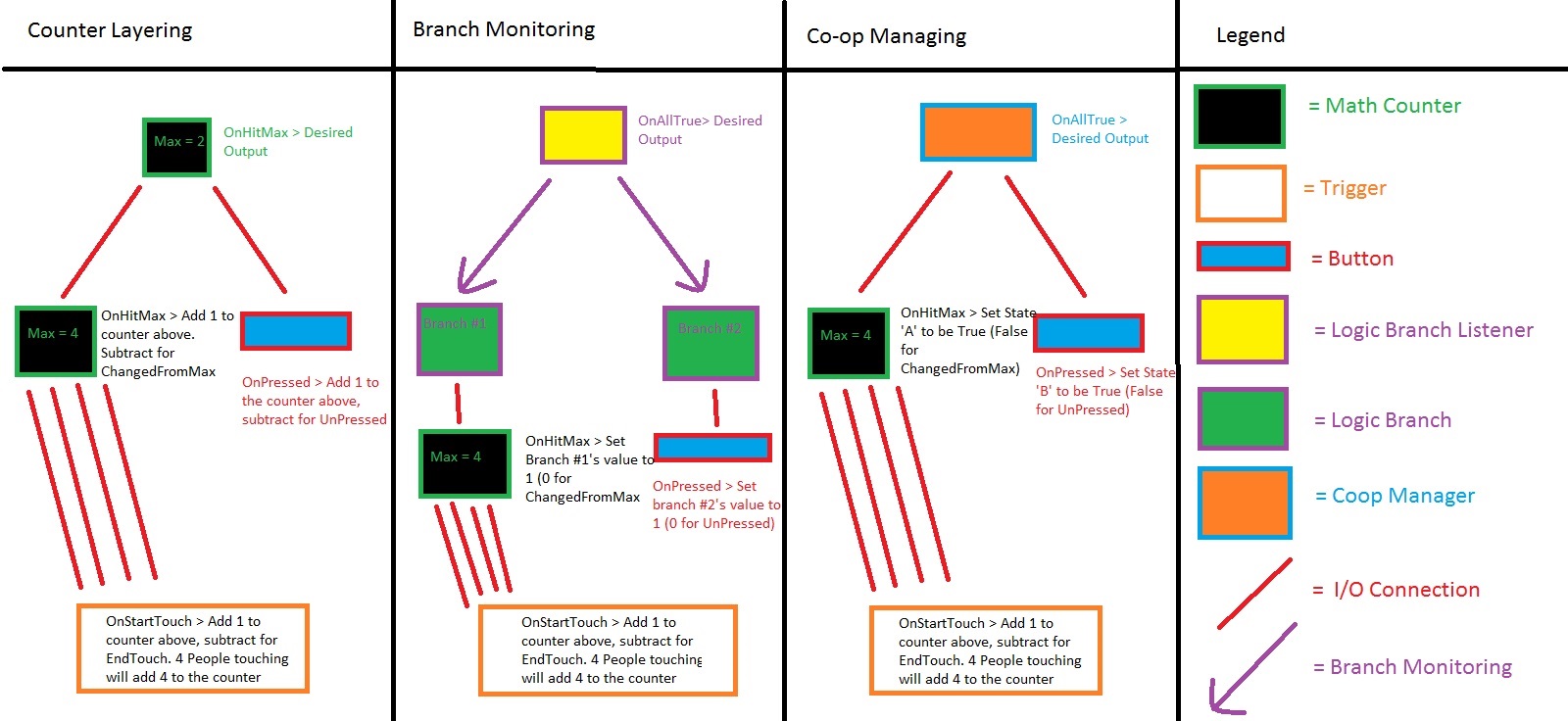
An AND gate can be done in 3 ways (in Hammer):
Counter Layering
||Counter #1:
OnHitMax > counter_2 > Add > 1
OnChangedFromMax > counter_2 > Subtract > 1
Button
*OnPressed > counter_2 > Add > 1
OnUnPressed > counter_2 > Subtract > 1 *
Counter #2
OnHitMax > do something||
BRANCH MONITORING
||Using the logic_branch and logic_branch_listener entities,
Counter #1:
OnHitMax > branch_1> SetValue> 1
OnChangedFromMax > branch_1 > SetValue > 0
Button
OnPressed > branch_2 > SetValue > 1
OnUnPressed > branch_2 > SetValue > 0
Logic Branch Monitor
Logic Branch 01: branch_1
Logic Branch 02: branch_2
OnAllTrue > Do something
OnMixed/AllFalse > Don't do something||
COOP MANAGING
||Using the coop_manager entity,
Counter #1:
OnHitMax > coop_manager> SetStateATrue
OnChangedFromMax > coop_manager > SetStateAFalse
Button
OnPressed > coop_manager > SetStateBTrue
OnUnPressed > coop_manager > SetStateBFalse
Coop Manager
OnAllTrue > Do something
OnMixed/AllFalse > Don't do something||
Those all work for what (it seems) you're trying to do.
EDIT: You can also look at this diagram
|
|
V

I still have one problem though. I just realized, that the counter caps at the max value, right? So if the value is already 4, it can't go up one more. Which is all fine, if you play the map in ideal circumstances. But if let's say there are 5 players total in the map and they all enter the trigger, the counter caps at 4. Then one player exits and it will say 3, but there are still 4 players there..
I'm just making this more and more complicated
1. Simply make the Max Value 5. Of course, this assumes there's SUPPOSED to be 5 players in the trigger. If there's meant to be one on a button or something, then this wouldn't work.
2. Maybe these settings on the button?
*OnPressed > Counter > SetMaxValue > 4 > Delay 0.1
OnUnPressed > Counter > SetMaxValue> (something unattainable, e.g. 10) *
Theoretically, changing the MaxValue with the button means it won't fire the output until it has the correct conditions.
I also did an "else-thingy" (a relay which activates if you press the button and there aren't enough players in the area) with another counter, it seems to be working as well. I almost started asking about it, but as I started to write the question, I figured out how to do it.
On a sort of related note: How do I get game_text work properly in multiplayer? It only shows up for one player, even if I set the all players flag. (still on splitscreen, but I assume it's no different in actual online multiplayer)Or should I use another entity?
EDIT: Nevermind, env_message doesn't work (as far as I know).
lord_blex wrote:
On a sort of related note: How do I get game_text work properly in multiplayer? It only shows up for one player, even if I set the all players flag. (still on splitscreen, but I assume it's no different in actual online multiplayer)Or should I use another entity?
Game_text work for the entire screen; not per player; so as long as you have the all players flag checked it shows up for all players. On splitscreen however the texts are overlapping thus you'll only see one.
As for the cases; I would go for a combination of a trigger_multiple, math_counter, a logic_case and a coop_manager:
A trigger multiple:
OnStartTouch; math_counter; add; 1
OnEndTouch; math_counter; subtract; 1
A math_counter:
Outvalue; logic_case; Invalue
logic_case:
set the value "3" for case01
set the value "4" for case02
OnCase01; coop_manager; setstateafalse
oncase02; coop_manager; setstateatrue
button
onpressed; coop_manager; setstatebtrue
onbuttonreset; coop_manager; setstatebfalse
coop_manager:
onchangetoalltrue (DO STUFF)
onchangetoanyfalse (STOP DOING STUFF)
Hope that helps 
But I have something working now, so I don't really wanna mess it up. Unless it proves to be non-functioning - then I will get back to this
Lpfreaky90 wrote:
I would go for...a logic_case
Of course! Why didn't I think of that >.<
math_counter is the new ducttape