PTI element: Dice signages (1?4 dots)

Click to zoom.
Dice-box signages. Been wanting to use them in the editor for quite a while.
Download: http://bisqwit.iki.fi/kala/ptal2/dice_signages.zip
To use, place the element on ground. Use the "Cube type" option to select the type of sign.
Standard = 1 dot
Companion = 2 dots
Sphere = 3 dots
Franken = 4 dots
The element can be moved around within the voxel the same way as lightpanels can.
Use Reflective, if you want to rotate the dot around (to place it in a diagonal orientation), before assigning it the correct type and place.
Still needs in-editor graphics for this.


Thanks for sharing, I will try it when I work on my next map.
But I can already say, that this is a really good idea. 
FelixGriffin wrote:
Looks very nice! You should make these act as AND gates, so that people can see the progress they're making on a certain stage of the puzzle.
I'm not sure what kind function you are suggesting.
Do you mean an input that would change the color of the sign?
Sorry, I don't think I know how to do that.
If you want to toggle the texture itself:
https://developer.valvesoftware.com/wik ... turetoggle
But you would need a vmt + vtf with the different textures to switch between, then.
I think Felix was suggesting to use them as an AND gate, which means:
- 1 must be activated in order to activate 2
- 2 must be activated in order to activate 3 ... etc.
Did I get you right, Felix? 
Re: Toggling textures, there are no differently-colored versions of those textures in the game data.
I meant that making them act as AND gates would allow lots of antlines to attach to check boxes around the sign, then one antline to lead away to the next thing. It would just be a nice visual indicator.
EDIT: AAND I put it in wrong category. Now it's in Portal 1 section. How was I to know what is the difference between the two "Other Files" selections...? Even the help text did not explain it.
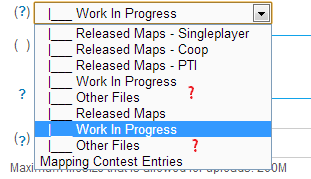
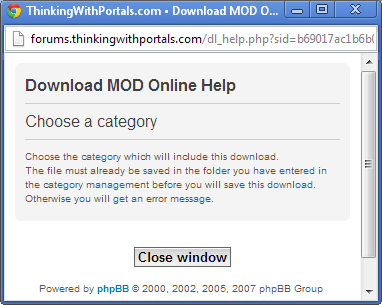
Bah. How do I change the category? Admin? Moderator? Database wizard? MySQL commandline!
yishbarr wrote:
Wut. You could have just looked at the download categories without using the dropdown menu.
By "download categories" I assume you mean something other than information presented on that form.
Because when I e.g. click "Upload a file" on downloads.php?cat=9 (a URL helpfully suggested to me by someone as a starting point for uploading stuff to the Downloads section), it presents me with the form where I must choose something from the dropdown menu.
Newbie mistakes, I know. I am a newbie, and I make mistakes. Never visited the "download categories" before, never knew to do that. The form was confusing and did not provide necessary information to complete it, nor did it suggest to go somewhere elsewhere to look for the instructions. In my books, not knowing something is not a sin. Now, how to fix the category?
You should be able to edit the download yourself and choose the correct category. Follow your download link, then select "edit" in the top-right corner of the page. Then change the category and press "submit" at the bottom. (You don't need to re-upload the file.)
We know that there are some strange things in the forums; thanks for pointing this out.
If you browse to the download database you should be able to upload it in the appropriate section. We know how confusing the form can be and we tried and try to come up with something that works better but it's hard to get it working in a better fashion due to the complexity of the system.
If you upload from a category the correct section should already be picked for you.
As for what HMW said; I'm quite sure that's impossible unless you're a moderator or admin on this website. Just sent the Global moderators A private message and we'll move it for you
Kind regards,
Lp
HMW wrote:
You should be able to edit the download yourself and choose the correct category. Follow your download link, then select "edit" in the top-right corner of the page. Then change the category and press "submit" at the bottom. (You don't need to re-upload the file.)
I agree on the word "should"....
But when I click "edit", the category selection box does not appear on the form.
Thanks Lpfreaky90!