Ben and August’s Extended Editor (BEEMOD) & BEE2
FelixGriffin wrote:
But since there isn't actually a wall there it would be placed on the floor, bringing back the same problem we have now.
What am I missing here? What do you mean by "no wall" next to the door? Screenshot? 
The door is between 3 wall parts, top and sides.
So you place the invisible item on the wall you want and rotate it as you need it.
Even if the door would be in the middle of a 128x128 block you could still place the
invisble item wherever you want...

What I mean is an element that you embed in the wall and which actually removes the voxel it is embedded into.
I tried it a bit, but I couldn't figure out how to 1. have the puzzlemaker not create metal embed-walls inside the embedding square and 2. remove the back wall surface.
As for changing antline attachments without changing the element, I tried altering the antline coordinates and positions a bit, but the best I could make is signages that are "floating" up in air beside the door, but they are still facing up as if they were on the floor. Looks like the editor doesn't support changing the plane of signages.
Yes, one solution (that I really often use) is to put Ben's Logic AND elements on the walls right inside the same square where the door is standing, and connect the antlines into those AND elements. However, when you want to have some antlines going to the front, some to the left, some to the right, there is inconsistency, if some of them don't include "X" symbol that comes only when multiple antlines connect to the same target. If you have four connections, one going to the left side (AND element), one to the right side (another AND element), and two going to the front (door itself), you get X'es on the two going to the front, but not on the ones going to the sides.
Hmm... What if there was an invisible logic connection element that could be placed next to the door, i.e. on its left side or its right side, which would be "embedded" on the wall on the side of the door, standing on the wall surface much like the Portal Magnet or the Flip Panel, but instead of rendering its signages around the element itself, the signages would be offset by one wall-unit, i.e. it would render its signages around the next element -- around the door? Could this work?
Or does the editor have a restriction that the signages cannot be offseted too far off? Earlier I tried making six parallel signage points in front of the door on the floor, but any signages I tried placing on the floor that were not directly in front of the door (i.e. they were diagonally ahead from the door), caused the editor to crash...

Bisqwit wrote:
Is it possible to create a wall-embedded object that actually makes a passage through the wall?
What I mean is an element that you embed in the wall and which actually removes the voxel it is embedded into.
I tried it a bit, but I couldn't figure out how to 1. have the puzzlemaker not create metal embed-walls inside the embedding square and 2. remove the back wall surface.As for changing antline attachments without changing the element, I tried altering the antline coordinates and positions a bit, but the best I could make is signages that are "floating" up in air beside the door, but they are still facing up as if they were on the floor. Looks like the editor doesn't support changing the plane of signages.
Yes, one solution (that I really often use) is to put Ben's Logic AND elements on the walls right inside the same square where the door is standing, and connect the antlines into those AND elements. However, when you want to have some antlines going to the front, some to the left, some to the right, there is inconsistency, if some of them don't include "X" symbol that comes only when multiple antlines connect to the same target. If you have four connections, one going to the left side (AND element), one to the right side (another AND element), and two going to the front (door itself), you get X'es on the two going to the front, but not on the ones going to the sides.
Hmm... What if there was an invisible logic connection element that could be placed next to the door, i.e. on its left side or its right side, which would be "embedded" on the wall on the side of the door, standing on the wall surface much like the Portal Magnet or the Flip Panel, but instead of rendering its signages around the element itself, the signages would be offset by one wall-unit, i.e. it would render its signages around the next element -- around the door? Could this work?
Or does the editor have a restriction that the signages cannot be offseted too far off? Earlier I tried making six parallel signage points in front of the door on the floor, but any signages I tried placing on the floor that were not directly in front of the door (i.e. they were diagonally ahead from the door), caused the editor to crash...
For the first idea, Ben and I were discussing this over at the Steam community forums a while ago:
BenVlodgi wrote:
TeamSpen210 wrote:It might work better if it were placed like the PTI entry/exit sections, occupying one voxel and set to take up the front as well as a surface recessed one block in, so you place it on a one block thick surface and the PTI makes a straight hole through. That might work, if you can specify surface occupation like that. It'd have to be a different item, though.
I originally had it like this, however it wasn't apparent to the user that they had to make a room on the other side or else the map wouldn't compile, and they wouldn't know why not... people also wanted to be able to place where the door went inside the voxel, and with the door taking up a whole voxel in the editor, you can't place a fizzler right after it, which a lot of people wanted. You are correct though, this would have been super easy, because most of the code could have been copied right from the exit door.
I won't be changing any of the original BEE items, just adding new ones, however anyone is free to add new ones like this different door. I may even make a version of it, however right now I'm just trying to sew up all the loose ends on the software side
The metal sides that the editor makes are there to seal leaks and ensure the sides of that wall-cube, if exposed are the correct portalability settings. It could be possible to make something that wires to a block beside it, the stair item does so an it is rotatable. I did have an idea like this, which was a placeable indicator panel item. It would be positioned like a light strip and behave like an AND gate.
FelixGriffin wrote:
Yes, but then you couldn't place it next to glass or gratings.
I don't think that should matter, and it's more according to the designer of the map as it's better than nothing. (Unless, you have a better idea).
And, I just tried this.
Bisqwit wrote:
Hmm... What if there was an invisible logic connection element that could be placed next to the door, i.e. on its left side or its right side, which would be "embedded" on the wall on the side of the door, standing on the wall surface much like the Portal Magnet or the Flip Panel, but instead of rendering its signages around the element itself, the signages would be offset by one wall-unit, i.e. it would render its signages around the next element -- around the door? Could this work?
Or does the editor have a restriction that the signages cannot be offseted too far off? Earlier I tried making six parallel signage points in front of the door on the floor, but any signages I tried placing on the floor that were not directly in front of the door (i.e. they were diagonally ahead from the door), caused the editor to crash...
Doesn't work. Portal 2 crashes when it tries to attach signages outside the voxels directly connected into the element.
Very well.
I changed the connection points for the AND gate, so that at least you can now put four signs parallel, rather than just two.
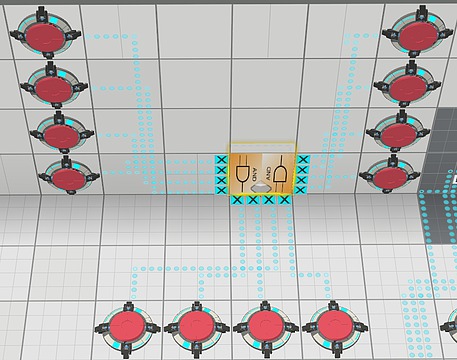
To hide the antline between the AND gates and the door, a third AND gate is used, into which the two other AND gates are connected, and third third gate is set to Hide connections and it connects into the door.
This hogs so many entities, but... You do what you have to do.
         "ConnectionPoints"
         {
            // bottom edge left to right
            "Point"
            {
               "Dir"            "1 0 0"
               "Pos"            "-1 6 0"
               "SignageOffset"      "-2 7 0"
               "Priority"  "0"
               "GroupID"   "0"
            }
            "Point"
            {
               "Dir"            "1 0 0"
               "Pos"            "-1 4 0"
               "SignageOffset"      "-2 5 0"
               "Priority"  "1"
               "GroupID"   "0"
            }
            "Point"
            {
               "Dir"            "1 0 0"
               "Pos"            "-1 2 0"
               "SignageOffset"      "-2 3 0"
               "Priority"  "2"
               "GroupID"   "0"
            }
            "Point"
            {
               "Dir"            "1 0 0"
               "Pos"            "-1 0 0"
               "SignageOffset"      "-2 1 0"
               "Priority"  "3"
               "GroupID"   "0"
            }

            // top edge left to right
            "Point"
            {
               "Dir"            "-1 0 0"
               "Pos"            "8 6 0"
               "SignageOffset"      "9 7 0"
               "Priority"  "1"
               "GroupID"   "3"
            }
            "Point"
            {
               "Dir"            "-1 0 0"
               "Pos"            "8 4 0"
               "SignageOffset"      "9 5 0"
               "Priority"  "1"
               "GroupID"   "3"
            }
            "Point"
            {
               "Dir"            "-1 0 0"
               "Pos"            "8 2 0"
               "SignageOffset"      "9 3 0"
               "Priority"  "1"
               "GroupID"   "3"
            }
            "Point"
            {
               "Dir"            "-1 0 0"
               "Pos"            "8 0 0"
               "SignageOffset"      "9 1 0"
               "Priority"  "1"
               "GroupID"   "3"
            }

            // left edge top to bottom
            "Point"
            {
               "Dir"            "0 1 0"
               "Pos"            "6 -1 0"
               "SignageOffset"      "7 -2 0"
               "Priority"  "0"
               "GroupID"   "1"
            }
            "Point"
            {
               "Dir"            "0 1 0"
               "Pos"            "4 -1 0"
               "SignageOffset"      "5 -2 0"
               "Priority"  "1"
               "GroupID"   "1"
            }
            "Point"
            {
               "Dir"            "0 1 0"
               "Pos"            "2 -1 0"
               "SignageOffset"      "3 -2 0"
               "Priority"  "2"
               "GroupID"   "1"
            }
            "Point"
            {
               "Dir"            "0 1 0"
               "Pos"            "0 -1 0"
               "SignageOffset"      "1 -2 0"
               "Priority"  "3"
               "GroupID"   "1"
            }

            // right edge top to bottom
            "Point"
            {
               "Dir"            "0 -1 0"
               "Pos"            "6 8 0"
               "SignageOffset"      "7 9 0"
               "Priority"  "0"
               "GroupID"   "2"
            }
            "Point"
            {
               "Dir"            "0 -1 0"
               "Pos"            "4 8 0"
               "SignageOffset"      "5 9 0"
               "Priority"  "1"
               "GroupID"   "2"
            }
            "Point"
            {
               "Dir"            "0 -1 0"
               "Pos"            "2 8 0"
               "SignageOffset"      "3 9 0"
               "Priority"  "2"
               "GroupID"   "2"
            }
            "Point"
            {
               "Dir"            "0 -1 0"
               "Pos"            "0 8 0"
               "SignageOffset"      "1 9 0"
               "Priority"  "3"
               "GroupID"   "2"
            }

         }
Bisqwit wrote:
You do what you have to do.
You mean, place a door in Hammer?
FelixGriffin wrote:
Bisqwit wrote:You do what you have to do.
You mean, place a door in Hammer?
That would work, if you were ready to forfeit editability in Puzzlemaker. Which I am not.
yishbarr wrote:
Don't take risks.
jcdwalle wrote:
Any updates on when beemod 2.0 comes out?
the beta should be out tomorrow
should
I've been trying to use BEE mod and have 1 problem. When I walk over the trigger, the panel which is connected to it doesn't make a sound.
I would like to know is this a bug, or just problem on my end. Thanks.

TeamSpen210 wrote:
PTI angled panels never make sounds. All the buttons and laser recievers make sounds, so you probably didn't notice. BEEMOD drawbridges do make sounds, though.
Well, now I feel dumb. Thanks for explaining, though.
BenVlodgi wrote:
the beta should be out tomorrow
should
About to fly out of my seat like a slicked turret dropped onto repulsion gel

Would be nice to get an update on how the mod is coming along though.