New Puzzle Item Icon Glitch, Help

Avatar
CamBen
973 Posts
Posted May 11, 2013
So, I was trying to make neurotoxin for the PTI editor, and the instance works great. However, my path in editoritems.txt pointing to an icon that is in the same exact place as the other icons, is not taking effect. In the game, it shows up as the regular purple-black checkerboard texture, even though I checked the spelling and the path. When I changed the icon to the frankenturret, it worked. So, I cannot seem to get any custom icons for the new element working, even using vmt and vtf files.

            "Palette"
            {
               "Tooltip"   "Neurotoxin Timer"
               "Image"      "palette/panel_toxin.png"
               "Position"   "0 3 0"
            }

Here is the placeholder picture I am trying use till I can get a better one:
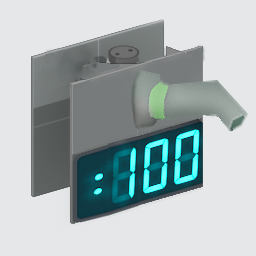
Images 1
Post image 1
Advertisement
Registered users don’t see ads! Register now!
Avatar
FelixGriffin
2,680 Posts
Posted May 11, 2013
Replied 54 minutes later
This is really stupid, but the editor doesn't use those PNG files. It uses almost-identical (but higher-resolution) VTF files from materials/models/puzzlemaker/palette, which are all packed in the VPK.
Avatar
CamBen
973 Posts
Posted May 11, 2013
Replied 43 minutes later
Wow, that is ridiculous! :lol: Oh well, thanks for the help!
Avatar
FelixGriffin
2,680 Posts
Posted May 11, 2013
Replied 6 hours later
You should be able to fix it by just taking the VTF you made and putting it in materials/models/puzzlemaker/palette IIRC.
Avatar
Lpfreaky90
2,842 Posts
Posted May 12, 2013
Replied 8 hours later
Well, unfortunately source doesn't support png/jpg/tga so to be honest; shouldn't be too surprising that you can't use the png :razz:

It's probably included for the sake of making it easy to make different icons so you have a simple base reference.

The same goes for subtitles; they're included as .txt files; but the game uses compiled versions in .dat files. Once again; makes an easy comparison.

Avatar
Gemarakup
1,183 Posts
Posted May 12, 2013
Replied 1 hour later
What's weird that the portal 2 logo on the main menu uses a VMT. :potd:
Avatar
Lpfreaky90
2,842 Posts
Posted May 12, 2013
Replied 2 hours later

yishbarr wrote:
What's weird that the portal 2 logo on the main menu uses a VMT. :potd:

vtf's are the actual textures, they are the actual images; the vmt's are the materials, they give properties like material type, transparency etc.
Basically every texture that needs to be used in game as a texture needs a vmt.

Avatar
FelixGriffin
2,680 Posts
Posted May 12, 2013
Replied 28 minutes later
The really weird thing about those PNGs is that they're smaller than the VTFs and off-color.
Avatar
Gemarakup
1,183 Posts
Posted May 12, 2013
Replied 1 hour later

Lpfreaky90 wrote:
yishbarr wrote:

What's weird that the portal 2 logo on the main menu uses a VMT. :potd:

vtf's are the actual textures, they are the actual images; the vmt's are the materials, they give properties like material type, transparency etc.
Basically every texture that needs to be used in game as a texture needs a vmt.

I know that, but a non in game texture needs to have an unlit generic vmt.

Avatar
FelixGriffin
2,680 Posts
Posted May 12, 2013
Replied 7 hours later
These ones are just pure VTFs, no VMTs. I don't know why the main menu ones still use UnlitGeneric VMTs.
Avatar
krishiv2
23 Posts
Posted Jul 21, 2013
Replied 2 months later
Just when your game starts the valve logo comes then source logo comes,below the source logo read the text.
Avatar
Gemarakup
1,183 Posts
Posted Jul 21, 2013
Replied 2 hours later

krishiv2 wrote:
Just when your game starts the valve logo comes then source logo comes,below the source logo read the text.

Krishiv2, please stop posting in outdated threads. I understand that you want to "be in the buisness" but you're not really posting things on-topic anyways. If there's a thread like this that has to do with solving problems and has been solved already, don't post in it unless it has to do with the soloution not working for you.

Avatar
radelite
121 Posts
Posted Sep 26, 2013
Replied 2 months later
Thanks for posting this guys it should help me alot but there is something I would like to know concerning 3ds files is there a way of turning vmf files into 3ds
Advertisement
Registered users don’t see ads! Register now!
Avatar
FelixGriffin
2,680 Posts
Posted Sep 26, 2013
Replied 29 minutes later
Yes, I suppose, but it's not very elegant. Turn it into an SMD with Propper, then import the SMD into Blender and re-export as a 3DS.

If you have more questions about this you should start a new thread, it's rather tangential to the original discussion here.
