Black and Pink Checkerboard Patterns on Downloaded Maps?

Avatar
firemario1
7 Posts
Posted Feb 14, 2008
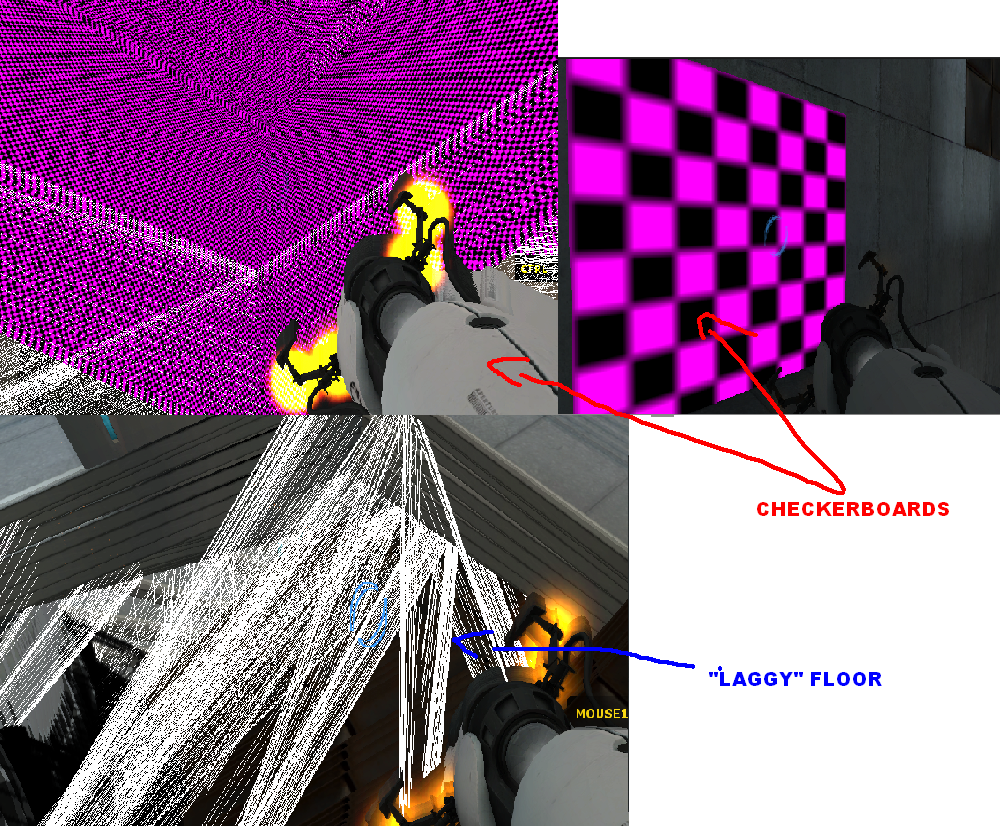
I'm a huge fan of Portal, and found out recently about this site. I've downloaded a few maps, and on most of them, a message will appear before playing it, and black and pink checkerboard patterns will appear on some surfaces, making it impossible to navigate. There will also be areas where if you move in front of the area, images will be "smeared" across the area, like when you noclip to far off the map.

An example of this is in this map.
http://forums.thinking.withportals.com/viewtopic.php?t=789

These maps look really enjoyable to play, so any answers would be helpful.

Advertisement
Registered users don't see ads! Register now!
Avatar
Duffers
474 Posts
Posted Feb 14, 2008
Replied 19 minutes later

firemario1 wrote:
I'm a huge fan of Portal, and found out recently about this site. I've downloaded a few maps, and on most of them, a message will appear before playing it, and black and pink checkerboard patterns will appear on some surfaces, making it impossible to navigate. There will also be areas where if you move in front of the area, images will be "smeared" across the area, like when you noclip to far off the map.

An example of this is in this map.
http://forums.thinking.withportals.com/viewtopic.php?t=789

These maps look really enjoyable to play, so any answers would be helpful.

Are you using a legit version of portal?

Avatar
firemario1
7 Posts
Posted Feb 14, 2008
Replied 9 minutes later

Duffedwaffe wrote:
Are you using a legit version of portal?

Straight out of the Orange Box.
Avatar
firemario1
7 Posts
Posted Feb 14, 2008
Replied 9 minutes later
Here are a few examples of what I see in game. (sorry for the size)

Avatar
msleeper
4,095 Posts
Member
Posted Feb 14, 2008
Replied 25 minutes later
Are you sure that developer 1 or 2 or 3 isn't set? That looks like some sort of wireframe developer mode.

As for the materials, are you sure that you've followed the proper installation instructions for custom maps such as where to place the material files? Try posting the console log when you start up the map, there should be a bunch of red lines that say something about missing materials.

Avatar
taco
504 Posts
Posted Feb 14, 2008
Replied 2 hours later
"Laggy Floor" looks like your video drivers are out of date.
Avatar
Hurricaaane
189 Posts
Posted Feb 15, 2008
Replied 14 hours later
The laggy floor is the combinaison of a missing texture that renders like nodraw and a missing something else. It's a diagonal wireframe that displays when a texture is missing (no need for developer mode) but i forgot in what case.
Avatar
NykO18
183 Posts
Posted Feb 15, 2008
Replied 45 minutes later

Hurricaaane wrote:
The laggy floor is the combinaison of a missing texture that renders like nodraw and a missing something else. It's a diagonal wireframe that displays when a texture is missing (no need for developer mode) but i forgot in what case.

Usually when you're using an invalid shader or a shader that was not meant to be used on that kind of surface. Stick with LightmappedGeneric, UnlitGeneric and VertexLitGeneric.
Avatar
firemario1
7 Posts
Posted Feb 15, 2008
Replied 17 minutes later
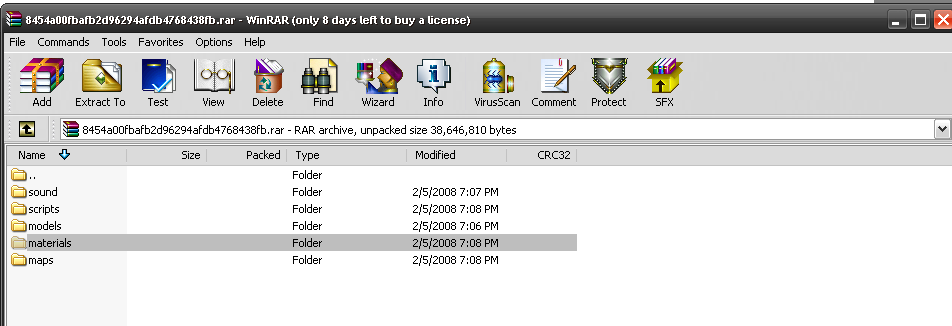
Maybe something that was included in the .rar file may help? I was looking through the materials, and I have no idea what to do with them.

Avatar
Tigger
100 Posts
Posted Feb 15, 2008
Replied 2 hours later
Make sure when you unzip the file you keep the directory structure and follow the install instructions. Normally you unpak the entire archive into the SteamApps\portal\portal folder. So the contents of the materials folder in the pak would go into the materials folder on your disk.

You might also check to make sure you have the latest version of your video drivers installed. There is a remote possibility your current drivers or your card can't handle the textures.

Avatar
NykO18
183 Posts
Posted Feb 15, 2008
Replied 45 minutes later
Hum, Steam tells you when your video drivers are outdated.
But I doubt that it's his problem, my video drivers are 18 month old, and I have no problem running everything Steam-related.
Avatar
firemario1
7 Posts
Posted Feb 15, 2008
Replied 16 minutes later

Tigger wrote:
Make sure when you unzip the file you keep the directory structure and follow the install instructions. Normally you unpak the entire archive into the SteamApps\portal\portal folder. So the contents of the materials folder in the pak would go into the materials folder on your disk.

That did it!

I was just importing all the files straight to the Maps folder.

Thanks! And now onto the game itself...

Advertisement
Registered users don't see ads! Register now!
Avatar
Cooper
129 Posts
Posted Mar 28, 2008
Replied 1 month later
I have a similar problem when I play some maps, mainly for specific textures used in the PMK Map Pack, such as the blue and red door textures in one of the bonus maps. Its not a huge problem, but it kinda ruins the atmosphere of the game.
