Custom "pedestal button" with 4 skins + Example Instances
by josepezdj · Uploaded Feb 24, 2014
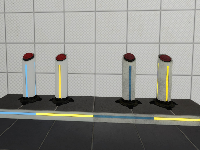
File Size: 1.54 MB
Downloads: 91
Rating: 5.0 (4 votes)
Description
This is a custom model based on the stock "pedestal button" but with 4 skins: I just decompiled the stock model and edited the .QC file to recompile it again with more textures. This was requested to me by Srs Bsnss and I thought somebody else in the community could be interested in it as well. This is a pack that includes the following: 1. A custom model based in the stock "pedestal button" (switch.MDL) with 4 skins instead of 2: - Skin 0 = Clean button OFF (blue lines) - Skin 1 = Dirty button OFF (blue lines) - Skin 2 = Clean button ON (yellow lines) - Skin 3 = Dirty button ON (yellow lines) 2. A custom animated texture with 4 frames to match the button type and state. These are: Clean ON and OFF, and Dirty ON and OFF. 3. An instance called "custom_prop_button.vmf" emulating the prop_button Portal2 entity, where you can select the value of the following variables: - Button_reset_delay = you can enter whatever float value (a number with decimals) or integers. This value determines the time for the button to reset and go back to the initial state. - Button_type = "0" is the clean one while "1" is the dirty model. Note that the pedestal skins will change as well accordingly in this instance - Play_timer_sound = "0" means not to play it, while "1" means to do. It will play or not the classical "tick-tack" sound. - Prevent_fast_reset = "0" means no, and "1" means yes. This will prevent the player from pressing the button again while it's still into the "reset_delay" time set before. 4. An example map in the case you need help with setting the button up into hammer. 5. The decompiled files (the .QC file and the .SMD files) for anyone interested in changing something in the model or adding even more skins and whatnot... INSTRUCTIONS - There's a folder inside the zipped file you downloaded called "portal 2", this folder and its structure inside is exactly as the one you have in your computer, so just copy the folder "portal 2" on the "Steam/SteamApps/Common" folder, and everything will go to its right place. - The custom button model is named "switch_4skins.mdl" and it is located under /models/props/ folder - The model's textures are located into /materials/models/props/ folder - The custom texture jose_button_frame_alpha(.VMT and .VTF) for the pedestal base goes into /materials/josepezdj/detail/ folder - The instance with the example button is into sdk_content/maps/instances/josepezdj/ folder - The example map (.VMF and .BSP) into sdk_content/maps/ folder NOTE Don't forget to give it a NAME to your func_instance into hammer when you use the custom instance "custom_prop_button.vmf" for its I/O to work properly Do not hesitate to ask me anything related to this content. Cheers! jose ChangeLog v1.1 - I improved the button textures tweaking a bit the alpha channel in order to get the right self-illumination - I added the corresponding (multi-framed) texture for the button's pedestal itself including the 4 skins/frames (clean-dirty / on-off) v1.2 - I added 2 more variables to the button instance: the "prevent fast reset" feature, and the possibility to play the timer sound.

Comments
Sign in to comment.
I was wondering when you'd upload this  These buttons are a small detail that can really add a lot to the map (at the cost of a couple minutes setting it up); I totally recommend them!
I guess I was too early. This is what I've wanted for some time, and I stole it from srs bsnss's map to look at. Thanks. I guess I should learn to recompile and make textures.
Thanks for your comments guys! 
I've updated the pack with better textures for the button model, and also including the pedestal skins into a multi-framed texture called "jose_button_frame_alpha".
Srs, you already know this texture, but the included one into this pack is improved, you'll like it a lot 
I should have known that sooner. Is that the glowing base? Also, I noticed the buttons were brighter than usual. Is that what you fixed?
yishbarr wrote:
I should have known that sooner. Is that the glowing base?
Yes, I called that a "pedestal" because of the 'pedestal button'... I made the clean version for Srs a while back, and I thought it would be a nice touch to include it into this release. I made the dirty versions yesterday because I didn't like the dirty buttons with the clean pedestals >.< Now they match perfectly
yishbarr wrote:
Also, I noticed the buttons were brighter than usual. Is that what you fixed?
Yup, I also noticed the clean buttons were much brighter than the stock ones (although I did like them :p), so I remade the textures letting almost no self-illumination on the button, but only on the 'light strips' they have, in order to let them glow in the dark (more the clean ones than the dirty ones).
I hope you use some of this!
Always wondered why Valve did not do this in Stock Portal 2 since everything else follows the Blue and Orange/Yellow toggle. Awesome though.
Also please fix your tags.
reepblue wrote:
Awesome though
Thanks mate!
reepblue wrote:
Also please fix your tags.
Do you mean the screenshot's url tags in the topic? If so, I can't do that myself, but moderators It's showing properly on the download page though.
A very neat idea! I never really thought about it, but they DO look really nice. Maybe I'll use this strategy to add skins, rather than bother with replacing one via a portal2_dlc# folder. That gets annoying, especially when you manage seven of them.
CJLERCH wrote:
Maybe I'll use this strategy to add skins, rather than bother with replacing one via a portal2_dlc# folder
This "strategy" involves decompiling, editing models' .QC files and recompiling... be aware that not all the models are this easy to decompile/recompile though. Also, if you only want to replace some of the stock textures for models, you can always hex the model instead May I ask what custom materials are you needing to introduce in the game with the extra dlc folders?
The glowing base shows as a checkerboard. I don't know what I'm missing. Can you also make an instance that allows fast reset?
yishbarr wrote:
The glowing base shows as a checkerboard. I don't know what I'm missing
Make sure the custom files 'jose_button_frame_alpha.VTF' and 'jose_button_frame_alpha.VMT' are inside your /materials/josepezdj/detail/ folder.
yishbarr wrote:
Can you also make an instance that allows fast reset?
Yes, any other request before I make it?
Mmm, maybe not for now.
EDIT: can you add a skin input for the button instance? I could use that, since I want to make my buttons fancy.
yishbarr wrote:
EDIT: can you add a skin input for the button instance? I could use that, since I want to make my buttons fancy.
I don't really know what you mean. The custom model that is included in this release needs to be used as a prop_dynamic (as Srs Bsnss told you in the other thread). Therefore, the input Skin is available already But do not mix this with the prop_button entity, ok?
Can you please let me know what do you mean exactly by 'to make my buttons fancy'? is it that you would like to use your own custom skins? because you can already do that by replacing mine.
Doesn't matter. I'll add it on my own. What I wanted to do is to make the lights on the button flash together with the timer if you know what I mean.
Also, I'm pretty sure I installed stuff properly by just dropping the materials folder in. I'll check.
OK, you got it. Version 1.2 up Changes above, on the description.
yishbarr wrote:
What I wanted to do is to make the lights on the button flash together with the timer if you know what I mean.
Hehe... interesting, if I got your meaning... The only thing I can think of to achieve that effect is to create more than just 4 frames for the custom material 'jose_button_frame_alpha.VTF' and fake a fade in-out effect or something similar. Send me a pm if you think I can help you out on that, but let's leave the instance as it is now... I think now it's pretty complete! 

The model looks really nice! With your instance, you can use the not-in-FGD keyvalues RenderMode 10 and Solid 0 to make prop_buttons nonsolid and invisible, saving on a lot of logic. RenderMode actually works on a lot of entities, and doesn't affect any special effects, letting you make things like tractor beams without a visible source.
@TeamSpen210: LOL, you're right! Thanks for the tip, mate! However, now that I took the time to create this instance I'll leave it like this, full of logic entities >.<
Cheers!
EDIT
In my defense I'll say that some of the entities are killed on map spawn after the chosen variables have been set up :p
Jose, I'll tell you what the problem with the base texture is. You didn't put it in the download... Also, the button instance never changed.
Man, it's not my fault, this has happened someother times with the uploads on TWP: even though I try to upload the latest file, it doesn't update the file, but keeps on using the previous one >.<
Here there's the latest pack. I'll try to continue updating though.
EDIT
OK, it should be fixed now thanks to LPFreaky I should rename the zipped file before uploading it so that the download database thinks the file is new and update it.
I thinl you're meant to upload it as a different file name.
EDIT: I just saw what you wrote. Thanks.
josepezdj wrote:
CJLERCH wrote:Maybe I'll use this strategy to add skins, rather than bother with replacing one via a portal2_dlc# folder
This "strategy" involves decompiling, editing models' .QC files and recompiling... be aware that not all the models are this easy to decompile/recompile though. Also, if you only want to replace some of the stock textures for models, you can always hex the model instead
I only have one active at the moment, but I have custom dlc folders for my own cube skins, occasionally I use them to see what a texture (e.g. a custom fizzler model texture) might look like on a model, and so on. Long story short, I play a lot. That's mainly why I have seventy-two seperate dlc folders from old projects.
Srs bsnss also used a floor button with these custom toggles, are you going to release that?
Srs is using the same toggleable custom "border" texture included in this instance You can grab it and use it directly on your floor buttons' frames and change the border skin via a env_texturetoggle entity.
I made this instance because it also envolves a custom pedestal button model and I thought it was more complex to set it all up, and it'd be nice to have an instance with all options and stuff.... However, if you really have issues getting your toogleable floor button frame working, let me know and I'll make an instance for you.
This is a custom model based on the stock "pedestal button" but with 4 skins:


[url=http://postimg.org/image/xale20e6l/][img]http://s14.postimg.org/xale20e6l/buttons.jpg[/img][/url]
I just decompiled the stock model and edited the .QC file to recompile it again with more textures. This was requested to me by Srs Bsnss and I thought somebody else in the community could be interested in it as well.
This is a pack that includes the following:
1. A custom model based in the stock "pedestal button" (switch.MDL) with 4 skins instead of 2:
- Skin 0 = Clean button OFF (blue lines)
- Skin 1 = Dirty button OFF (blue lines)
- Skin 2 = Clean button ON (yellow lines)
- Skin 3 = Dirty button ON (yellow lines)
2. A custom animated texture with 4 frames to match the button type and state. These are: Clean ON and OFF, and Dirty ON and OFF.
3. An instance called "custom_prop_button.vmf" emulating the prop_button Portal2 entity, where you can select the value of the following variables:
- Button_reset_delay = you can enter whatever float value (a number with decimals) or integers. This value determines the time for the button to reset and go back to the initial state.
- Button_type = "0" is the clean one while "1" is the dirty model. Note that the pedestal skins will change as well accordingly in this instance
- Play_timer_sound = "0" means not to play it, while "1" means to do. It will play or not the classical "tick-tack" sound.
- Prevent_fast_reset = "0" means no, and "1" means yes. This will prevent the player from pressing the button again while it's still into the "reset_delay" time set before.
4. An example map in the case you need help with setting the button up into hammer.
5. The decompiled files (the .QC file and the .SMD files) for anyone interested in changing something in the model or adding even more skins and whatnot...
INSTRUCTIONS
- There's a folder inside the zipped file you downloaded called "portal 2", this folder and its structure inside is exactly as the one you have in your computer, so just copy the folder "portal 2" on the "Steam/SteamApps/Common" folder, and everything will go to its right place.
- The custom button model is named "switch_4skins.mdl" and it is located under /models/props/ folder
- The model's textures are located into /materials/models/props/ folder
- The custom texture jose_button_frame_alpha(.VMT and .VTF) for the pedestal base goes into /materials/josepezdj/detail/ folder
- The instance with the example button is into sdk_content/maps/instances/josepezdj/ folder
- The example map (.VMF and .BSP) into sdk_content/maps/ folder
NOTE
Don't forget to give it a NAME to your func_instance into hammer when you use the custom instance "custom_prop_button.vmf" for its I/O to work properly
Do not hesitate to ask me anything related to this content.
Cheers!
jose
ChangeLog
v1.1
- I improved the button textures tweaking a bit the alpha channel in order to get the right self-illumination
- I added the corresponding (multi-framed) texture for the button's pedestal itself including the 4 skins/frames (clean-dirty / on-off)
v1.2
- I added 2 more variables to the button instance: the "prevent fast reset" feature, and the possibility to play the timer sound.
File Name: twp_custom_prop_button1.2.7z
File Size: 1.54 MiB
Click here to download Custom "pedestal button" with 4 skins + Example Instances