File Size: 2.75 MB
Downloads: 116
Rating: 5.0 (2 votes)
Description
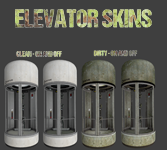
(As requested by Lonewolf) This is a default Portal 2 elevator model with 4 skins: Clean with light on, Clean with light off, Dirty with light on, and Dirty with light off. These correspond to skin0-skin3 in hammer respectively. High resolution preview: http://i.imgur.com/PqnpUqf.jpg To install, simply extract the zip to /steamapps/common/Portal 2/portal2/ (The readme basically says all this too) Please credit me for making this if used in a map, and also link me to the map on here because I'd love to see what you make of it

Comments
Sign in to comment.
These are awesome, great for overgrown chambers and adding projected textures that turn on and off with a quick skin swap for the on and off versions. Massive 
Great job!
Thanks! Although, I honestly don't know why valve didn't already have an overgrown model in the game, seems like they would have.
I installed these the way you said to, but when I try to add the model into Hammer, it just shows up as a big blank box (http://prntscr.com/8q0wdt), and when I compile the map, it doesn't show up still.
Quote from AuesomeMan3840 on October 10, 2015, 8:46 pm I installed these the way you said to, but when I try to add the model into Hammer, it just shows up as a big blank box (http://prntscr.com/8q0wdt), and when I compile the map, it doesn\'t show up still.
the problem is in the .zip file, but is a easy fix.
put the file in this directory:
MODELS TO: portal2/portal2/models/elevator
MATERIALS TO: portal2/portal2/materials/models/elevator
little note here: The model works just fine, but the hitbox is not hollow, so you have to set it \'not solid\' to work (and also make an invisible brush around the model)
also thx for the modell CAMBEN, you are a hero!
(As requested by Lonewolf)

This is a default Portal 2 elevator model with 4 skins: Clean with light on, Clean with light off, Dirty with light on, and Dirty with light off. These correspond to skin0-skin3 in hammer respectively.
High resolution preview: http://i.imgur.com/PqnpUqf.jpg
To install, simply extract the zip to /steamapps/common/Portal 2/portal2/
(The readme basically says all this too)
Please credit me for making this if used in a map, and also link me to the map on here because I'd love to see what you make of it
File Name: elevator.zip
File Size: 2.75 MiB
Click here to download Elevator with Extra Skins