File Size: 0.34 MB
Downloads: 698
Rating: 5.0 (1 votes)
Description
This program generates element templates that can help give you grounds for a puzzle. It doesn't generate puzzle themselves, but gives lists of elements chosen at random you can use to give your brain ideas for puzzles. See topic for more details.

Comments
Sign in to comment.
It's an interesting idea, and I really think this will help me make more complex puzzles however I don't quite get what each picture means or how to read it.
The picture i generated said something like:
Floor button, floor button, button, laser, fling,laser receiver, floor button,button something like that...I think.
Anyway it has A TON of promise I just can't figure it out at the moment. It's all German to me right now :p.
EDIT: Also what does the blue and gray pic mean? I have been trying to figure that out but I just can't. it's probably just something I overlooked though.
EDIT AGAIN: Also, Y u no put Hard Light Bridge? ?(????)? I also think I've figured out what that one pic is and I've figured out how to "read" it. I hope this places some sort of good puzzle in my head.
This is a good idea, and it's got me thinking about puzzles and making them, but you should add labels, when the arrow hovers over the picture, i got stumped on a lot of icons.
RubyCarbuncIe wrote:
It's an interesting idea, and I really think this will help me make more complex puzzles however I don't quite get what each picture means or how to read it.The picture i generated said something like:
Floor button, floor button, button, laser, fling,laser receiver, floor button,button something like that...I think.Anyway it has A TON of promise I just can't figure it out at the moment. It's all German to me right now :p.
EDIT: Also what does the blue and gray pic mean? I have been trying to figure that out but I just can't. it's probably just something I overlooked though.
EDIT AGAIN: Also, Y u no put Hard Light Bridge? ?(????)? I also think I've figured out what that one pic is and I've figured out how to "read" it. I hope this places some sort of good puzzle in my head.
I think i'll make an image key.
Anyway the point of this is to give you element templates. IE when you generate a random amount of elements per door for example (say 6) it chooses 6 random elements that would be needed in some way to exit that specific puzzle. This doesn't make the puzzles itself, what it does is give you elements you could use as a base for a puzzle. It's like "Here's the pieces, now make the puzzle".
I knew I forgot an element! I'll add hard-light bridges ASAP.
You really, really, need some form of caption so we have a clue what some of the pics mean. Please?
RubbishyUsername wrote:
You really, really, need some form of caption so we have a clue what some of the pics mean. Please?
added this in the newest update, see OP.

I don't get this... You can pick a number X and then you get X random test elements which you could combine to a puzzle? I really don't see how this can be a puzzle idea generator...
It's like letting a program determine what elements you randomly insert into a map... I really can't see any real purpose for this, sorry.
For a good puzzle some imagination is required. Three different elements can be used in a lot of various ways... a good puzzle requires more then just a list of those three elements...
lpfreaky90 wrote:
I don't get this... You can pick a number X and then you get X random test elements which you could combine to a puzzle? I really don't see how this can be a puzzle idea generator...It's like letting a program determine what elements you randomly insert into a map... I really can't see any real purpose for this, sorry.
For a good puzzle some imagination is required. Three different elements can be used in a lot of various ways... a good puzzle requires more then just a list of those three elements...
But you see, that's exactly the point. It gives you elements to help give you ideas using those elements. I couldn't build something that makes good puzzles because it requires some human interaction, so instead it gives you base elements to get your brain jogging.
Tbh I made this for myself because it helps me make more interesting puzzles, so I decided to upload it to see what others thought, or if they got use of it.
@RubbishyUsername: I just checked and the dl is now 1.1, do you still have that problem?
EDIT: Oh I see the issue, a class is missing, i'll reupload.
EDIT2: Updated, it's pending so give it a few minutes then try again.
protoborg wrote:
The link still seems to connect to version 0.1.0.
I have no idea what's up, I uploaded it but it's not taking, it keeps using an older version as the new one.
For version 1.2, how about making the name of the element show up under the picture of the element so that we don't have to open the key. It would also mean that when we go to print the puzzle out, the key is included within the puzzle. Also might be nice if we could add our own elements to the program. That second one is less important then the captions within the puzzle.
EDIT: Also, technically the energy ball launcher and catcher are Portal elelments, not Portal 2 elements.
protoborg wrote:
For version 1.2, how about making the name of the element show up under the picture of the element so that we don't have to open the key. It would also mean that when we go to print the puzzle out, the key is included within the puzzle. Also might be nice if we could add our own elements to the program. That second one is less important then the captions within the puzzle.EDIT: Also, technically the energy ball launcher and catcher are Portal elelments, not Portal 2 elements.
I can't do that, because of two reasons:
A. It wouldn't fit.
B. To get scrolling images I had to hack a bit, which means text won't draw properly.
Custom elements I might be able to do, i'll look into it.
And yes they are, but they are useable in Portal 2. (Rocket turrets are bugged and noone uses the scaffold...)
Groxkiller585 wrote:
I can't do that, because of two reasons:A. It wouldn't fit.
B. To get scrolling images I had to hack a bit, which means text won't draw properly.Custom elements I might be able to do, i'll look into it.
And yes they are, but they are useable in Portal 2. (Rocket turrets are bugged and noone uses the scaffold...)
You don't have to make the image scroll. How would the text not fit directly under the image of the element? Just make the space a little bigger and you can put the name directly under the image tile.
Thank you.
The scaffold has just not found a use in Portal 2 yet. Also, the turret can be fixed if anyone cared to do so.
protoborg wrote:
Groxkiller585 wrote:I can't do that, because of two reasons:
A. It wouldn't fit.
B. To get scrolling images I had to hack a bit, which means text won't draw properly.Custom elements I might be able to do, i'll look into it.
And yes they are, but they are useable in Portal 2. (Rocket turrets are bugged and noone uses the scaffold...)
You don't have to make the image scroll. How would the text not fit directly under the image of the element? Just make the space a little bigger and you can put the name directly under the image tile.
Thank you.
The scaffold has just not found a use in Portal 2 yet. Also, the turret can be fixed if anyone cared to do so.
Let me rephrase:
The way the image currently works requires the image being scrollable (try making a big puzzle (100+ elements) and you'll see why) and because i'm drawing it, not using java's usual GUI antics, I can't add text. (and again it wouldn't fit even if I could, it's just too small, stuff would overwrite each other)
It's true, it hasn't been used, which is why it's p1-only. The turret actually HAS been fixed, but not in multiplayer. In coop it's permanently broken (it doesn't seek targets at all, even when given one)
To be honest I don't think you should really put much more time in this 
DLC 2 is right around the corner and the fast drag and drop makes drafting puzzles really really easy. Sorry
Lpfreaky90 wrote:
To be honest I don't think you should really put much more time in this
DLC 2 is right around the corner and the fast drag and drop makes drafting puzzles really really easy. Sorry
I just bumped a 3 year old thread. Yay! all kidding aside. This is especially useful for those of us who are stumped for puzzle ideas in the PeTI. Drag-and-drop (DnD) is nice and all, but it doesn't really help if you have no ideas for a puzzle. That's why i just downloaded this thing again, even after all this time.
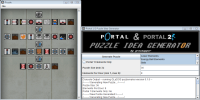
This little program generates element templates that can help give you grounds for a puzzle. It doesn't generate puzzle themselves, but gives lists of elements chosen at random you can use to give your brain ideas for puzzles.


Features include:
-generating puzzle ideas (duh)
-Portal-only elements mode
-different bg graphic if it's in Portal-only elements mode
-export to png so you have the puzzle idea on hand
Tell me what you think
UPDATE!
1.1
-added Hard-Light Bridge to the puzzle element pool
-added Element Key; to access it, generate a puzzle, then go to File -> Show Key...
1.0 initial release
File Name: p2_puzzle_generator.zip
File Size: 300.24 KiB
Portal 1/2 Puzzle Idea Generator