File Size: 10.15 MB
Downloads: 275
Rating: 0.0 (0 votes)
Description
This test element, for Hammer or the Editor, will throw bombs if it sees you. It needs to be activated by something to start. This also includes breakable walls for the Editor, which the bombs will shatter. Enjoy!

Comments
Sign in to comment.
There's a map for it in the workshop now. It has the models and stuff bspzipped in.
What do you mean "the editor or Hammer"? If I dl it and put it where it belongs, will I be able to throw this in while using the PTI?
FelixGriffin wrote:
Yes. But I think it conflicts with HMW's utilities for the PTI.
Whats HMW?

I should...
HMW is a moderator here, and the creator of the Sendificator as well as a set of Utilities (logic gates, portal positioners, etc.) for the PTI editor. Plus a ton of other maps, of course.
This works in the PTI editor (although I need to upload the new version with better textures at some point), but I think HMW's utilities put the portal-detector right on top of the breakable glass in the item selector, so one of them is hidden. If you use only one of the mods at a time it should be fine.
EDIT: Actually, it doesn't anymore. They changed the editoritems.txt format and I need to make a new version. But it still works in Hammer atm.
So it doesn't work in the pti any more? Thats a shame, though this seems cool enough to go through dealing with Hammer to use.
Wow, thank you! I'll see if I can get it working in the PTI again.
If you use it in the PTI, though, you'll want to install FudgePacker. It lets you "package" the Animal King into your map so that other people can see it in that map (although only that one), even if they don't have this addon.
Okay, for now, try this. Install as usual, but don't copy over editoritems.txt or the PTI will break.
Instead, open the original editoritems.txt, and add the following to the end, right above}<br />"Renderables"<br />{.
Stuff
"Item"
{
"Type" "ITEM_ANIMAL_KING"
"Editor"
{
"SubType"
{
"Name" "Animal King"
"Model"
{
"ModelName" "sentry.3ds"
"TextureName" "sentryturret.png"
}
"Palette"
{
"Tooltip" "ANIMAL KING"
"Image" "palette/animalking.png"
"Position" "3 0 0"
}
"Sounds"
{
"SOUND_CREATED" "P2Editor.PlaceTurret"
"SOUND_EDITING_ACTIVATE" "P2Editor.ExpandTurret"
"SOUND_EDITING_DEACTIVATE" "P2Editor.CollapseTurret"
"SOUND_DELETED" "P2Editor.RemoveTurret"
}
}
"MovementHandle" "HANDLE_36_DIRECTIONS"
"OccupiesVoxel" "0"
}
"Exporting"
{
"InstanceNames" "instances/p2editor/animal_king.vmf"
"TargetName" "animalking"
"Inputs"
{
"CONNECTION_STANDARD"
{
"Activate" "instance:activator;Trigger"
"Deactivate" "instance:deactivator;Trigger"
}
}
"ConnectionPoints"
{
// outside voxel
"Point"
{
"Dir" "1 0 0"
"Pos" "0 6 0"
"SignageOffset" "0 7 0"
"Priority" "0"
"GroupID" "0"
}
"Point"
{
"Dir" "1 0 0"
"Pos" "0 4 0"
"SignageOffset" "0 5 0"
"Priority" "0"
"GroupID" "0"
}
"Point"
{
"Dir" "1 0 0"
"Pos" "0 2 0"
"SignageOffset" "0 3 0"
"Priority" "0"
"GroupID" "0"
}
"Point"
{
"Dir" "1 0 0"
"Pos" "0 0 0"
"SignageOffset" "0 1 0"
"Priority" "0"
"GroupID" "0"
}
}
"Offset" "64 64 0"
}
}
"Item"
{
"Type" "ITEM_GLASS_BREAK"
"Editor"
{
"SubType"
{
"Name" "Breakable Glass"
"Model"
{
"ModelName" "glass_handle.3ds"
"TextureName" "glassitem.png"
}
"Palette"
{
"Tooltip" "PORTAL2_PuzzleEditor_Palette_glass"
"Image" "breakglass.png"
"Position" "2 0 0"
}
"Sounds"
{
"SOUND_CREATED" "P2Editor.PlaceOther"
"SOUND_EDITING_ACTIVATE" "P2Editor.ExpandOther"
"SOUND_EDITING_DEACTIVATE" "P2Editor.CollapseOther"
"SOUND_DELETED" "P2Editor.RemoveOther"
}
}
"MovementHandle" "HANDLE_4_DIRECTIONS"
"OccupiesVoxel" "0"
}
"Exporting"
{
"InstanceNames" "instances/p2editor/glass_breakable.vmf"
"TargetName" "breakwall"
"Inputs"
{
"CONNECTION_STANDARD"
{
"Activate" "instance:input;Trigger"
}
}
"Outputs"
{
"CONNECTION_STANDARD"
{
"Activate" "instance:output;OnTrigger"
}
}
"ConnectionPoints"
{
// outside voxel
"Point"
{
"Dir" "1 0 0"
"Pos" "0 6 0"
"SignageOffset" "0 7 0"
"Priority" "0"
"GroupID" "0"
}
"Point"
{
"Dir" "1 0 0"
"Pos" "0 4 0"
"SignageOffset" "0 5 0"
"Priority" "0"
"GroupID" "0"
}
"Point"
{
"Dir" "1 0 0"
"Pos" "0 2 0"
"SignageOffset" "0 3 0"
"Priority" "0"
"GroupID" "0"
}
"Point"
{
"Dir" "1 0 0"
"Pos" "0 0 0"
"SignageOffset" "0 1 0"
"Priority" "0"
"GroupID" "0"
}
}
"Offset" "64 64 0"
}
}
The images won't work, but the rest should. I think. Tell me if it does.
Don't have it downloaded (yet) - I'm close to my dl limit and my free trial on winzip has expired.. maybe going to the library tomorrow, thats when I'll be installing a free trial on a file unzipper and dling tons of mods 
The moral of the story is: I'll try that tomorrow 
Aww, I need to do some funky thing with fudgepacker to use it? Damn!
Anyway, besides that, what do you mean by..
To play maps with this, the models must be embedded into the BSP (as in my demo) outside the editor, or installed on the user's computer. There's no way around it, sorry.
- Felix Griffin aka Albino Pokey
How do I embed models in to the BSP? Or is that what the fudgepacker does?


npc_msleeper_boss wrote:
FelixGriffin wrote:HMW is a moderator here
He's not a moderator, but he should be.
DING DING DING DING DING. http://www.youtube.com/watch?v=VHTLIi3erIg
That's what FudgePacker does for you, or you can use PakRat. The idea is that the user's computer needs to know what an animal king looks like, which it doesn't by default.
And I definitely agree, HMW should be a moderator.
Alexander Bell wrote:
my free trial on winzip has expired...I'll be installing a free trial on a file unzipper and dling tons of mods
That is the funniest thing I have ever heard. Why don't you just use 7-Zip? It's open source and not shareware.
Damn you! (though I guess somehow it's my fault)
I installed this and added everything where it belonged, but then I couldn't build any test chambers... I had to validate my cache, which un installed this mod... but also...
IT UNDID THE EDITS I DID TO THE ENTRANCES, LIGHT STRIPS, AND OBSERVATION ROOMS OF THE PTI 
Anyway, about this... how do I use the glass walls? they're 1 square and can't be stretched or stacked... so...................
re installed it just as you say in the readme > Quote:
Simply install these folders into [Steam]/steamapps/common/portal 2 (merging with the ones there).
Put editoritems.txt into [Steam]/steamapps/common/portal 2/portal2_dlc2/scripts and OVERWRITE THE ONE THERE. This allows you to use them in the editor.
To play maps with this, the models must be embedded into the BSP (as in my demo) outside the editor, or installed on the user's computer. There's no way around it, sorry.
Give credit please if you use these!
- Felix Griffin aka Albino Pokey
, and now the game can't build chambers... again.
FelixGriffin wrote:
This works in the PTI editor (although I need to upload the new version with better textures at some point), but I think HMW's utilities put the portal-detector right on top of the breakable glass in the item selector, so one of them is hidden. If you use only one of the mods at a time it should be fine.
Good to know: if you want to use multiple 'mods' in a single map, you need to have all of them installed, otherwise all custom stuff from the non-installed mod is removed from your map as soon as you load it in the editor.
I don't see any overlaps right now between my pack and this one. Did you update it?
(Or perhaps I overlooked it; definitely possible since I only quickly checked out the download.
It's almost  time over here.)
Some kind of drag&drop thing for this would be nice, i.e. you download as many custom packs as you want and assemble your own palette.
Food for thought...
ChickenMobile wrote:
npc_msleeper_boss wrote:FelixGriffin wrote:
HMW is a moderator here
He's not a moderator, but he should be.
DING DING DING DING DING.
Wow, that would be a real honour!
Hm, maybe I didn't update it fully for the new editoritems format. I'll look at that again.
And unfortunately the breakable glass can't be like the normal glass, which is mostly hardcoded. I've been trying to make it stackable, but no success yet. 
HMW wrote:
Good to know: if you want to use multiple 'mods' in a single map, you need to have all of them installed, otherwise all custom stuff from the non-installed mod is removed from your map as soon as you load it in the editor.I don't see any overlaps right now between my pack and this one. Did you update it?
(Or perhaps I looked over it; definitely possible since I only quickly checked out the download.
It's almostSome kind of drag&drop thing for this would be nice, i.e. you download as many custom packs as you want and assemble your own palette.
Food for thought...
My Style Changer mod (nearly finished) has a program for choosing which editoritems.txt file will be used. I was going to just make a version of each style with HMW elements in the palette and one without HMW elements in the palette but still with them listed so they still work if in the map but can't be added. And I was going to make my own HMW elements for those that need a different look in different styles.
But I think maybe I need to make a more advanced version of the program that can merge different editoritems files together.
BTW, you can't say "looked over" because that means "examined", you need to say "overlooked".
Carl wrote:
My Style Changer mod (nearly finished) has a program for choosing which editoritems.txt file will be used. I was going to just make a version of each style with HMW elements in the palette and one without HMW elements in the palette but still with them listed so they still work if in the map but can't be added. And I was going to make my own HMW elements for those that need a different look in different styles.
But I think maybe I need to make a more advanced version of the program that can merge different editoritems files together.
That's what I was thinking about. Each mod would place a text file in the scripts folder, containing its own items. The program would then merge all of those into one "master" editoritems.txt and let the user choose which items would appear where on the palette. (Just a matter of changing the numbers in the "palette" section.)
Carl wrote:
BTW, you can't say "looked over" because that means "examined", you need to say "overlooked".
Right, that's what I meant. Thanks for pointing that out. (Fixed.)
Or all of them could be added, so that they all still appear in existing maps, but only the selected ones would be given room on the palette.
so... does this still work or not ? maybe you make a install.exE ? like BenVlodgi
I'm going to update it to work with the BEE2 when it comes out, along with my other test elements. But probably not before then. If you want you could copy and paste the relevant parts of this file and add them to your editoritems file in the meantime.
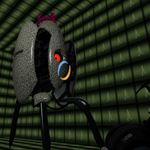
This test element, for Hammer or the Editor, will throw bombs if it sees you. It needs to be activated by something to start.
This also includes breakable walls for the Editor, which the bombs will shatter.
Enjoy!
File Name: animalking.zip
File Size: 10.15 MiB
Click here to download Test Element - Animal King