A bunch of entities unavailable in Hammer.

Avatar
RYANSUPERGENIUS1123
6 Posts
Posted Feb 01, 2015
I'm trying to spawn things like catwalks. For a catwalk, I went to the Model Browser, and browsed through the folder "catwalk_destruction", and the models are unavailable, and yet I see catwalks in custom maps in the Workshop. I wanna add that entity too. Is there like a ZIP file that has a model pack that automatically adds all the existing models to their proper directories, or what?
Advertisement
Registered users don't see ads! Register now!
Avatar
CamBen
973 Posts
Posted Feb 01, 2015
Replied 2 hours later
try searching "walkway" instead
Avatar
RYANSUPERGENIUS1123
6 Posts
Posted Feb 01, 2015
Replied 2 hours later
I did. I'll record myself having the problem, and put it on YouTube and embed it. Cuz I need help.
Avatar
RYANSUPERGENIUS1123
6 Posts
Posted Feb 02, 2015
Replied 3 hours later
This should have everything y'all need to know on what I need help with. If u can't understand what I'm saying in the video (due to a shitty mic on my webcam), please enable captions. I added captions to the video by myself to help make myself more understanding. http://youtu.be/vGyJuj42-sQ
Avatar
CamBen
973 Posts
Posted Feb 02, 2015
Replied 23 minutes later
Aha. I see your problem. Your search filter is "door". Clear the search filter and look in that folder, or just don't specify a folder and make the search filter be "walkway"
Avatar
RYANSUPERGENIUS1123
6 Posts
Posted Feb 02, 2015
Replied 1 hour later
I added captions to the video, so please enable subtitles and watch the second half of the video, cuz there's another thing I don't know how to do with Hammer. Thanks in advance. It's past my curfew, and have rebelled against the group home curfew for 3 hours already, so I'll go to bed now and try your advice later on, but please check out what else I'm confused about, reading the captions on YouTube.
Advertisement
Registered users don't see ads! Register now!
Avatar
josepezdj
2,386 Posts
Posted Feb 02, 2015
Replied 3 hours later
As a general advice when using the model browser, I'd suggest you to directly scroll up to where it says "MDL Files", try not to stick to any category (like "a4_destruction" or "anim_wp"), and this way you'll have higher chances to find what you're looking for.

About your question about extracting de model files, well, the way I know is more manual than automatic:

  • Get GCFScape, install it and open it
  • Go to File > Open and browse your file: Steam/SteamApps/Common/portal 2/portal2/pak01_dir.VPK

There you'll find all files from Portal2 that aren't in the local folders. Remember to extract both, the model files and also their textures. You'll only need to place the extracted files right to the same relative folders for them to work out.

Example:

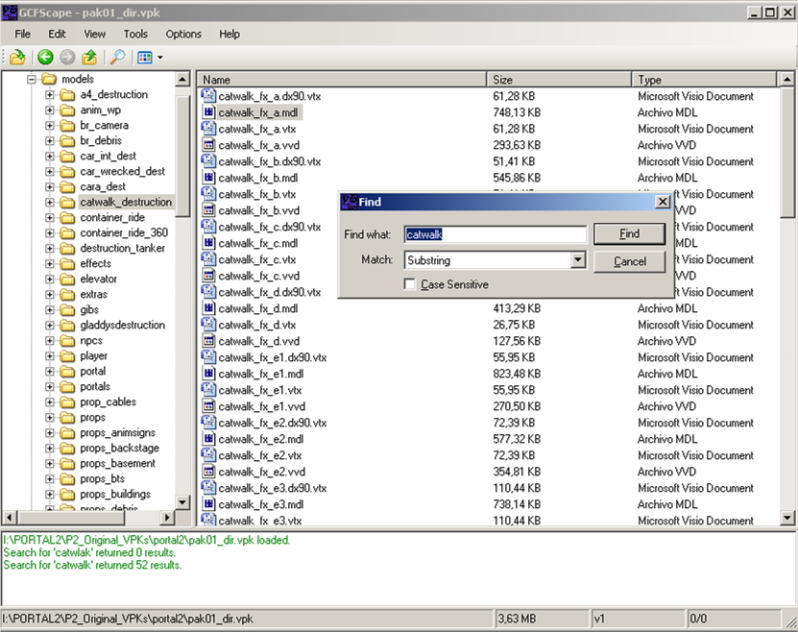
You want to search for "catwalk". Either you locate the exact model in the Hammer Editor model browser, or you find it through GCFScape inside the pak01_dir.VPK file, like so:

Imagen1.png

(Remember to use "Substring" option in the "Match" field so it's a less exclusive search)

As you can see there are a lot of catwalk model files. You have them inside the pak01_dir.VPK file and their folder is "models\catwalk_destruction\".

I hope this helps.