Portal 2 effect


[yt:87o8u1ah]http://www.youtube.com/watch?v=nKaRDpS1A6A[/yt:87o8u1ah]
(The effect in the beginning, but with the "normal" Aperture logo). I've googled for it, but I haven't found this effect, or at least the frame itself as an image.
I don't know if this topic is useless, but I haven't found any topic to ask this specific question...
EDIT: Also, a quick test using my super 3D program (Google SketchUp  )
)
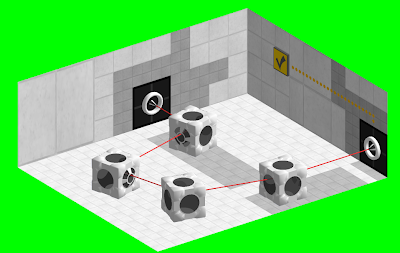
and the effect that I want (more or less):
[yt:87o8u1ah]http://www.youtube.com/watch?v=JKD725vjbqw[/yt:87o8u1ah]
But this was just a test, to see how I'll make the 3D effects for this video I'm talking about.


And with the original Aperture logo:

(Click the space to view, they're mostly transparent so hard to see)
I still have the source files for all the other animation parts of that video, if you need anything else.
p0rtalplayer wrote:
I have the PSD source file still lying around, so here's the frame by itself:And with the original Aperture logo:
(Click the space to view, they're mostly transparent so hard to see)
I still have the source files for all the other animation parts of that video, if you need anything else.
Thanks, p0p! That's what I was searching for. If there's no problem, you can send me the animations too. But what software/video editor you used to make this animation? Because I use Vegas Pro 9.0... Also, If you want, you can give me the PSD file too. I have Photoshop too 
HugoBDesigner wrote:
p0rtalplayer wrote:
I have the PSD source file still lying around, so here's the frame by itself:And with the original Aperture logo:
(Click the space to view, they're mostly transparent so hard to see)
I still have the source files for all the other animation parts of that video, if you need anything else.>
Thanks, p0p! That's what I was searching for. If there's no problem, you can send me the animations too. But what software/video editor you used to make this animation? Because I use Vegas Pro 9.0... Also, If you want, you can give me the PSD file too. I have Photoshop too
PDN+psd plugin > Photoshop
Kizzycocoa wrote:
PDN+psd plugin > Photoshop
Um... False. I'll go false 
HugoBDesigner wrote:
Kizzycocoa wrote:
PDN+psd plugin > Photoshop>
Um... False. I'll go false

Kizzycocoa wrote:
The only reason why Photoshop is better:

Before and after Photoshop
HugoBDesigner wrote:
The only reason why Photoshop is better:
Before and after Photoshop
but all the stuff on photoshop is hard to get to. and it seems to be vector-based. sure, good for leaflets or something, but for REAL image-editing, PDN is the best. plus, super-easy GUI, and moddable.
FelixGriffin wrote:
I'm a Photoshop person myself as well. Which version do you use?
The old Photoshop 7.0.1 

I'll add the frame later, in my video editor
As for the PDN/PS debate, I used to think the same thing until I actually used Photoshop. The featureset, UI, performance, and general quality of Photoshop is much, much higher than PDN, especially in newer versions. Can you edit videos in PDN? Can you use brushes with a pressure sensitive tablet? Can you even edit the alpha channel of images separate from the other channels? The answer to all those questions is no, which is why if I have the option to I will always prefer Photoshop.
p0rtalplayer wrote:
I'd give you the PSD source, but it's a video...and if you're on an old version of photoshop, it probably won't load up correctly.As for the PDN/PS debate, I used to think the same thing until I actually used Photoshop. The featureset, UI, performance, and general quality of Photoshop is much, much higher than PDN, especially in newer versions. Can you edit videos in PDN? Can you use brushes with a pressure sensitive tablet? Can you even edit the alpha channel of images separate from the other channels? The answer to all those questions is no, which is why if I have the option to I will always prefer Photoshop.
YEAH! That's what I was talking about! 
Also, unfortunately, I'm using an old Photoshop (not even a "CS" version), so the video will not work 
FelixGriffin wrote:
I could probably convert it to a series of frames in Flash, but I've never tried importing a PSD into that.
Don't worry, I'll make the animation by myself. I think that it isn't that hard (just a moving image to convert into another image, that'll be reduced to a static image, then a text will appear on the screen, that will be reduced into a corner, then I'll play my animation. Looks hard, but it isn't )...
pdn has nothing on photoshop cs5, which is what i have.
photoshop can do all THIS:
custom brushes with a TON of options
defining custom brush shapes
defining custom patterns
content-aware fill
healing brush tool
layer masks
load/save different color pallets
can edit videos frame by frame
can use vectors, but not necessarily 100% vector based
lense flare rendering
rendering of lighting effects
several filters that pdn doesnt have
you can import 3ds files
it's the tool professionals use.
...and the list goes on pretty much indefinitely...

photoshop I sorta see as a big shambling monster. It can do great things, but the user interface and usability is horrible. I mostly put this down to it being vector-based, which messes up things like filling, selection etc. for myself.
Paint.NET, being pixel-based, seems so much nicer to work with. Total control over what you're working on, and you can perfect it down to that pixel level. Select selects, the paint bucket fills and all the adjustments etc. you'd ever need are in clean, simple GUI menus and windows. 