Length of prop_tractor_beam
Hi All,
I have come across a length limit for the tractor beam, I admit I am making it travel quite a bit but I wanted to see if this is normal or if there is something wrong. Also is there a way to extend it?
This is what I'm seeing:
beam limit.jpg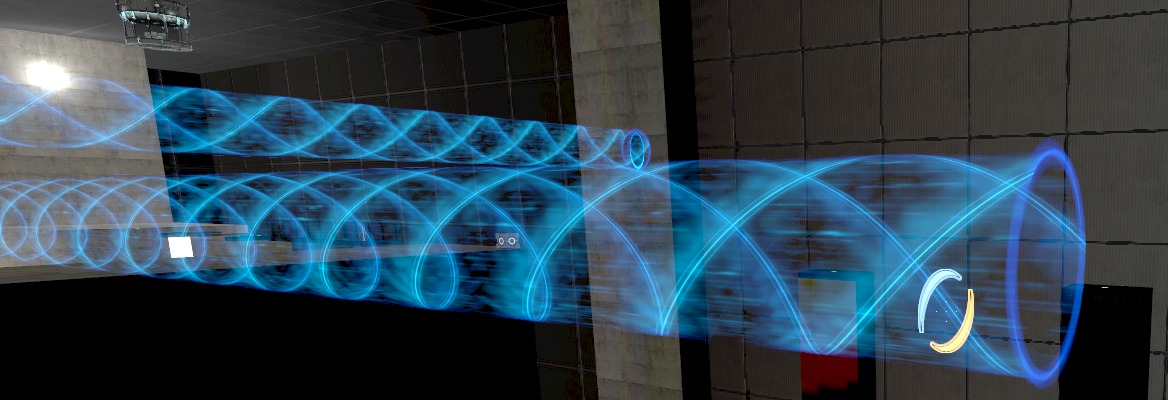


chickenmobile wrote:
If you have an invisible wall it will hit it. The same for a lightbridge. Try using playerclip/clip/clipvphysics if you just want to block a certain object.
What about lasers? how do i stop them? invisble brushes won't work but i do need something invisible to stop it.
Sorry for hijacking the subject a bit... but i didn't want to make a whole new topic about it. 
KenJeKenny!? wrote:
chickenmobile wrote:If you have an invisible wall it will hit it. The same for a lightbridge. Try using playerclip/clip/clipvphysics if you just want to block a certain object.
What about lasers? how do i stop them? invisble brushes won't work but i do need something invisible to stop it.
Sorry for hijacking the subject a bit... but i didn't want to make a whole new topic about it.
So a small invisible textured block doesn't stop a laser?
EDIT: This would look a little unrealistic, and maybe frustrate the player if it is used in the wrong spot. Can you explain why you want to stop the laser half way?
chickenmobile wrote:
KenJeKenny!? wrote:chickenmobile wrote:
If you have an invisible wall it will hit it. The same for a lightbridge. Try using playerclip/clip/clipvphysics if you just want to block a certain object.
What about lasers? how do i stop them? invisble brushes won't work but i do need something invisible to stop it.
Sorry for hijacking the subject a bit... but i didn't want to make a whole new topic about it.
So a small invisible textured block doesn't stop a laser?
Stops pretty much everything except lasers :S and i also have a brush with 1 side glass texture (with wire mesh in it) infront of it but that also doesnt stop it. (i can swear i've seen a custom map where the glass stopped a laser.)
KenJeKenny!? wrote:
Stops pretty much everything except lasers :S and i also have a brush with 1 side glass texture (with wire mesh in it) infront of it but that also doesnt stop it. (i can swear i've seen a custom map where the glass stopped a laser.)
The glass could have been a prop.
only glass props, but those are visible

DaMaGepy wrote:
nothing can stop a laser, I tried everything, every texture and entity.
only glass props, but those are visible
Try one of these:
http://developer.valvesoftware.com/wiki ... ser_target
The Terminal Point keyvalue should stop it. It's only a small volume for blocking lasers though. & it can handily be used as a laser detector if you uncheck terminal point & use the OnPowered output.
KenJeKenny!? wrote:
What about lasers? how do i stop them? invisble brushes won't work but i do need something invisible to stop it.Sorry for hijacking the subject a bit... but i didn't want to make a whole new topic about it.
All you need to do is have a NODRAW volume. Lasers don't go through solid nodraw brushes