Adding New Cubes
Brainstone wrote:
In this thread it is described how to create a new model for a turret. If you simply switch the words "turret" and "cube" you could create a new model and apply it to all prop_weighted_cube entities in your map as instructed there. You will need to pak a duplicated model, a custom texture and a custom .nut script into your BSP.Have a look: http://forums.thinking.withportals.com/post42321.html#p42321
Can someone confirm that this works?
I haven't tested this yet.
The turret entity has the unused parameter, "model".
not sure about prop_weighted_cube

spongylover123 wrote:
Brainstone wrote:In this thread it is described how to create a new model for a turret. If you simply switch the words "turret" and "cube" you could create a new model and apply it to all prop_weighted_cube entities in your map as instructed there. You will need to pak a duplicated model, a custom texture and a custom .nut script into your BSP.
Have a look: http://forums.thinking.withportals.com/post42321.html#p42321
Can someone confirm that this works?
I haven't tested this yet.
The turret entity has the unused parameter, "model".
not sure about prop_weighted_cube
I believe I tried this a while ago, following the steps from that thread. Couldn't seem to get it to work, but then again, I'm not an expert at this kind of thing. I may have missed something. And truth be told, I hope I did, too.
Oh wait, I might have missed that part about the .nut file. I've worked with it (the model changing script that is), but I might have not implemented that correctly. Can't look into that now, though, going to call it a day...
spongylover123 wrote:
Can someone confirm that this works?
I haven't tested this yet.
The turret entity has the unused parameter, "model".
not sure about prop_weighted_cube
Thing is, I've been trying this to work with prop_weighted_cubes, but, same as FourthReaper said, I'm not an expert at this either, and I couldn't make it work so far; I also think I must be missing something. I did make the .nut file and everything described in that thread Brainstone posted, but I guess is more complex due to the many skins the weighted cube has... This is what I did:
-
Extracted all metal_box.* files into my Portal2 folders preserving the same structure than into the pak01_dir.vpk
-
Renamed them all addding a "jose_" prefix to all, and modified consequently the paths into all the .vmt files to make them point to the new names (extremely annoying though)
-
I've changed the metal_box_skin01.vtf (or something like that, I'm not in front of my computer right now) which is where the companion cube skin is stored, editing the image for having my custom cube skin, giving it a name like meaal_box_skin01.vtf.
-
Opened the metal_box.mdl (placed correctly into my local Portal2/models/props folder) with Notepad++; went to the bottom part of the file where all skin files names are listed in a row (with several NUL thingies inbetween), and changed the text metal_box_skin01 by meaal_box_skin01.
-
Created a .nut script into scripts/vscripts/modelchanger folder called weighted_cube_change.nut with this text inside:
function ChangeCubes(){
   Entities.FindByTargetname(null, "@cube_dropper_box").SetModel("models/props/jose_metal_box.mdl");
(what I thought this does is to create a function called ChangeCubes()) that you can later call by the logic_auto outputs like so: OnMapSpawn > [logic_script_name here] > RunScriptCode > ChangeCubes() > delay 0.15)
I didn't want to change all cubes (including reflective ones) and that's why I used "FindByTargetname". Also as the cube is inside an instance, I thought this may not work without the prefix "@" (that looks into the instance)
- I did all stuff in hammer (logic_auto + logic_script + prop_dynamic) but I changed the prop_dynamic by a prop_physics, none of them worked out though.
I'll continue this afternoon, but am I on the right track? For sure I'm not!  could anyone tell me what could have I done differently in order to make this work out?
Though for testing I'd recommend replacing all cubes, just to make sure it works. Once you get the different cubes you can try the targetname again.
AAnd I'd recommend placing one prop with your model somewhere in your level (probably in a small nodraw box) so the model and texture are properly loaded.
I guess I'd have to modify the rest of cube skins as well... I'll post whatever I find later.
Using what Jose had written down and what was on that turret thread I finally was able to get the model and skin working 100% in-game. So far I haven't gotten around to doing what needs to be done in Hammer just yet and I don't have time right now because I have to get to school in 5 minutes so I'll have to try all that out when I get home. I just thought I'd post my progress.
Here's and image of the model:
http://steamcommunity.com/id/RubyCarbun ... 4343989634
I need to make the blue darker and make that metal ring around the blue light the default color, but hey it's progress.
Here's a picture of my fully functional turret with a blue eye benaeth a prop_dynamic to precache it.
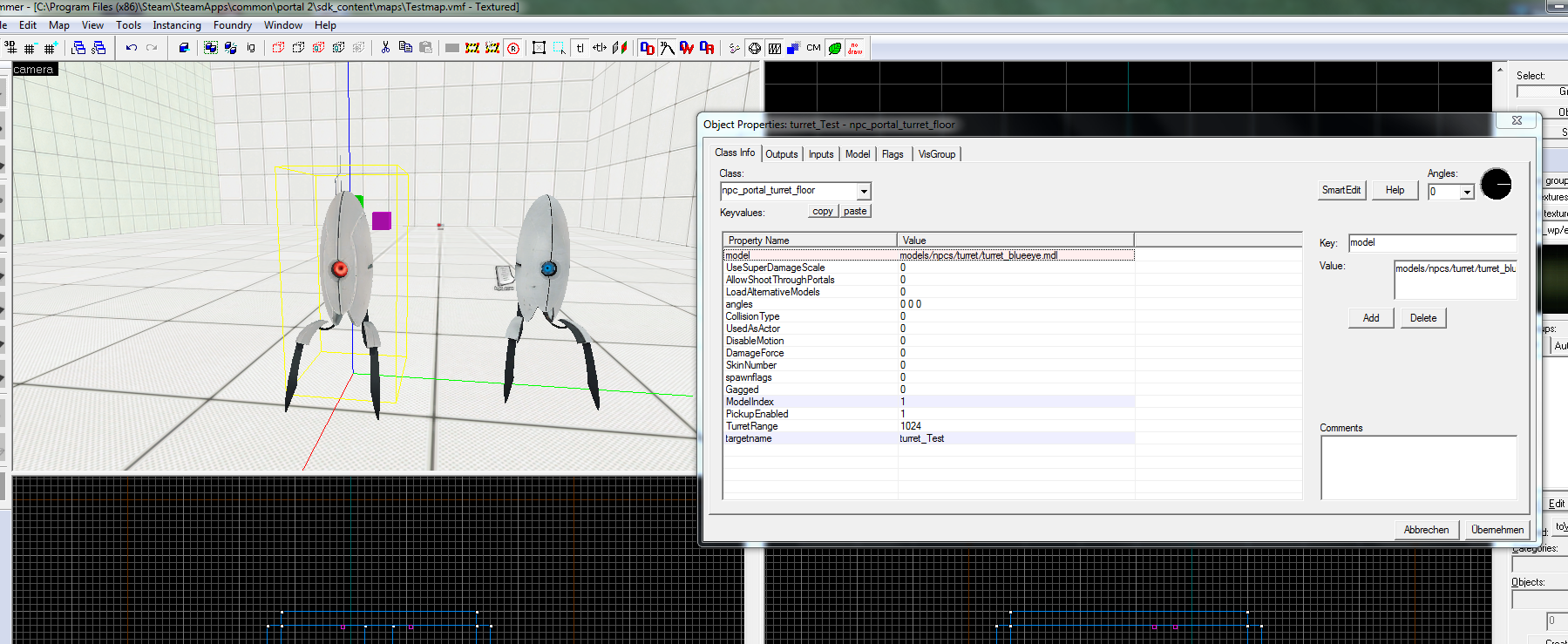
Things I've changed to make this to work:
- Index FindbyTargetname does not exist, so let's simply use the FindbyClassname into the script, like so:
function ChangeCubes(){
   Entities.FindByClassname(null, "prop_weighted_cube").SetModel("models/props/jose_metal_box.mdl");
-
I definitely used a prop_physics for the custom cube model.
-
I finally thought of making a trigger_multiple brush to trigger the script directly instead. This way as soon as the falling cube touches the trigger, the cube model is changed.
-
I moved the logic_auto (not really necessary now though) + logic_script + the above trigger_multiple + the cube_model (a prop_physics) inside the cube dropper instance (I think this way is more neat). And I built a mini room for the cube model right beside the dropper's falling column. Check:

This way the cube model is loaded by the engine but the player cannot see it, and it's easy to make the change by the script.
I guess that's all...
Important: If you are going to make your own instance taking a stocked one, note that some of the logic_relays inside it refer to the "cube_dropper_box" target name in their inputs/ouputs, be careful about where (which height) you place the new trigger_multiple that changes the first cube for our custom one, and include the new custom cube name inside the relays... Also, there's a trigger_multiple already inside each dropper instance filtered by class name (allowing only prop_weighted_cube entities to pass): note that we are changing a prop_weighted_cube class entity by a prop_physics.
(I guess I'm still used to classic Portal and gcf's. Man, remember gcf's? So easy to replace stuff...)
Anyway, I'm glad to hear that there's a workaround for this, because I need to turn off all light-emitting parts on buttons, cubes etc. for a "powered-down" section of my next map.
HMW wrote:
Crap. You're right Grox, vpks override everything. For some reason I was 100% sure that the order was bsp > vpk > file system. Alas, that was just a figment of my imagination.
(I guess I'm still used to classic Portal and gcf's. Man, remember gcf's? So easy to replace stuff...)Anyway, I'm glad to hear that there's a workaround for this, because I need to turn off all light-emitting parts on buttons, cubes etc. for a "powered-down" section of my next map.
What I wish is VALVe let us override at least the materials and models folders. But instead we need to make completely new models, which is hardly ideal, especially for a big reskin map (not mod).
And the VPK addon system is still broken, which is a big deal because it was a great way to keep things clean and removing maps was easy.
lpfreaky90 wrote:
@jose: seems like an idea.
Though for testing I'd recommend replacing all cubes, just to make sure it works. Once you get the different cubes you can try the targetname again
Just to clarify this for future readers of this thread: I found out my mistake in the previous styntax: it is FindbyName or FindbyTarget instead of FindbyTargetname.
It can also be used Findbymodel, which could be very handy for some other purposes than reskinning cubes...