File Size: 0.01 MB
Downloads: 437
Rating: 5.0 (4 votes)
Description
This pack contains multiple instances for fizzlers. It also includes textures and instances for death fizzlers. They are combined laserfields and fizzlers! The instances should be self-explanatory Have fun with them! NOTE: if you want to use these textures in your map, make sure you include them in your bsp! Fixed in v2: * An issue with the antique fizzler.

Comments
Sign in to comment.
So, I was really disappoint when I found out the deathfizzlers can't be actively disabled/re-enabled from button outputs.
Insomnautik wrote:
So, I was really disappoint when I found out the deathfizzlers can't be actively disabled/re-enabled from button outputs.
They can, if you use the instances you have the outputs
Red_to_blue_relay;trigger
Red_to_off_relay; trigger
off_to_red_relay; trigger
off_to_blue_relay;trigger
blue_to_off_relay;trigger
blue_to_red_relay;trigger
These 6 outputs should be enough to actively control the instances!
In order to do that, make sure the instance has a name and select the appropriate output.
Note: If you have more then one instance with the same fixup name and you select that it won't properly show up. Just create one, set the outputs and copy the whole thing and you have two the same things!
Hope that helped 
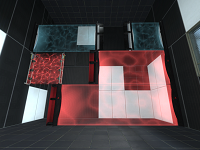
This pack contains multiple instances for fizzlers.
It also includes textures and instances for death fizzlers.
They are combined laserfields and fizzlers!
The instances should be self-explanatory Have fun with them!
NOTE: if you want to use these textures in your map, make sure you include them in your bsp!
Fixed in v2:
* An issue with the antique fizzler.
File Name: Lps_fizzlers_v2.7z
File Size: 6.7 KiB
Click here to download Lp's Fizzlers